Challenge 8.3: Custom Loop
What if you need more control than the built-in maxSteps/stopWhen pattern of generateText provides — e.g., custom termination conditions, state tracking, or decisions between loop iterations?
OVERVIEW
Section titled “OVERVIEW”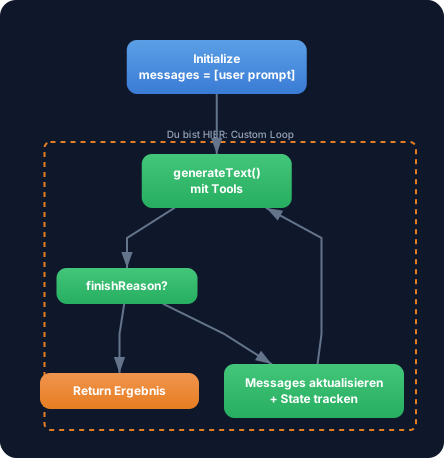
A custom loop gives you full control over the agent lifecycle. You manage the messages array, check the finishReason, track your own state, and decide after each iteration whether the loop continues.
Without custom loop: You use generateText with maxSteps or stopWhen: stepCountIs(N) (from Level 3). That’s enough for standard cases. But: you can only break by step count, can’t track your own state between iterations, and can’t make decisions based on tool results.
With custom loop: Full control over the agent lifecycle. You decide after each iteration: continue or stop? You track which tools were called, how often, with what results. You can terminate based on a specific tool result — not just after N steps.
WALKTHROUGH
Section titled “WALKTHROUGH”Layer 1: The Simplest Custom Loop
Section titled “Layer 1: The Simplest Custom Loop”A while loop that calls generateText until the LLM returns finishReason: 'stop' (meaning it no longer wants to make a tool call):
import { generateText } from 'ai';import { anthropic } from '@ai-sdk/anthropic';import { tool } from 'ai';import { z } from 'zod';
const model = anthropic('claude-sonnet-4-5-20250514');
// A simple toolconst searchTool = tool({  description: 'Search for information on a topic',  inputSchema: z.object({    query: z.string().describe('The search query'),  }),  execute: async ({ query }) => {    // Simulated search    return { results: [`Result for "${query}": Important facts...`] };  },});
// Custom Loopconst messages: Array<any> = [  { role: 'user', content: 'Recherchiere die Vorteile von Edge Computing.' },];
let done = false;
while (!done) {  const result = await generateText({    model,    tools: { search: searchTool },    messages,  });
  if (result.finishReason === 'stop') {          // ← LLM is done, no more tool calls    done = true;    console.log('--- Final Answer ---');    console.log(result.text);  } else {    messages.push(...result.response.messages);   // ← Tool calls + results added to messages array    console.log(`Loop: ${messages.length} Messages`);  }}
The core: result.response.messages contains the assistant message (with tool calls) and the tool result messages. These are pushed to the messages array so the LLM has context in the next iteration.
Layer 2: State Tracking
Section titled “Layer 2: State Tracking”The real advantage of the custom loop — you can track your own state:
import { generateText, tool } from 'ai';import { anthropic } from '@ai-sdk/anthropic';import { z } from 'zod';
const model = anthropic('claude-sonnet-4-5-20250514');
const searchTool = tool({  description: 'Search for information',  inputSchema: z.object({ query: z.string() }),  execute: async ({ query }) => ({    results: [`Facts about "${query}"...`],  }),});
const saveTool = tool({  description: 'Save the final research result',  inputSchema: z.object({ content: z.string() }),  execute: async ({ content }) => {    console.log('Saved:', content.slice(0, 100) + '...');    return { saved: true };  },});
// State trackingconst state = {  toolCallCount: 0,  toolsUsed: new Set<string>(),  iterations: 0,};
const messages: Array<any> = [  { role: 'user', content: 'Recherchiere Edge Computing und speichere das Ergebnis.' },];
let done = false;
while (!done) {  state.iterations++;
  const result = await generateText({    model,    tools: { search: searchTool, save: saveTool },    messages,  });
  // Count and track tool calls  if (result.toolCalls.length > 0) {    state.toolCallCount += result.toolCalls.length;    for (const tc of result.toolCalls) {      state.toolsUsed.add(tc.toolName);    }  }
  if (result.finishReason === 'stop') {    done = true;    console.log('--- Final Answer ---');    console.log(result.text);  } else {    messages.push(...result.response.messages);  }
  // Log state  console.log(`Iteration ${state.iterations}: ${state.toolCallCount} Tool Calls, Tools: [${[...state.toolsUsed].join(', ')}]`);}
console.log('\n--- Statistics ---');console.log(`Iterations: ${state.iterations}`);console.log(`Total tool calls: ${state.toolCallCount}`);console.log(`Tools used: ${[...state.toolsUsed].join(', ')}`);
Now you see after each loop pass: How many tool calls were made? Which tools were used? This isn’t possible with ToolLoopAgent — there you only get this information at the end.
Layer 3: Termination Based on Tool Result
Section titled “Layer 3: Termination Based on Tool Result”The most powerful aspect: you check a specific tool result and terminate when a condition is met:
import { generateText, tool } from 'ai';import { anthropic } from '@ai-sdk/anthropic';import { z } from 'zod';
const model = anthropic('claude-sonnet-4-5-20250514');
const checkQualityTool = tool({  description: 'Check if the research quality is sufficient',  inputSchema: z.object({    content: z.string().describe('The research content to check'),  }),  execute: async ({ content }) => {    // Quality check (simulated here)    const wordCount = content.split(' ').length;    const hasSources = content.includes('Quelle') || content.includes('Source');    const score = (wordCount > 100 ? 50 : 20) + (hasSources ? 50 : 0);    return { score, sufficient: score >= 70 };  },});
const searchTool = tool({  description: 'Search for information',  inputSchema: z.object({ query: z.string() }),  execute: async ({ query }) => ({    results: [`Detailed results for "${query}". Quelle: Fachjournal 2026...`],  }),});
const messages: Array<any> = [  {    role: 'user',    content: 'Recherchiere Edge Computing. Nutze search fuer Recherche und checkQuality um die Qualitaet zu pruefen. Stoppe erst wenn die Qualitaet ausreicht.',  },];
let done = false;let qualityScore = 0;
while (!done) {  const result = await generateText({    model,    tools: { search: searchTool, checkQuality: checkQualityTool },    messages,  });
  // Check if checkQuality was called and the result is sufficient  for (const tc of result.toolResults) {    if (tc.toolName === 'checkQuality' && tc.result.sufficient) {      qualityScore = tc.result.score;      done = true;                                // ← Termination based on tool result      console.log(`Quality sufficient: Score ${qualityScore}`);    }  }
  if (result.finishReason === 'stop') {    done = true;  } else if (!done) {    messages.push(...result.response.messages);  }}
This is the core advantage: you don’t terminate after N steps, but when a specific tool delivers a specific result. The LLM keeps researching until the quality is right.
Task: Build a custom agent loop that tracks how many tool calls were made. The loop stops when the save tool is called and returns { saved: true }.
Create the file custom-loop.ts and run it with npx tsx custom-loop.ts.
Tip: If the loop doesn’t terminate on its own, abort it with
Ctrl+C. In Challenge 8.4 you’ll learn how to prevent this automatically.
import { generateText, tool } from 'ai';import { anthropic } from '@ai-sdk/anthropic';import { z } from 'zod';
const model = anthropic('claude-sonnet-4-5-20250514');
// TODO 1: Define a search tool// const searchTool = tool({ ... });
// TODO 2: Define a save tool that returns { saved: true }// const saveTool = tool({ ... });
// TODO 3: Initialize the messages array with a user message// const messages = [{ role: 'user', content: '...' }];
// TODO 4: Initialize state tracking (toolCallCount, iterations)
// TODO 5: Implement the while loop://   - Call generateText with tools//   - Increment toolCallCount//   - Check if save tool was called with { saved: true } → done = true//   - If finishReason === 'stop' → done = true//   - Otherwise: messages.push(...result.response.messages)
// TODO 6: Log the statistics at the end
Checklist:
- Messages array correctly initialized
- while loop checks
finishReason -
result.response.messagesis pushed to the messages array - Tool call count is tracked
- Loop terminates when
savetool returns{ saved: true }
Show solution
import { generateText, tool } from 'ai';import { anthropic } from '@ai-sdk/anthropic';import { z } from 'zod';
const model = anthropic('claude-sonnet-4-5-20250514');
const searchTool = tool({  description: 'Search for information on a topic',  inputSchema: z.object({    query: z.string().describe('The search query'),  }),  execute: async ({ query }) => ({    results: [`Detaillierte Ergebnisse zu "${query}": Fakten und Daten...`],  }),});
const saveTool = tool({  description: 'Save the final research result when research is complete',  inputSchema: z.object({    content: z.string().describe('The final content to save'),  }),  execute: async ({ content }) => {    console.log(`\nSaved (${content.length} characters)`);    return { saved: true };  },});
const messages: Array<any> = [  {    role: 'user',    content: 'Recherchiere die Vorteile von Edge Computing. Nutze search fuer die Recherche. Wenn Du genug Informationen hast, nutze save um das Ergebnis zu speichern.',  },];
let done = false;let toolCallCount = 0;let iterations = 0;
while (!done) {  iterations++;
  const result = await generateText({    model,    tools: { search: searchTool, save: saveTool },    messages,  });
  // Count tool calls  toolCallCount += result.toolCalls.length;
  // Check if save was called with { saved: true }  for (const tr of result.toolResults) {    if (tr.toolName === 'save' && tr.result.saved === true) {      done = true;      console.log('Save tool returned saved: true. Loop terminated.');    }  }
  if (result.finishReason === 'stop') {    done = true;    console.log('--- Final Answer ---');    console.log(result.text);  } else if (!done) {    messages.push(...result.response.messages);  }
  console.log(`Iteration ${iterations}: ${toolCallCount} Tool Calls`);}
console.log(`\n--- Statistics ---`);console.log(`Iterations: ${iterations}`);console.log(`Total tool calls: ${toolCallCount}`);console.log(`Messages in array: ${messages.length}`);
Expected output (approximate):
Iteration 1: 1 Tool CallsIteration 2: 2 Tool Calls
Saved (523 characters)Save tool returned saved: true. Loop terminated.Iteration 3: 3 Tool Calls
--- Statistics ---Iterations: 3Total tool calls: 3Messages in array: 7
Explanation: The while loop runs until either the save tool returns { saved: true } or finishReason === 'stop'. After each iteration, the response messages are pushed to the array so the LLM has full context. Tool calls are counted and output as statistics at the end.
COMBINE
Section titled “COMBINE”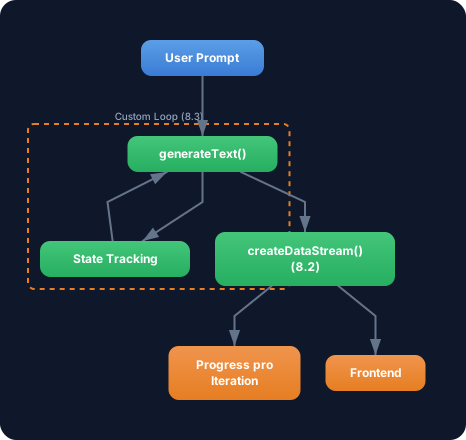
Exercise: Combine the custom loop with the progress streaming from Challenge 8.2. After each loop iteration:
- Send a Custom Data Part with the current iteration and tool call count
- Send the name of the most recently called tool
- At the end: send the overall statistics as a Data Part
// Per iteration:dataStream.writeData({ type: 'iteration', iteration: state.iterations, toolCallCount: state.toolCallCount, lastTool: result.toolCalls.at(-1)?.toolName ?? 'none',});Optional Stretch Goal: Stream the agent’s final text (the last result.text when finishReason === 'stop') with streamText instead of generateText, so the user sees the final result in real time.