Challenge 8.2: Streaming to Frontend
If a workflow has 3 steps and each step takes 5-10 seconds — how do you show the user the progress, not just the final result?
OVERVIEW
Section titled “OVERVIEW”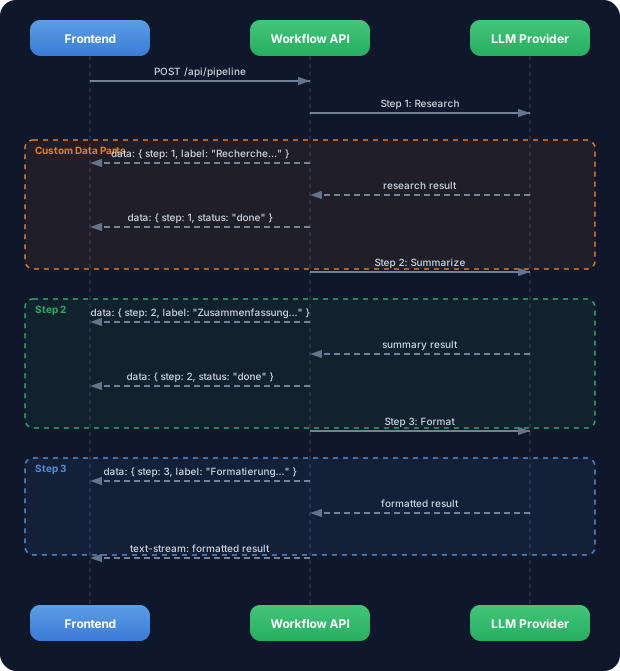
Instead of 30 seconds of silence, the user gets an update after each step. The first two steps run in the background (progress only), and the third step streams the text directly into the UI.
Without progress streaming: User waits 30 seconds staring at a blank screen. No feedback whether anything is happening. User hits reload, starts the pipeline again, doubles the cost.
With progress streaming: Real-time updates per step. “Researching…” -> “Summarizing…” -> “Formatting…” -> text appears. The user sees that something is happening and knows where in the process the pipeline stands.
WALKTHROUGH
Section titled “WALKTHROUGH”Layer 1: createDataStream for Workflow Progress
Section titled “Layer 1: createDataStream for Workflow Progress”In Level 7.1 you learned about createDataStream and writeData. Now we use them to track workflow steps:
import { createDataStream, generateText, streamText } from 'ai';import { anthropic } from '@ai-sdk/anthropic';
const model = anthropic('claude-sonnet-4-5-20250514');
export async function POST(req: Request) {  const { topic } = await req.json();
  const dataStream = createDataStream({    async execute(dataStream) {      // Step 1: Research      dataStream.writeData({ step: 1, total: 3, label: 'Recherche laeuft...' });
      const research = await generateText({        model,        system: 'Du bist ein Research-Assistent. Sammle Fakten zum Thema.',        prompt: `Recherchiere: ${topic}`,      });
      dataStream.writeData({ step: 1, total: 3, status: 'done' });
      // Step 2: Summarize      dataStream.writeData({ step: 2, total: 3, label: 'Zusammenfassung...' });
      const summary = await generateText({        model,        system: 'Fasse die Informationen in 5 Kernaussagen zusammen.',        prompt: research.text,      });
      dataStream.writeData({ step: 2, total: 3, status: 'done' });
      // Step 3: Format — we stream this step as text      dataStream.writeData({ step: 3, total: 3, label: 'Formatierung...' });
      const result = streamText({                           // ← streamText instead of generateText        model,        system: 'Formatiere als professionelle E-Mail.',        prompt: summary.text,        onFinish() {          dataStream.writeData({ step: 3, total: 3, status: 'done' });        },      });
      result.mergeIntoDataStream(dataStream);               // ← Insert text stream    },  });
  return dataStream.toDataStreamResponse();}
The key trick: the first two steps use generateText (we need the result as a string for the next step). The last step uses streamText + mergeIntoDataStream, so the user sees the final text in real time.
Layer 2: Frontend Consumption
Section titled “Layer 2: Frontend Consumption”On the frontend you consume the Data Parts as in Level 7.1 — via the data array from useChat:
'use client';import { useChat } from '@ai-sdk/react';
export function PipelineUI() {  const { messages, input, handleInputChange, handleSubmit, data, isLoading } = useChat({    api: '/api/pipeline',  });
  // Extract current progress from Data Parts  const progressParts = data?.filter((d: any) => d.step !== undefined) ?? [];  const currentStep = progressParts.at(-1);
  return (    <div>      {/* Progress indicator */}      {isLoading && currentStep && (        <div className="progress">          <div className="steps">            {[1, 2, 3].map((step) => {              const stepData = progressParts.filter((d: any) => d.step === step);              const isDone = stepData.some((d: any) => d.status === 'done');              const isActive = currentStep.step === step && !isDone;              return (                <div                  key={step}                  className={`step ${isDone ? 'done' : ''} ${isActive ? 'active' : ''}`}                >                  Step {step}: {isDone ? 'Done' : isActive ? currentStep.label : 'Pending'}                </div>              );            })}          </div>          <div>Step {currentStep.step} of {currentStep.total}</div>        </div>      )}
      {/* Messages */}      {messages.map((m) => (        <div key={m.id}>          <strong>{m.role}:</strong> {m.content}        </div>      ))}
      <form onSubmit={handleSubmit}>        <input value={input} onChange={handleInputChange} placeholder="Enter topic..." />      </form>    </div>  );}
Layer 3: CLI Variant Without Frontend
Section titled “Layer 3: CLI Variant Without Frontend”For CLI tests without Next.js you can consume the Data Stream directly:
import { createDataStream, generateText, streamText } from 'ai';import { anthropic } from '@ai-sdk/anthropic';
const model = anthropic('claude-sonnet-4-5-20250514');
const dataStream = createDataStream({  async execute(dataStream) {    // Step 1    dataStream.writeData({ step: 1, label: 'Recherche...' });    const research = await generateText({      model,      system: 'Recherchiere Fakten zum Thema.',      prompt: 'Recherchiere: Edge Computing',    });    dataStream.writeData({ step: 1, status: 'done' });
    // Step 2    dataStream.writeData({ step: 2, label: 'Zusammenfassung...' });    const summary = await generateText({      model,      system: 'Fasse in 3 Saetzen zusammen.',      prompt: research.text,    });    dataStream.writeData({ step: 2, status: 'done' });
    // Step 3: Stream as text    dataStream.writeData({ step: 3, label: 'Formatierung...' });    const result = streamText({      model,      system: 'Formatiere als kurze E-Mail.',      prompt: summary.text,      onFinish() {        dataStream.writeData({ step: 3, status: 'done' });      },    });    result.mergeIntoDataStream(dataStream);  },});
// Read stream in terminalconst reader = dataStream.toDataStream().getReader();const decoder = new TextDecoder();
while (true) {  const { done, value } = await reader.read();  if (done) break;  process.stdout.write(decoder.decode(value));}
In the terminal you’ll see the Data Parts as JSON lines and the streamed text — all in one stream, in the correct order.
Task: Extend the 3-step pipeline from Challenge 8.1 with progress streaming. Send a Custom Data Part before and after each step.
Create the file streaming-pipeline.ts and run it with npx tsx streaming-pipeline.ts.
import { createDataStream, generateText, streamText } from 'ai';import { anthropic } from '@ai-sdk/anthropic';
const model = anthropic('claude-sonnet-4-5-20250514');
// TODO 1: Create a dataStream with createDataStream
// TODO 2: In the execute function://   - Send a Data Part { step: 1, label: 'Researching...' }//   - Execute Step 1 (Research) with generateText//   - Send a Data Part { step: 1, status: 'done' }
// TODO 3: Repeat for Step 2 (Summarize)
// TODO 4: For Step 3 (Translate)://   - Use streamText instead of generateText//   - Merge the stream with mergeIntoDataStream
// TODO 5: Consume the stream in the terminal
Checklist:
-
createDataStreamcreated withexecutecallback - A Data Part with label is sent before each step
- A Data Part with status “done” is sent after each step
- Steps 1 and 2 use
generateText, Step 3 usesstreamText - The last step is inserted into the Data Stream with
mergeIntoDataStream
Show solution
import { createDataStream, generateText, streamText } from 'ai';import { anthropic } from '@ai-sdk/anthropic';
const model = anthropic('claude-sonnet-4-5-20250514');const topic = 'Kuenstliche Intelligenz in der Medizin';
const dataStream = createDataStream({  async execute(dataStream) {    // Step 1: Research    dataStream.writeData({ step: 1, total: 3, label: 'Recherche laeuft...' });    const research = await generateText({      model,      system: 'Du bist ein Research-Assistent. Sammle Fakten und aktuelle Entwicklungen zum Thema.',      prompt: `Recherchiere: ${topic}`,    });    dataStream.writeData({ step: 1, total: 3, status: 'done', tokens: research.usage.totalTokens });
    // Step 2: Summarize    dataStream.writeData({ step: 2, total: 3, label: 'Zusammenfassung...' });    const summary = await generateText({      model,      system: 'Fasse die folgenden Informationen in exakt 5 Kernaussagen zusammen.',      prompt: `Fasse zusammen:\n\n${research.text}`,    });    dataStream.writeData({ step: 2, total: 3, status: 'done', tokens: summary.usage.totalTokens });
    // Step 3: Translate (streamed)    dataStream.writeData({ step: 3, total: 3, label: 'Uebersetzung...' });    const result = streamText({      model,      system: 'Translate the following German text to English. Keep the professional tone.',      prompt: `Translate:\n\n${summary.text}`,      onFinish({ usage }) {        dataStream.writeData({ step: 3, total: 3, status: 'done', tokens: usage.totalTokens });      },    });    result.mergeIntoDataStream(dataStream);  },});
// Read stream in terminalconst reader = dataStream.toDataStream().getReader();const decoder = new TextDecoder();
while (true) {  const { done, value } = await reader.read();  if (done) break;  process.stdout.write(decoder.decode(value));}
console.log('\n--- Pipeline finished ---');
Expected output (approximate):
2:[{"step":1,"total":3,"label":"Recherche laeuft..."}]2:[{"step":1,"total":3,"status":"done","tokens":342}]2:[{"step":2,"total":3,"label":"Zusammenfassung..."}]2:[{"step":2,"total":3,"status":"done","tokens":187}]2:[{"step":3,"total":3,"label":"Uebersetzung..."}]0:"The "0:"analysis "0:"shows..."2:[{"step":3,"total":3,"status":"done","tokens":156}]
--- Pipeline finished ---
Explanation: createDataStream opens a mixed channel. writeData sends Custom Data Parts (JSON lines, prefix 2:) before and after each step. streamText + mergeIntoDataStream inserts the text stream of the last step (prefix 0:). The user sees: progress updates for Steps 1 and 2, then the streamed text from Step 3 — all in real time.
COMBINE
Section titled “COMBINE”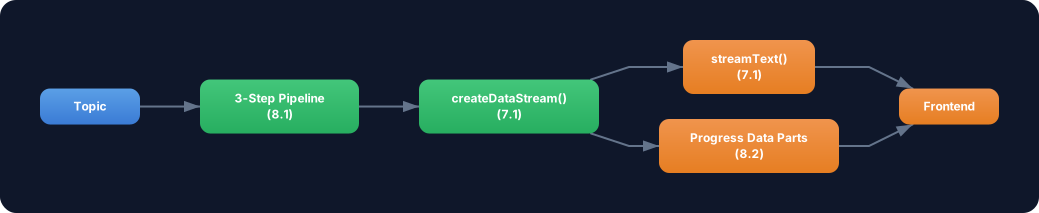
Exercise: Combine workflow streaming with smoothStream from Level 7.3. For the last step (which streams the text):
- Use
experimental_transform: smoothStream()instreamTextfor smoother text output - Additionally send a Data Part with the total duration alongside the step updates:
{ type: 'stats', durationMs: Date.now() - startTime } - Send a Data Part with the total token usage across all three steps
Optional Stretch Goal: Build the pipeline as a Next.js API route and consume it with useChat. Display a visual progress bar with three segments that turn green one after another.