Challenge 7.4: Error Handling
What happens in your app when the LLM provider throws an error mid-stream? The user has already read half the response — and then what? Blank page? Abort without explanation? Or a helpful error message?
OVERVIEW
Section titled “OVERVIEW”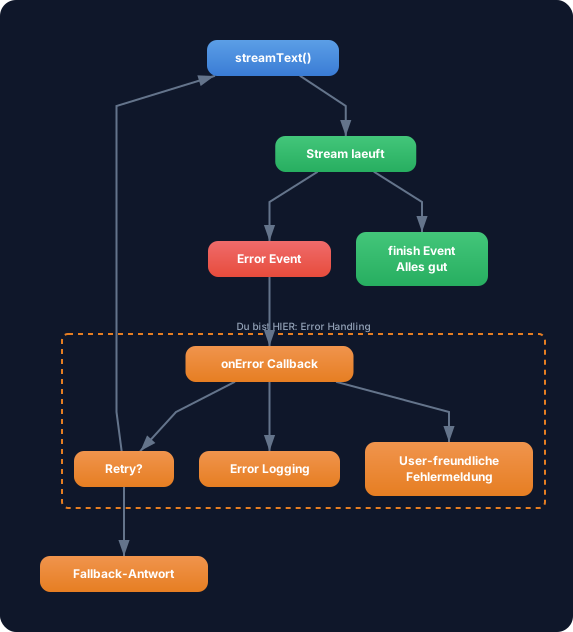
Errors happen: provider timeouts, rate limits, unknown tools, network drops. With error handling you catch these errors and give the user a meaningful response instead of letting the app crash.
Without Error Handling: Your app crashes when the provider throws an error. The user sees a blank page, a cryptic error message, or the half-finished response simply cuts off. In production this is unacceptable — users lose trust and data is lost.
With Error Handling: Errors are caught and translated into understandable messages. The user knows what happened and can try again. Your logging captures the error for debugging. And with retry strategies your app can even resolve certain errors on its own.
WALKTHROUGH
Section titled “WALKTHROUGH”Layer 1: onError in streamText
Section titled “Layer 1: onError in streamText”The simplest form: the onError callback in streamText is called when an error occurs during generation:
import { streamText } from 'ai';import { anthropic } from '@ai-sdk/anthropic';
const result = streamText({  model: anthropic('claude-sonnet-4-5-20250514'),  prompt: 'Erklaere Error Handling.',  onError({ error }) {                                // ← Called on every error    console.error('Stream-Fehler:', error);    // Hier: Logging, Alerting, Metriken  },});
onError is called for:
- Provider errors: API unreachable, rate limit, authentication
- Stream errors: Connection drop, timeout
- Tool errors: Tool throws exception (from Level 3)
Important: onError does not prevent the error from reaching the user. It’s a hook for logging and monitoring — not for user-facing error messages.
Layer 2: onError in toUIMessageStreamResponse
Section titled “Layer 2: onError in toUIMessageStreamResponse”Web app context: The following code shows error handling in a Next.js API route. Your TRY exercise below works in the terminal (CLI).
For web APIs you control with onError in toUIMessageStreamResponse which error message the client sees:
export async function POST(req: Request) {  const { messages } = await req.json();
  const result = streamText({    model: anthropic('claude-sonnet-4-5-20250514'),    messages,    onError({ error }) {      // Server-seitiges Logging      console.error('[Stream Error]', error);    },  });
  return result.toUIMessageStreamResponse({    onError(error) {                                  // ← Controls client error message      // WICHTIG: Gibt den String zurueck, den der Client sieht      // Keine internen Details leaken!      return 'Es ist ein Fehler aufgetreten. Bitte versuche es erneut.';    },  });}
The separation is crucial:
onErrorinstreamText: Server side. Log the full error for debugging.onErrorintoUIMessageStreamResponse: Client side. Return a short, understandable message.
Layer 3: Handling Specific Error Types
Section titled “Layer 3: Handling Specific Error Types”The AI SDK exports typed error classes. You can distinguish errors specifically:
import { streamText, NoSuchToolError } from 'ai';
const result = streamText({  model: anthropic('claude-sonnet-4-5-20250514'),  messages,  tools: { /* ... */ },  onError({ error }) {    if (NoSuchToolError.isInstance(error)) {           // ← Typed check      console.error(`Unbekanntes Tool: ${error.toolName}`);      console.error(`Verfuegbare Tools: ${error.availableToolNames.join(', ')}`);    } else {      console.error('Unbekannter Fehler:', error);    }  },});
return result.toUIMessageStreamResponse({  onError(error) {    if (NoSuchToolError.isInstance(error)) {      return `Das Tool "${error.toolName}" existiert nicht. Verfuegbar: ${error.availableToolNames.join(', ')}`;    }    return 'Ein unerwarteter Fehler ist aufgetreten.';  },});
Important error types in the AI SDK:
| Error Class | When | Useful Properties |
|---|---|---|
NoSuchToolError | LLM calls a tool that doesn’t exist | toolName, availableToolNames |
InvalidToolArgumentsError | Tool arguments don’t match the schema | toolName, toolArgs |
APICallError | Provider API responds with error | statusCode, message |
Layer 4: Retry Strategy
Section titled “Layer 4: Retry Strategy”For transient errors (network, rate limits) you can build a retry wrapper:
import { streamText } from 'ai';import { anthropic } from '@ai-sdk/anthropic';
async function streamWithRetry(  params: Parameters<typeof streamText>[0],  maxRetries = 3,) {  let lastError: unknown;
  for (let attempt = 1; attempt <= maxRetries; attempt++) {    try {      const result = streamText(params);
      // Test the stream: await the full text promise      // If the provider responds, the stream is OK      const fullText = await result.text;             // ← Waits for complete text      return { result, fullText };                    // ← Success: return result
    } catch (error) {      lastError = error;      console.error(`Versuch ${attempt}/${maxRetries} fehlgeschlagen:`, error);
      if (attempt < maxRetries) {        const delay = Math.min(1000 * Math.pow(2, attempt - 1), 10000); // Exponential Backoff        console.log(`Warte ${delay}ms vor Versuch ${attempt + 1}...`);        await new Promise((resolve) => setTimeout(resolve, delay));      }    }  }
  throw new Error(`Alle ${maxRetries} Versuche fehlgeschlagen: ${lastError}`);}
The retry strategy uses Exponential Backoff: 1s, 2s, 4s, … This gives the provider time to recover (e.g., after rate limiting).
Note: This pattern waits for the complete text (
result.text). For streaming retries (where you want to display text during generation) you need a more complex solution — e.g., thefor awaitloop inside the retry loop itself.
Layer 5: Try/Catch Around the Stream Consumer
Section titled “Layer 5: Try/Catch Around the Stream Consumer”Don’t forget: errors can also occur when consuming the stream. Wrap the for await loop in a try/catch:
const result = streamText({  model: anthropic('claude-sonnet-4-5-20250514'),  prompt: 'Erklaere Error Handling.',});
try { for await (const chunk of result.textStream) { process.stdout.write(chunk); } console.log('\n--- Stream erfolgreich beendet ---');} catch (error) { console.error('\n--- Stream abgebrochen ---'); console.error('Fehler:', error); // Fallback: Gespeicherte Antwort zeigen, User informieren, etc. console.log('Die Antwort konnte nicht vollstaendig geladen werden.');}Task: Simulate an error and catch it with onError. Show a user-friendly message.
Create the file error-handling.ts:
import { streamText } from 'ai';import { anthropic } from '@ai-sdk/anthropic';
// TODO 1: Starte streamText mit einem absichtlich falschen Modellnamen// const result = streamText({//   model: anthropic('claude-nonexistent-model'),//   prompt: 'Dieser Call wird fehlschlagen.',//   onError({ error }) {//     // TODO 2: Logge den Fehler serverseitig//   },// });
// TODO 3: Konsumiere den Stream in einem try/catch// try {//   for await (const chunk of result.textStream) {//     process.stdout.write(chunk);//   }// } catch (error) {//   // TODO 4: Zeige eine User-freundliche Fehlermeldung// }
Checklist:
-
streamTextcalled with an invalid model (or another error trigger) -
onErrorcallback implemented with server-side logging -
for awaitloop wrapped in try/catch - User-friendly error message in the catch block
Run: npx tsx error-handling.ts
Show solution
import { streamText } from 'ai';import { anthropic } from '@ai-sdk/anthropic';
console.log('Starte Stream mit absichtlichem Fehler...\n');
const result = streamText({  model: anthropic('claude-nonexistent-model-99'),  prompt: 'Dieser Call wird fehlschlagen.',  onError({ error }) {    console.error('[Server Log] Stream-Fehler aufgetreten:');    console.error('[Server Log]', error);  },});
try {  for await (const chunk of result.textStream) {    process.stdout.write(chunk);  }} catch (error) {  console.log('\n--- Fehler abgefangen ---');  console.log('Dem User anzeigen: "Die Antwort konnte nicht geladen werden. Bitte versuche es in einigen Sekunden erneut."');
  // In einer echten App:  // - User-freundliche Meldung in der UI anzeigen  // - Retry-Button anbieten  // - Fehler an Error-Tracking senden (Sentry, etc.)}
Explanation: The invalid model name causes an API error. onError logs the error server-side (with all details for debugging). The try/catch around the stream consumer catches the error and shows an understandable message. In production you would render a UI component here instead of console.log.
Expected output (approximately):
Starte Stream mit absichtlichem Fehler...
[Server Log] Stream-Fehler aufgetreten:[Server Log] APICallError: 404 model_not_found ...
--- Fehler abgefangen ---Dem User anzeigen: "Die Antwort konnte nicht geladen werden.Bitte versuche es in einigen Sekunden erneut."
The exact error text varies by provider. What matters:
onErrorlogs the full error, the try/catch shows the user-friendly message.
COMBINE
Section titled “COMBINE”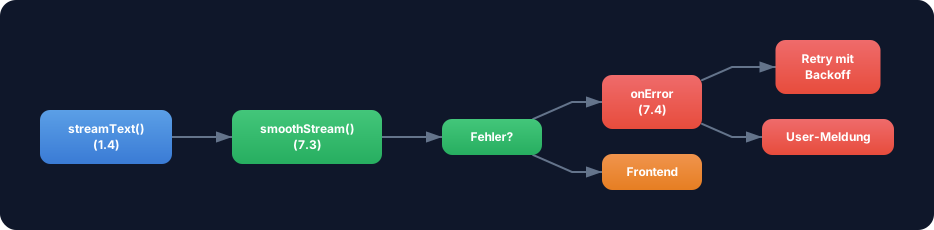
Exercise: Combine Error Handling with Stream Transforms. Build a stream that:
- Uses
smoothStream()as a transform - Has a custom transform that checks whether a chunk contains a certain “forbidden” pattern (e.g., “ERROR_SIMULATION”) and throws an error in that case
onErrorlogs the error server-side- A try/catch around the stream consumer shows a user-friendly message
Optional Stretch Goal: Implement streamWithRetry with exponential backoff. Provoke an error (e.g., with a wrong API key) and observe how the retry logic makes 3 attempts before giving up. Log each attempt with a timestamp.