Challenge 7.2: Message Metadata
How do you attach additional info to a message that should NOT go to the LLM — e.g., a timestamp, the user ID, or the IP address? Packing everything into the message content would waste tokens and could confuse the LLM.
OVERVIEW
Section titled “OVERVIEW”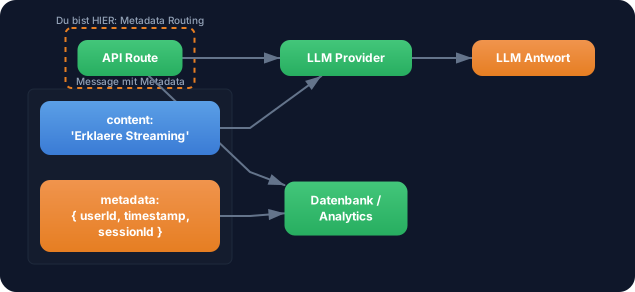
Message Metadata lives alongside the content but is NOT sent to the LLM. The content goes to the LLM, the metadata stays in your app — for logging, persistence, analytics.
Without Metadata: You pack everything into the message content. The LLM sees irrelevant information (“userId: abc123, timestamp: 1709…”), wastes tokens, and may get confused. Or you store metadata in a separate data structure and have to keep it manually in sync with the messages — error-prone and cumbersome.
With Metadata: Clean separation. The content contains only what the LLM should see. The metadata contains everything your app needs — timestamps, user IDs, session data, ratings. Both travel together in one message, but only the content goes to the LLM.
WALKTHROUGH
Section titled “WALKTHROUGH”Layer 1: The Metadata Concept
Section titled “Layer 1: The Metadata Concept”Every message in the AI SDK has an optional metadata property. It’s a freely definable object:
import type { UIMessage } from 'ai';
const message: UIMessage = {  id: 'msg-1',  role: 'user',  content: 'Erklaere Streaming im AI SDK.',  parts: [{ type: 'text', text: 'Erklaere Streaming im AI SDK.' }],  metadata: {                                         // ← Metadata: Does NOT go to the LLM    userId: 'user-42',    timestamp: Date.now(),    sessionId: 'session-abc',    source: 'web-app',  },};
The metadata property is automatically ignored by the AI SDK when sending to the LLM provider. It’s exclusively for your application logic.
Layer 2: Using Metadata on the Server Side
Section titled “Layer 2: Using Metadata on the Server Side”Web app context: The following examples show metadata in a Next.js/React app. Your TRY exercise below works in the terminal (CLI).
In your API route you can read the metadata before starting the LLM call:
import { streamText } from 'ai';import { anthropic } from '@ai-sdk/anthropic';
export async function POST(req: Request) {  const { messages } = await req.json();
  // Read metadata from the last user message  const lastMessage = messages.at(-1);  const metadata = lastMessage?.metadata ?? {};
  // For logging / analytics  console.log(`User ${metadata.userId} fragt:`, lastMessage?.content);  console.log(`Session: ${metadata.sessionId}`);  console.log(`Timestamp: ${new Date(metadata.timestamp).toISOString()}`);
  // Only the content goes to the LLM — metadata stays here  const result = streamText({    model: anthropic('claude-sonnet-4-5-20250514'),    messages,                                         // ← SDK filters out metadata  });
  return result.toUIMessageStreamResponse();}
Layer 3: Setting Metadata on the Response
Section titled “Layer 3: Setting Metadata on the Response”You can also attach metadata to the response messages. This happens via messageMetadata in toUIMessageStreamResponse:
const result = streamText({  model: anthropic('claude-sonnet-4-5-20250514'),  messages,});
return result.toUIMessageStreamResponse({  messageMetadata: ({ part }) => {                    // ← Callback, not object!    if (part.type === 'start') {      return {        generatedAt: Date.now(),        modelId: 'claude-sonnet-4-5-20250514',        cached: false,      };    }  },});
In the frontend the metadata is then available on the assistant message:
const { messages } = useChat();
messages.map((m) => {  if (m.role === 'assistant') {    console.log('Generiert am:', m.metadata?.generatedAt);    console.log('Modell:', m.metadata?.modelId);  }});
Layer 4: Metadata for Persistence
Section titled “Layer 4: Metadata for Persistence”Metadata is especially valuable in combination with persistence (Level 4). You can store timestamps, versions, and user data directly on the message:
// Beim Speichern in die Datenbankasync function saveMessage(message: UIMessage) {  await db.insert('messages', {    id: message.id,    role: message.role,    content: message.content,    // Metadata wird MIT der Message gespeichert    userId: message.metadata?.userId,    timestamp: message.metadata?.timestamp,    sessionId: message.metadata?.sessionId,    modelId: message.metadata?.modelId,  });}
// Beim Laden aus der Datenbank — Metadata wird rekonstruiertasync function loadMessages(chatId: string): Promise<UIMessage[]> { const rows = await db.select('messages', { chatId }); return rows.map((row) => ({ id: row.id, role: row.role, content: row.content, parts: [{ type: 'text', text: row.content }], metadata: { userId: row.userId, timestamp: row.timestamp, sessionId: row.sessionId, modelId: row.modelId, }, }));}Task: Create messages with metadata (userId, timestamp) and log the metadata server-side before the LLM call starts. Verify that the LLM does not see the metadata.
Create the file message-metadata.ts:
import { streamText } from 'ai';import { anthropic } from '@ai-sdk/anthropic';import type { UIMessage } from 'ai';
// TODO 1: Erstelle eine Message mit metadata// const messages: UIMessage[] = [//   {//     id: 'msg-1',//     role: 'user',//     content: 'Was siehst Du in dieser Nachricht? Liste ALLES auf.',//     parts: [{ type: 'text', text: 'Was siehst Du in dieser Nachricht? Liste ALLES auf.' }],//     metadata: {//       // TODO: Fuege userId, timestamp und sessionId hinzu//     },//   },// ];
// TODO 2: Logge die Metadata der letzten Message// const lastMessage = messages.at(-1);// console.log('Metadata:', lastMessage?.metadata);
// TODO 3: Sende an streamText und pruefe ob das LLM die Metadata erwaehnt// const result = streamText({//   model: anthropic('claude-sonnet-4-5-20250514'),//   messages,// });
// TODO 4: Konsumiere den Stream und pruefe die Antwort// for await (const chunk of result.textStream) {//   process.stdout.write(chunk);// }
Checklist:
- Message with
metadataobject created (at least userId and timestamp) - Metadata logged on the “server side”
-
streamTextcalled with the messages - Verified: LLM does NOT mention userId/timestamp in the response
Run: npx tsx message-metadata.ts
Show solution
import { streamText } from 'ai';import { anthropic } from '@ai-sdk/anthropic';import type { UIMessage } from 'ai';
const messages: UIMessage[] = [  {    id: 'msg-1',    role: 'user',    content: 'Was siehst Du in dieser Nachricht? Liste ALLES auf, was Du sehen kannst.',    parts: [{ type: 'text', text: 'Was siehst Du in dieser Nachricht? Liste ALLES auf, was Du sehen kannst.' }],    metadata: {      userId: 'user-42',      timestamp: Date.now(),      sessionId: 'session-abc-123',      source: 'level-7-test',    },  },];
// Metadata loggen (bleibt in der App)const lastMessage = messages.at(-1)!;console.log('--- App-Metadata (geht NICHT zum LLM) ---');console.log('userId:', lastMessage.metadata?.userId);console.log('timestamp:', new Date(lastMessage.metadata?.timestamp as number).toISOString());console.log('sessionId:', lastMessage.metadata?.sessionId);console.log('');
// LLM-Call — Metadata wird NICHT mitgesendetconst result = streamText({  model: anthropic('claude-sonnet-4-5-20250514'),  messages,});
console.log('--- LLM-Antwort ---');for await (const chunk of result.textStream) {  process.stdout.write(chunk);}console.log('\n');
// Pruefe: Die Antwort sollte NUR den Text-Content erwaehnen,// NICHT userId, sessionId oder timestamp.
Explanation: The LLM only sees the content of the message: “Was siehst Du in dieser Nachricht? Liste ALLES auf, was Du sehen kannst.” The metadata (userId, timestamp, sessionId) is filtered out by the AI SDK and does not appear in the LLM response. This lets you transport metadata safely without wasting tokens or confusing the LLM.
Expected output (approximately):
--- App-Metadata (geht NICHT zum LLM) ---userId: user-42timestamp: 2026-03-09T14:30:00.000ZsessionId: session-abc-123
--- LLM-Antwort ---In this message I can see a question asking me to list everythingI can see. I see the text "Was siehst Du in dieser Nachricht?..."
The LLM should mention only the text content — no userId, no timestamp, no sessionId.
COMBINE
Section titled “COMBINE”
Exercise: Combine Message Metadata with the persistence concept from Level 4. Build a function that:
- Creates user messages with metadata (userId, timestamp)
- Automatically filters out the metadata when sending to
streamText(handled by the SDK) - Enriches the LLM response with its own metadata (modelId, generatedAt, tokenCount)
- Saves both messages (user + assistant) including metadata into an array
Optional Stretch Goal: Build a getSessionStats(sessionId) function that calculates the total number of tokens, session duration, and message count from the stored messages — all from the metadata, without parsing the content.