Challenge 7.1: Custom Data Parts
What if you want to transport structured data alongside text in the stream — e.g., a progress bar showing how many of 5 research steps are completed?
OVERVIEW
Section titled “OVERVIEW”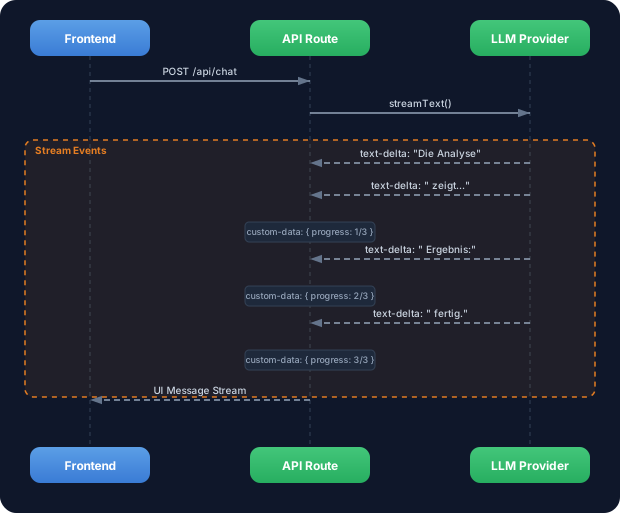
The stream doesn’t just carry text chunks. Custom Data Parts let you send structured data — progress, sources, status — alongside the text to the frontend.
Without Custom Data Parts: Your stream delivers only text. If you want to show the user progress, sources, or status, you have to either embed this information in the text (ugly, hard to parse) or send it over a separate channel (complex, race conditions).
With Custom Data Parts: Structured data flows in the same stream as the text. The frontend receives typed objects and can render them directly in the UI — progress bars, source citations, status badges. One stream, one channel, everything in sync.
WALKTHROUGH
Section titled “WALKTHROUGH”Layer 1: The Data Part Types
Section titled “Layer 1: The Data Part Types”Every chunk in the fullStream has a type. The most important standard types:
| Type | Description | Data |
|---|---|---|
text-delta | Text chunk | chunk.textDelta |
reasoning | Reasoning/Chain-of-Thought | chunk.textDelta |
source | Source citation | chunk.source |
tool-call | Tool is invoked | chunk.toolName, chunk.args |
tool-result | Tool result | chunk.toolName, chunk.result |
data | Custom Data Part | chunk.data (arbitrary object) |
You already know the first five partly from Level 1 and 3. The data type is new — it lets you send your own structured data.
Layer 2: Sending Custom Data Parts
Section titled “Layer 2: Sending Custom Data Parts”You send Custom Data Parts via sendDataPart on the stream result or via the onChunk/onStepFinish callbacks. The simplest way is mergeIntoDataStream combined with createDataStream:
import { createDataStream, streamText } from 'ai';
export async function POST(req: Request) {  const { messages } = await req.json();
  const dataStream = createDataStream({    execute(dataStream) {                             // ← dataStream Controller      // Send Custom Data Part BEFORE the LLM stream starts      dataStream.writeData({ status: 'searching' }); // ← Any JSON object
      const result = streamText({        model: anthropic('claude-sonnet-4-5-20250514'),        messages,        onFinish() {          dataStream.writeData({ status: 'done' });  // ← After completion        },      });
      result.mergeIntoDataStream(dataStream);         // ← Insert LLM stream    },  });
  return dataStream.toDataStreamResponse();}
createDataStream opens a channel into which you can feed both your own data (writeData) and the LLM stream (mergeIntoDataStream). The frontend receives everything in the correct order.
Layer 3: Consuming Custom Data Parts in the Frontend
Section titled “Layer 3: Consuming Custom Data Parts in the Frontend”Web app context: The following code shows Custom Data Parts in a Next.js/React app. Your TRY exercise below works in the terminal (CLI).
In the frontend you receive Custom Data Parts via the data array in the useChat hook:
'use client';import { useChat } from '@ai-sdk/react';
export function Chat() {  const { messages, input, handleInputChange, handleSubmit, data } = useChat();
  // data contains all Custom Data Parts as an array  const latestStatus = data?.at(-1);                  // ← Latest Data Part
  return (    <div>      {latestStatus?.status === 'searching' && (        <div className="status-bar">Suche laeuft...</div>      )}
      {messages.map((m) => (        <div key={m.id}>          <strong>{m.role}:</strong> {m.content}        </div>      ))}
      {latestStatus?.status === 'done' && (        <div className="status-bar">Fertig!</div>      )}
      <form onSubmit={handleSubmit}>        <input value={input} onChange={handleInputChange} />      </form>    </div>  );}
Layer 4: Typed Data Parts with writeData
Section titled “Layer 4: Typed Data Parts with writeData”You can send any JSON objects. Here’s an example with progress display and source citations:
// Send progressdataStream.writeData({  type: 'progress',                                   // ← Custom type for differentiation  current: 2,  total: 5,  label: 'Recherche-Schritt 2 von 5',});
// Send source citationdataStream.writeData({  type: 'source',  url: 'https://ai-sdk.dev/docs/streaming',  title: 'AI SDK Streaming Docs',});
// Send status updatedataStream.writeData({  type: 'status',  phase: 'analyzing',  timestamp: Date.now(),});
In the frontend you then filter by type:
const progressParts = data?.filter((d) => d.type === 'progress') ?? [];const sourceParts = data?.filter((d) => d.type === 'source') ?? [];const latestProgress = progressParts.at(-1);Task: Build a stream that sends a status (“searching”, “analyzing”, “done”) AND the LLM stream via createDataStream. Consume the Data Parts in the terminal.
Create the file custom-data-parts.ts:
import { createDataStream, streamText } from 'ai';import { anthropic } from '@ai-sdk/anthropic';
// TODO 1: Erstelle einen dataStream mit createDataStream// const dataStream = createDataStream({//   execute(dataStream) {//     // TODO 2: Sende ein Data Part mit status: 'searching'//     // dataStream.writeData({ ??? });////     // TODO 3: Starte streamText//     // const result = streamText({//     //   model: anthropic('claude-sonnet-4-5-20250514'),//     //   prompt: 'Erklaere Custom Data Parts im AI SDK.',//     //   onFinish() {//     //     // TODO 4: Sende ein Data Part mit status: 'done'//     //   },//     // });////     // TODO 5: Merge den LLM-Stream in den dataStream//     // result.mergeIntoDataStream(dataStream);//   },// });
// Fuer CLI-Test: Den dataStream als ReadableStream konsumieren// const reader = dataStream.toDataStream().getReader();// const decoder = new TextDecoder();// while (true) {//   const { done, value } = await reader.read();//   if (done) break;//   console.log(decoder.decode(value));// }
Checklist:
-
createDataStreamcreated andexecutecallback implemented - At least one
writeDatacall with a JSON object -
streamTextstarted and merged into thedataStream - Data Part with status “done” is sent in
onFinish
Run: npx tsx custom-data-parts.ts
Show solution
import { createDataStream, streamText } from 'ai';import { anthropic } from '@ai-sdk/anthropic';
const dataStream = createDataStream({  execute(dataStream) {    // Status: Suche startet    dataStream.writeData({ type: 'status', status: 'searching', timestamp: Date.now() });
    const result = streamText({      model: anthropic('claude-sonnet-4-5-20250514'),      prompt: 'Erklaere Custom Data Parts im AI SDK in 3 Saetzen.',      onFinish() {        // Status: Fertig        dataStream.writeData({ type: 'status', status: 'done', timestamp: Date.now() });      },    });
    result.mergeIntoDataStream(dataStream);  },});
// Den Stream als ReadableStream konsumierenconst reader = dataStream.toDataStream().getReader();const decoder = new TextDecoder();
while (true) {  const { done, value } = await reader.read();  if (done) break;  const chunk = decoder.decode(value);  process.stdout.write(chunk);}
console.log('\n--- Stream beendet ---');
Explanation: createDataStream opens a mixed channel. writeData sends Custom Data Parts as JSON, mergeIntoDataStream inserts the LLM text stream. In the output you’ll see Data Parts (as JSON lines) and text chunks alternating — all in one stream, in the correct order.
Expected output (approximately):
2:["status","searching"]0:"Custom Data Parts "0:"are a mechanism "0:"in the AI SDK..."2:["status","done"]--- Stream beendet ---Lines with
2:are Data Parts (JSON objects), lines with0:are text chunks. The exact text varies (LLM output).
COMBINE
Section titled “COMBINE”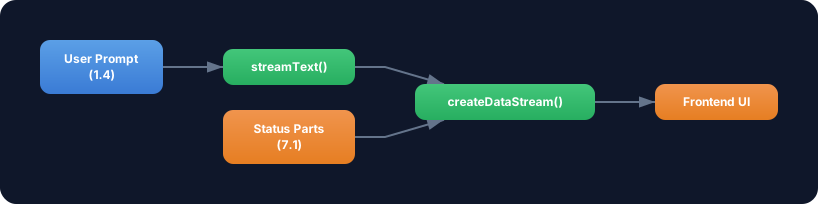
Exercise: Combine Custom Data Parts with the streamText knowledge from Level 1.4. Build a stream that:
- Sends a status “thinking” before the LLM call starts
- During LLM generation, increments a progress counter every 2 seconds (via
setIntervalin theexecutecallback) - After completion, sends the final token usage as a Data Part
- Streams the LLM text stream in parallel
Optional Stretch Goal: Build a frontend with useChat that renders the progress counter as an animated progress bar and displays the token usage at the end.