Challenge 6.2: Deterministic Eval
Not every evaluation needs an LLM — sometimes a string comparison is enough. When is a deterministic scorer the better choice, and when do you really need an LLM as a judge?
OVERVIEW
Section titled “OVERVIEW”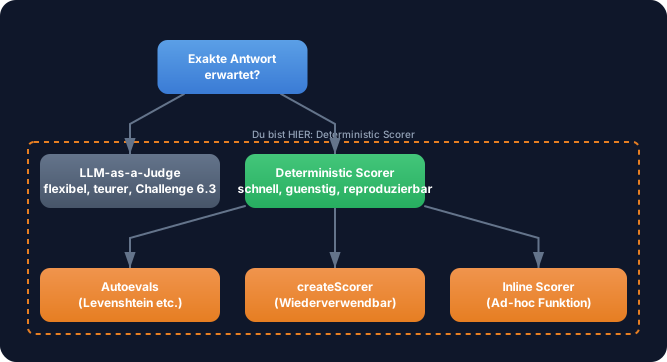
The decision is simple: Is there a single correct answer? Then deterministic. Is the answer open-ended? Then LLM-as-Judge (next challenge).
Without deterministic evals: You use an LLM to check whether the answer contains the word “Paris”. That costs tokens, takes seconds, and delivers slightly different results on each run. For trivial checks, that’s wasteful.
With deterministic evals: An output.includes('Paris') runs in microseconds, costs nothing, and gives the same result on every run. Fast, cheap, reproducible — perfect for everything that can be expressed as a string operation.
WALKTHROUGH
Section titled “WALKTHROUGH”Layer 1: Inline Scorer
Section titled “Layer 1: Inline Scorer”The simplest approach — an object with name, description, and scorer function directly in the scorers array:
import { evalite } from 'evalite';
evalite('Capital Cities', {  data: async () => [    { input: 'What is the capital of France?', expected: 'Paris' },    { input: 'What is the capital of Germany?', expected: 'Berlin' },  ],  task: async (input) => {    // Your LLM call goes here    return 'The capital is Paris';  },  scorers: [{    name: 'Contains Paris',    description: 'Checks whether Paris appears.',    scorer: ({ output }) => {        // <- Gets output, expected, input      return output.includes('Paris') ? 1 : 0;  // <- Score: 0 or 1    },  }],});
The scorer receives an object with output (what the task returned), expected (the expected value from data), and input (the input from data). It must return a number between 0 and 1.
Layer 2: Dynamic Inline Scorer with expected
Section titled “Layer 2: Dynamic Inline Scorer with expected”Instead of checking a fixed string, use the expected value from the data:
scorers: [{ name: 'Contains Expected', description: 'Checks whether the expected value appears in the output.', scorer: ({ output, expected }) => { if (!expected) return 0; return output.toLowerCase().includes(expected.toLowerCase()) ? 1 : 0; },}]Now the scorer works for all test cases — not just for “Paris”. Normalizing to lowercase makes the check more robust.
Layer 3: createScorer — Reusable Scorers
Section titled “Layer 3: createScorer — Reusable Scorers”If you need the same scorer in multiple evals, extract it with createScorer:
import { createScorer } from 'evalite';
const containsExpected = createScorer<string, string, string>({  name: 'Contains Expected',  description: 'Checks whether the expected value appears in the output.',  scorer: ({ output, expected }) => {    if (!expected) return 0;    return output.toLowerCase().includes(expected.toLowerCase()) ? 1 : 0;  },});
The three generics <Input, Output, Expected> type the parameters. Now you can reuse containsExpected in any eval:
evalite('Cities', { data: async () => [ { input: 'Capital of France?', expected: 'Paris' }, { input: 'Capital of Germany?', expected: 'Berlin' }, ], task: async (input) => { /* LLM Call */ return ''; }, scorers: [containsExpected], // <- Reusable});Layer 4: Graduated Scores
Section titled “Layer 4: Graduated Scores”Scores don’t have to be binary (0 or 1). You can use gradations:
const titleLength = createScorer<string, string, string>({ name: 'Title Length', description: 'Evaluates whether the title has a good length (10-50 characters).', scorer: ({ output }) => { const len = output.length; if (len >= 10 && len <= 50) return 1; // <- Perfect if (len >= 5 && len <= 80) return 0.5; // <- Acceptable return 0; // <- Too short or too long },});Graduated scores give you finer control. A title with 60 characters isn’t as good as one with 40, but still better than one with 200.
Layer 5: Autoevals Library
Section titled “Layer 5: Autoevals Library”The autoevals library from Braintrust provides pre-built scorers. You already know Levenshtein:
import { Levenshtein } from 'autoevals';
evalite('Exact Match', {  data: [{ input: 'test', expected: 'test result' }],  task: async (input) => input + ' result',  scorers: [Levenshtein],});
Levenshtein measures the edit distance — how many characters need to be changed to get from the output to the expected value. A score of 1.0 means identical, a score of 0.0 means completely different.
Layer 6: Combining Multiple Scorers
Section titled “Layer 6: Combining Multiple Scorers”You can combine multiple scorers in a scorers array. Each evaluates independently:
evalite('Multi-Scorer', { data: async () => [ { input: 'Capital of France?', expected: 'Paris' }, ], task: async (input) => 'The capital of France is Paris.', scorers: [ containsExpected, // <- Contains "Paris"? -> 1 Levenshtein, // <- How close to "Paris"? -> low (because of extra text) { name: 'Short Answer', description: 'Checks whether the answer is under 50 characters.', scorer: ({ output }) => output.length < 50 ? 1 : 0, }, ],});In the dashboard you’ll then see three separate scores per test case. This gives you a differentiated picture: the answer contains the right word, but is too long.
Task: Create your own “Contains Keyword” scorer and test it with capital city questions.
Create the file capitals.eval.ts and run it with pnpm eval:dev.
import { evalite } from 'evalite';import { createScorer } from 'evalite';import { Levenshtein } from 'autoevals';
// TODO 1: Create a createScorer called 'containsKeyword'//   - Checks whether output.toLowerCase() contains the expected value//   - Returns 1 if yes, 0 if no
// TODO 2: Create an evalite() with the name 'Capital Cities'//   - data: 5 capital city questions (input: question, expected: city name)//   - task: Returns an answer in the format "The capital is [City]."//     (simulate without an LLM for now — return fixed answers)//   - scorers: [containsKeyword, Levenshtein]
// TODO 3: Compare the scores of both scorers in the dashboard//   - Why do the scores differ?
Checklist:
-
createScorerwithcontainsKeywordimplemented -
datawith 5 test cases -
taskreturns answers - Both scorers (
containsKeywordandLevenshtein) in the array - Dashboard shows different scores for both scorers
Show solution
import { evalite } from 'evalite';import { createScorer } from 'evalite';import { Levenshtein } from 'autoevals';
const containsKeyword = createScorer<string, string, string>({  name: 'Contains Keyword',  description: 'Checks whether the expected value appears in the output (case-insensitive).',  scorer: ({ output, expected }) => {    if (!expected) return 0;    return output.toLowerCase().includes(expected.toLowerCase()) ? 1 : 0;  },});
evalite('Capital Cities', {  data: async () => [    { input: 'What is the capital of France?', expected: 'Paris' },    { input: 'What is the capital of Germany?', expected: 'Berlin' },    { input: 'What is the capital of Japan?', expected: 'Tokyo' },    { input: 'What is the capital of Italy?', expected: 'Rome' },    { input: 'What is the capital of Spain?', expected: 'Madrid' },  ],  task: async (input) => {    // Simulated answers — replace with LLM later    const answers: Record<string, string> = {      'What is the capital of France?': 'The capital of France is Paris.',      'What is the capital of Germany?': 'The capital of Germany is Berlin.',      'What is the capital of Japan?': 'The capital of Japan is Tokyo.',      'What is the capital of Italy?': 'The capital of Italy is Rome.',      'What is the capital of Spain?': 'The capital of Spain is Madrid.',    };    return answers[input] ?? 'I do not know.';  },  scorers: [containsKeyword, Levenshtein],});
Expected output: containsKeyword returns 1.0 for all 5 test cases. Levenshtein returns lower scores (~0.2-0.4) because “The capital of France is Paris.” is much longer than “Paris”.
Explanation: containsKeyword returns 1.0 for all test cases — “Paris” appears in “The capital of France is Paris.” Levenshtein returns lower scores because the output is much longer than the expected value “Paris”. Both perspectives are useful: Does the answer contain the right thing? AND: How concise is the answer?
COMBINE
Section titled “COMBINE”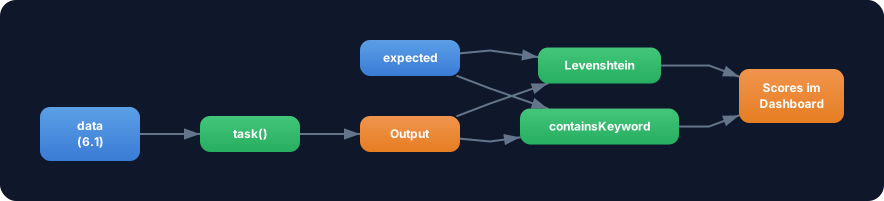
Exercise: Extend your eval from Challenge 6.1 with the containsKeyword scorer. Now use a real LLM call as the task instead of a simulated answer.
- Replace the simulated
taskwithgenerateTextusingtraceAISDKModel - System prompt:
'Answer concisely with only the city name.' - Scorers:
containsKeywordANDLevenshtein - Compare: Which scorer is stricter? Which is more informative?
Optional Stretch Goal: Build a startsWithCapital scorer that checks whether the answer starts with an uppercase letter. Simple, but a good formatting check.