Challenge 6.1: Evalite Basics
How do you test whether your LLM system gives good answers — manually read through them every time? What if you change 50 prompts and want to check whether quality went up or down?
OVERVIEW
Section titled “OVERVIEW”
evalite() takes three things: data (what goes in and what should come out), task (the function under test), and scorers (how the output is evaluated). Results are stored in a local SQLite database and displayed in the browser dashboard.
Without evals: You change a prompt and hope the answers get better. You manually read through 5 answers, they look fine, so you deploy. Two weeks later you notice: for a certain question the LLM now hallucinates. No idea since when.
With evals: You change a prompt, run evalite watch, and immediately see: score went from 0.82 to 0.91. Or: score dropped from 0.82 to 0.65 — regression caught before any user notices. Measure, compare, iterate.
WALKTHROUGH
Section titled “WALKTHROUGH”Layer 1: Installation
Section titled “Layer 1: Installation”Install Evalite and the Autoevals library as dev dependencies:
pnpm add -D evalite vitest autoevals ai @ai-sdk/openai zodThen set up a script in package.json:
{ "scripts": { "eval": "evalite", "eval:dev": "evalite watch" }}evalite watch starts watch mode — like vitest --watch. Whenever a .eval.ts file changes, evals are automatically re-run.
Layer 2: The .eval.ts File Convention
Section titled “Layer 2: The .eval.ts File Convention”Evalite looks for files ending in .eval.ts — analogous to .test.ts in Vitest:
src/ my-feature.ts <- Your code my-feature.test.ts <- Unit tests (Vitest) my-feature.eval.ts <- Evals (Evalite)Each .eval.ts file contains one or more evalite() calls.
Layer 3: evalite() Basic Structure
Section titled “Layer 3: evalite() Basic Structure”The three building blocks — data, task, scorers:
import { evalite } from 'evalite';import { Levenshtein } from 'autoevals'; // Levenshtein measures edit distance — how many character changes are needed to get from output to expected
evalite('My First Eval', {  // 1. Test data: What goes in, what should come out?  data: [    { input: 'Hello', expected: 'Hello World!' },  ],
  // 2. The function under test — here still without an LLM  task: async (input) => {    return input + ' World!';  },
  // 3. Evaluation: How close is the output to the expected?  scorers: [Levenshtein],});
Flow:
dataprovides test cases (input + expected output)taskis executed per test case with theinputscorerscompare the actual output with theexpectedvalue- Results are stored in SQLite (
node_modules/.evalite) - Dashboard shows scores at
http://localhost:3006
Layer 4: data as an async Function
Section titled “Layer 4: data as an async Function”Instead of a static array, data can also be an async function — useful for dynamic loading:
evalite('Capital Cities', { data: async () => [ { input: 'What is the capital of France?', expected: 'Paris' }, { input: 'What is the capital of Germany?', expected: 'Berlin' }, { input: 'What is the capital of Japan?', expected: 'Tokyo' }, ], task: async (input) => { // Your LLM call goes here later return input; }, scorers: [Levenshtein],});Layer 5: traceAISDKModel — AI SDK Integration
Section titled “Layer 5: traceAISDKModel — AI SDK Integration”When you use a real LLM call as your task, you wrap the model with traceAISDKModel. This lets Evalite capture all LLM calls (tokens, latency, cost) in the dashboard:
import { evalite } from 'evalite';import { traceAISDKModel } from 'evalite/ai-sdk';import { generateText } from 'ai';import { openai } from '@ai-sdk/openai';import { Levenshtein } from 'autoevals';
evalite('Capital Cities', {  data: async () => [    { input: 'What is the capital of France?', expected: 'Paris' },    { input: 'What is the capital of Germany?', expected: 'Berlin' },  ],  task: async (input) => {    const result = await generateText({      model: traceAISDKModel(openai('gpt-4o-mini')),  // <- Tracing!      system: 'Answer concisely. No periods.',      prompt: input,    });    return result.text;  },  scorers: [Levenshtein],});
traceAISDKModel is a wrapper that adds Evalite tracing to the AI SDK model. In the dashboard you’ll then see not only the score, but also token usage and latency per test case.
Layer 6: Result UI
Section titled “Layer 6: Result UI”Start the evals with pnpm eval:dev and open http://localhost:3006:
- Overview: All evals with average score
- Detail view: Each test case with input, output, expected, and score
- History: Scores over time — see improvements or regressions
- Traces: With
traceAISDKModelyou see the LLM calls with token usage
Task: Set up Evalite and write a simple eval with the Levenshtein scorer.
Create the file hello.eval.ts and run it with pnpm eval:dev. You’ll see the results in the dashboard at http://localhost:3006.
import { evalite } from 'evalite';import { Levenshtein } from 'autoevals';
// TODO 1: Create an evalite() with the name 'Greeting Eval'
// TODO 2: Define data with 3 test cases://   - input: 'Hi'      -> expected: 'Hi! How can I help?'//   - input: 'Hello'   -> expected: 'Hello! How can I help?'//   - input: 'Hey'     -> expected: 'Hey! How can I help?'
// TODO 3: Implement a task function that takes the input//   and appends ' How can I help?' (with an exclamation mark after the input)
// TODO 4: Use Levenshtein as the scorer
Checklist:
-
evaliteandLevenshteinimported -
datawith 3 test cases defined -
taskreturns the input with appended text -
Levenshteinset as scorer -
pnpm eval:devshows results in the dashboard
Show solution
import { evalite } from 'evalite';import { Levenshtein } from 'autoevals';
evalite('Greeting Eval', {  data: [    { input: 'Hi', expected: 'Hi! How can I help?' },    { input: 'Hello', expected: 'Hello! How can I help?' },    { input: 'Hey', expected: 'Hey! How can I help?' },  ],  task: async (input) => {    return `${input}! How can I help?`;  },  scorers: [Levenshtein],});
Expected output: All three test cases should achieve a score of 1.0 — the task function produces exactly the expected output. In the dashboard at localhost:3006 you’ll see “Greeting Eval” with an average score of 1.0.
Explanation: The Levenshtein scorer measures the similarity between the actual output and the expected output. A score of 1.0 means identical, a score of 0.0 means completely different. In this example, every test case should achieve a score of 1.0, because the task function produces exactly the expected output.
COMBINE
Section titled “COMBINE”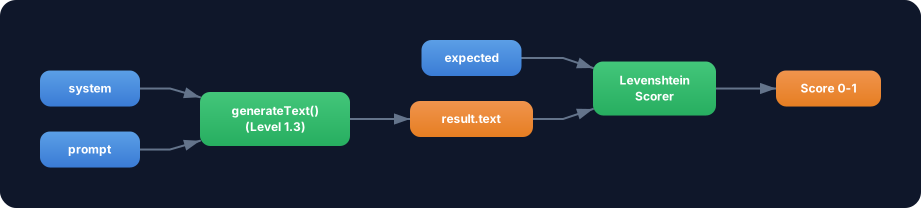
Exercise: Use generateText from Level 1.3 as the task function in an Evalite eval. Test whether an LLM correctly names capital cities.
- Create an
.eval.tsfile with 5 capital city questions - Use
generateTextwithtraceAISDKModelas thetask - System prompt:
'Answer with only the city name. No periods, no extra text.' - Scorer:
Levenshtein - Run
pnpm eval:devand check the scores in the dashboard
Food for thought: Why is Levenshtein not the ideal scorer here? What happens if the LLM answers “Paris, France” instead of “Paris”?