Challenge 5.4: Retrieval (RAG)
What happens when you ask an LLM about current news? How does it know whether its answer is correct?
OVERVIEW
Section titled “OVERVIEW”
The diagram shows the RAG data flow: A user question is not sent directly to the LLM — first, relevant data is loaded from an external source and inserted into the prompt via the <background-data> tag. Without this step (dashed line) hallucination is likely.
This is what the <background-data> tag looks like in the full prompt template:
<task-context>Du bist ein Assistent, der Fragen zu Webseiten beantwortet.</task-context>
<background-data>                          <!-- ← HIER kommen die externen Daten rein -->  <url>https://example.com</url>  <content>  [Geladener Inhalt der Webseite]  </content></background-data>
<rules>- Nutze nur die bereitgestellten Daten zur Beantwortung.- Wenn die Frage nicht beantwortbar ist, sage das ehrlich.</rules>
<the-ask>Beantworte die Frage basierend auf den Daten.</the-ask>
<output-format>Antwort mit Quellenangabe.</output-format>Without RAG: An LLM has a fixed training cutoff date. It knows nothing about current events, internal company data, or specific websites. If you ask about them anyway, it will hallucinate — generating a plausible-sounding but incorrect answer. The answer is not verifiable.
With RAG: You load the relevant data beforehand and provide it as context. The LLM answers based on real sources. The answer is verifiable, up-to-date, and includes source citations. Hallucinations are drastically reduced.
WALKTHROUGH
Section titled “WALKTHROUGH”Layer 1: The RAG Principle (Retrieve, Augment, Generate)
Section titled “Layer 1: The RAG Principle (Retrieve, Augment, Generate)”RAG stands for Retrieval-Augmented Generation and consists of three steps:
- Retrieve: Load relevant data from an external source
- Augment: Insert the data into the prompt (as
<background-data>) - Generate: The LLM answers based on the enriched context
// Schritt 1: RETRIEVE — Daten aus einer Quelle ladenconst content = loadContent('https://docs.example.com/api');  // ← Retrieve
// Schritt 2: AUGMENT — Daten in den Prompt einfuegenconst prompt = `<background-data>  <url>https://docs.example.com/api</url>  <content>${content}</content>                                // ← Augment</background-data>`;
// Schritt 3: GENERATE — LLM antwortet mit Kontextconst result = await generateText({                            // ← Generate  model: anthropic('claude-sonnet-4-5-20250514'),  prompt,});
The principle is simple: Give the LLM the data it needs — before it answers.
Layer 2: Data Source Table
Section titled “Layer 2: Data Source Table”The data for RAG can come from various sources:
| Source | Example | Typical Use Case |
|---|---|---|
| Web Scraping | Tavily, Firecrawl | Current web content |
| Vector Database | Pinecone, Chroma, pgvector | Own documents (embeddings) |
| SQL/API | Own DB, REST API | Structured enterprise data |
| File System | fs.readFileSync() | Local files, configurations |
In this challenge we use simulated content — but the prompt pattern remains the same regardless of where the data comes from.
Layer 3: Integration into the Prompt Template — background-data
Section titled “Layer 3: Integration into the Prompt Template — background-data”Loaded data belongs in the <background-data> section — i.e. in the middle of the prompt. Within <background-data> you structure the data with <url> and <content> tags:
const sourceUrl = 'https://www.aihero.dev/';const websiteContent = '...geladener Inhalt...';
const prompt = `<task-context>You are a helpful assistant that answers questions about website content.</task-context>
<background-data>  <url>${sourceUrl}</url>                    // ← Quellenangabe: woher kommen die Daten?  <content>  ${websiteContent}                          // ← Die eigentlichen Daten  </content></background-data>
<rules>- Use the content of the website to answer the question.- Use quotes from the content.- If the question is not answerable from the content, say so honestly.</rules>
<conversation-history>${question}</conversation-history>
<the-ask>Answer the question based on the provided data.</the-ask>
<output-format>Return the answer in paragraphs. Include quotes from the source material.</output-format>`;
The <url> tag is important: It enables the LLM to cite the source in its answer. This makes the answer verifiable.
Layer 4: The Critical Rule — Preventing Hallucinations
Section titled “Layer 4: The Critical Rule — Preventing Hallucinations”The most important line in any RAG prompt sits in <rules>:
<rules>- Use only the provided data to answer the question.- If the question is not answerable from the provided data, say "I can only answer questions based on the provided content."</rules>Without this rule the LLM will try to answer anyway — with its training knowledge, not with the provided data. This leads to hallucinations that are especially dangerous because they sound plausible and appear in a context that leads users to expect source-based answers.
Tip: Phrase the rule positively and concretely. Not “Don’t hallucinate”, but “Say honestly if the question cannot be answered.”
Task: Build a system that loads website content and answers questions about it. Use the simulated content below. Add <background-data>, <rules>, and <output-format> to the prompt.
Create challenge-5-4.ts and run with: npx tsx challenge-5-4.ts
import { streamText } from 'ai';import { anthropic } from '@ai-sdk/anthropic';
// Simulierter Web-Content (in Production: fetch, Tavily, etc.)const websiteContent = `AI Hero is an educational platform created by Matt Pocock,known for Total TypeScript. The platform teaches AI engineeringskills including the Vercel AI SDK, prompt engineering, andbuilding production-ready AI applications. Guillermo Rauch,CEO of Vercel, said: "Matt is one of the best educators inthe TypeScript ecosystem."`;
const question = 'What did Guillermo Rauch say about Matt Pocock?';const sourceUrl = 'https://www.aihero.dev/';
const result = await streamText({  model: anthropic('claude-sonnet-4-5-20250514'),  prompt: `<task-context>You are a helpful assistant that answers questions about website content.</task-context>
// TODO: Fuege <background-data> ein mit://   - <url> Tag fuer die Quellenangabe//   - <content> Tag fuer den geladenen Inhalt
// TODO: Fuege <rules> ein://   - Nur die bereitgestellten Daten verwenden//   - Zitate aus dem Quellmaterial nutzen//   - Ehrlich sagen wenn etwas nicht beantwortbar ist
<conversation-history>${question}</conversation-history>
<the-ask>Answer the question based on the provided website content.</the-ask>
// TODO: Fuege <output-format> ein://   - Antwort in Absaetzen//   - Quellenangabe einschliessen  `.trim(),});
for await (const chunk of result.textStream) {  process.stdout.write(chunk);}
Checklist:
-
<background-data>contains the loaded content with a<url>tag -
<rules>defines: only use provided data -
<rules>defines: say honestly if not answerable -
<output-format>defines the answer format
Show solution
import { streamText } from 'ai';import { anthropic } from '@ai-sdk/anthropic';
const websiteContent = `AI Hero is an educational platform created by Matt Pocock,known for Total TypeScript. The platform teaches AI engineeringskills including the Vercel AI SDK, prompt engineering, andbuilding production-ready AI applications. Guillermo Rauch,CEO of Vercel, said: "Matt is one of the best educators inthe TypeScript ecosystem."`;
const question = 'What did Guillermo Rauch say about Matt Pocock?';const sourceUrl = 'https://www.aihero.dev/';
const result = await streamText({  model: anthropic('claude-sonnet-4-5-20250514'),  prompt: `<task-context>You are a helpful assistant that answers questions about website content.</task-context>
<background-data>  <url>${sourceUrl}</url>  <content>  ${websiteContent}  </content></background-data>
<rules>- Use the content of the website to answer the question.- If the question is not related to the content of the website,  say "I can only answer questions based on the provided content."- Use quotes from the content of the website to support your answer.- Do not use any knowledge outside the provided content.</rules>
<conversation-history>${question}</conversation-history>
<the-ask>Answer the question based on the provided website content.</the-ask>
<output-format>Return the answer in paragraphs. Include direct quotes from the sourcematerial where relevant. Cite the source URL.</output-format>  `.trim(),});
for await (const chunk of result.textStream) {  process.stdout.write(chunk);}
Explanation: The loaded data sits in <background-data> with a clear source citation (<url>). The <rules> explicitly define that only the provided data may be used and that the LLM should be honest if the question cannot be answered. The <output-format> requires paragraphs and source citations — making the answer verifiable.
Expected output (approximate):
Guillermo Rauch, CEO of Vercel, said: "Matt is one of the best educators in the TypeScript ecosystem."
Source: https://www.aihero.dev/
COMBINE
Section titled “COMBINE”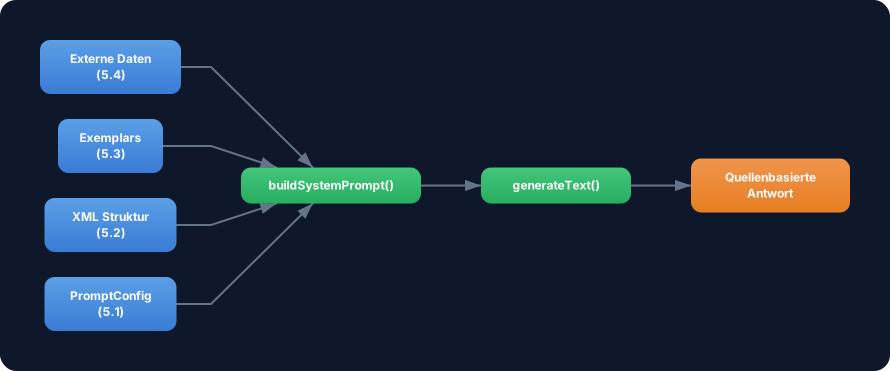
Exercise: Now build a complete RAG system that combines Template (5.1) + XML Structure (5.2) + Exemplars (5.3) + Retrieval (5.4). Create a buildRAGPrompt function that unifies all four concepts.
Specifically:
- Create a
RAGConfiginterface that extendsPromptConfigwithsourceUrl,content, andexemplars - In
buildRAGPrompt(): Build the prompt with<task-context>,<background-data>(with<url>and<content>),<examples>, and<rules> - The
<rules>must contain the anti-hallucination rule - Use the exemplars to demonstrate the answer format
Optional Stretch Goal: Add support for multiple sources — <background-data> with multiple <url>/<content> pairs. Use an array of sources in the config.
Looking Ahead: From Static Content to Vector Search
Section titled “Looking Ahead: From Static Content to Vector Search”This challenge uses static content. In production you would:
- Split documents into chunks (e.g. 500 tokens per chunk)
- Create embeddings (e.g. with
text-embedding-3-small) - Store them in a vector DB (Pinecone, Chroma, pgvector)
- At runtime, search for the most relevant chunks and insert them into the prompt
The prompt pattern stays the same — only the retrieve step becomes more complex.