Challenge 5.1: The Template
When you write a system prompt — how do you make sure it stays consistent across 20 different API calls?
OVERVIEW
Section titled “OVERVIEW”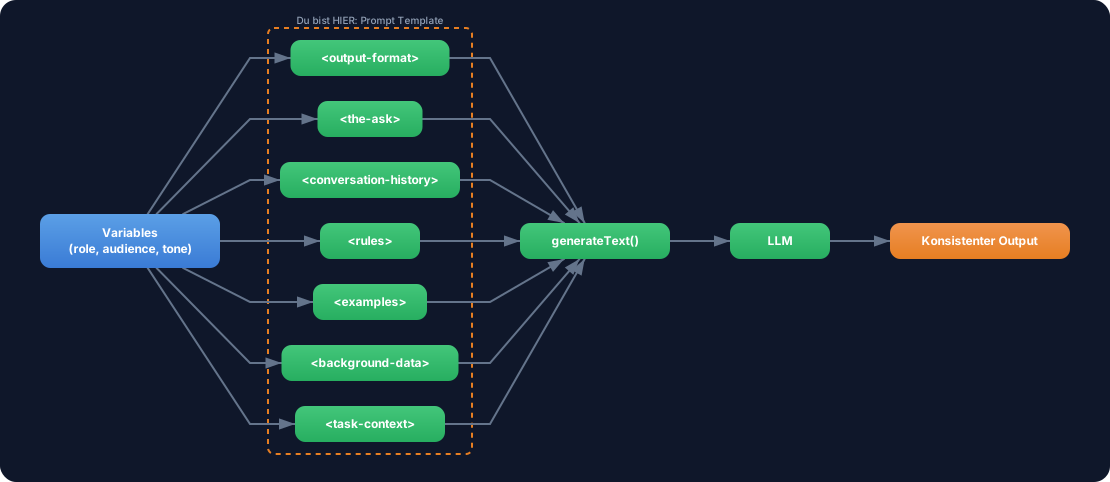
The diagram shows the core idea: A prompt template defines a fixed structure with XML tags. Variables are injected dynamically. The result is a consistent, reusable prompt for any number of API calls.
Without a template: You copy-paste prompts into every file. Each prompt looks slightly different. Changes to tone or format have to be made in 20 places at once. The result is inconsistent and untestable.
With a template: One prompt, one place, many tasks. You change the variables — the rest stays the same. DRY (Don’t Repeat Yourself), testable, maintainable.
WALKTHROUGH
Section titled “WALKTHROUGH”Layer 1: The Basic Structure (XML Tags for Sections)
Section titled “Layer 1: The Basic Structure (XML Tags for Sections)”Anthropic recommends structuring prompts with XML tags. Each tag has a specific function and position — the order follows the attention distribution of LLMs:
<task-context>Role and task — placed at the START (high influence)</task-context>
<background-data>Documents, context — placed in the MIDDLE</background-data>
<examples>Few-shot examples — placed in the MIDDLE</examples>
<rules>Detailed instructions — placed in the MIDDLE</rules>
<conversation-history>Chat history — placed in the MIDDLE</conversation-history>
<the-ask>The actual question — placed at the END (high influence)</the-ask>
<output-format>Output format — placed at the END (high influence)</output-format>
LLMs weigh the beginning and end more heavily than the middle. That is why <task-context> and <output-format> sit at the edges — where they have the greatest influence.
Layer 2: Variables and Dynamic Content
Section titled “Layer 2: Variables and Dynamic Content”The XML structure alone is static. To make it reusable you use TypeScript template literals. Variables are injected in the right places:
// Template Literal: Variables are inserted at runtimeconst systemPrompt = `<task-context>Du bist ein ${config.role}.                // ← Variable: Rolle dynamischDeine Zielgruppe: ${config.audience}.      // ← Variable: Zielgruppe dynamisch</task-context>
<rules>- Schreibe ${config.tone}                  // ← Variable: Ton dynamisch- Fachbegriffe beim ersten Auftreten erklaeren- Keine Annahmen ohne Kennzeichnung</rules>
<output-format>Formatiere Deine Antwort als: ${config.outputFormat}  // ← Variable: Format dynamisch</output-format>`;
Each variable makes the prompt flexible without changing the structure. The same prompt works for a “technical writer” just as well as for a “marketing copywriter” — only the variables change.
Layer 3: The buildSystemPrompt Function
Section titled “Layer 3: The buildSystemPrompt Function”The final layer wraps everything in a reusable function:
import { generateText } from 'ai';import { anthropic } from '@ai-sdk/anthropic';
interface PromptConfig {  role: string;  audience: string;  tone: string;  outputFormat: string;}
function buildSystemPrompt(config: PromptConfig): string {  // ← Reusable Funktion  return `<task-context>Du bist ein ${config.role}.Deine Zielgruppe: ${config.audience}.</task-context>
<rules>- Schreibe ${config.tone}- Fachbegriffe beim ersten Auftreten erklaeren- Keine Annahmen ohne Kennzeichnung- Codebeispiele muessen lauffaehig sein</rules>
<output-format>Formatiere Deine Antwort als: ${config.outputFormat}</output-format>  `.trim();}
// Derselbe Prompt, verschiedene Konfigurationen:const result = await generateText({  model: anthropic('claude-sonnet-4-5-20250514'),  system: buildSystemPrompt({                              // ← Template wird hier genutzt    role: 'technischer Redakteur',    audience: 'Entwickler mit 2 Jahren Erfahrung',    tone: 'professionell aber zugaenglich',    outputFormat: 'Markdown mit Codebeispielen',  }),  prompt: 'Erklaere, was Context Engineering ist.',});
console.log(result.text);
The function takes a PromptConfig object and returns a complete system prompt as a string. You can mock it in tests, reuse it in different contexts, and change it in one place.
Task: Build your own buildSystemPrompt function. It should return a template with XML tags that has at least four sections.
Create the file challenge-5-1.ts and run it with: npx tsx challenge-5-1.ts
import { generateText } from 'ai';import { anthropic } from '@ai-sdk/anthropic';
interface PromptConfig {  role: string;  audience: string;  tone: string;  outputFormat: string;}
// TODO: Implementiere buildSystemPrompt// 1. Nutze Template Literals (Backticks)// 2. Setze XML Tags fuer die Struktur ein://    - <task-context> fuer Rolle und Zielgruppe//    - <rules> fuer Tonalitaet und Einschraenkungen//    - <output-format> fuer das gewuenschte Format// 3. Injiziere die config-Variablen an den richtigen Stellenfunction buildSystemPrompt(config: PromptConfig): string {  // Dein Code hier  return '';}
const result = await generateText({  model: anthropic('claude-sonnet-4-5-20250514'),  system: buildSystemPrompt({    role: 'technischer Redakteur',    audience: 'Entwickler mit 2 Jahren Erfahrung',    tone: 'professionell aber zugaenglich',    outputFormat: 'Markdown mit Codebeispielen',  }),  prompt: 'Erklaere, was Context Engineering ist.',});
console.log(result.text);
Checklist:
- Template uses XML tags for structure
- At least 4 sections (role, audience, tone, format)
- Function returns a string
- Code runs with
generateText
Show solution
import { generateText } from 'ai';import { anthropic } from '@ai-sdk/anthropic';
interface PromptConfig {  role: string;  audience: string;  tone: string;  outputFormat: string;}
function buildSystemPrompt(config: PromptConfig): string {  return `<task-context>Du bist ein ${config.role}.Deine Zielgruppe: ${config.audience}.</task-context>
<rules>- Schreibe ${config.tone}- Fachbegriffe beim ersten Auftreten erklaeren- Keine Annahmen ohne Kennzeichnung- Codebeispiele muessen lauffaehig sein</rules>
<output-format>Formatiere Deine Antwort als: ${config.outputFormat}</output-format>  `.trim();}
const result = await generateText({  model: anthropic('claude-sonnet-4-5-20250514'),  system: buildSystemPrompt({    role: 'technischer Redakteur',    audience: 'Entwickler mit 2 Jahren Erfahrung',    tone: 'professionell aber zugaenglich',    outputFormat: 'Markdown mit Codebeispielen',  }),  prompt: 'Erklaere, was Context Engineering ist.',});
console.log(result.text);
Explanation: The function uses <task-context> at the beginning for maximum influence on the role and <output-format> at the end for maximum control over the format. The <rules> sit in the middle. All four config variables are dynamically injected.
Expected output (approximate — LLM outputs vary):
Context Engineering is the systematic design of the input...COMBINE
Section titled “COMBINE”
Exercise: Now use your template with streamText instead of generateText. Stream the response to the terminal.
You need to:
- Replace
generateTextwithstreamText - Iterate over
result.textStreamwithfor await...of - Output each chunk with
process.stdout.write(chunk)
Optional Stretch Goal: Add a second call that uses the same template with a different configuration (e.g. role: 'Marketing-Texter'). Compare the outputs.