Challenge 4.3: Persistence
What happens to your chat history when you reload the page?
OVERVIEW
Section titled “OVERVIEW”
Persistence means: Messages are saved after every LLM call and loaded again on the next request (or after a reload). The chat “remembers” everything that was said before.
Without Persistence: The chat history lives only in memory. On reload, server restart, or deployment everything is gone. The user has to start over. Multi-turn conversations only work within a single session.
With Persistence: The history survives reloads, server restarts, and deployments. The user can resume a chat at any time. You have a foundation for chat history, search, and analytics.
WALKTHROUGH
Section titled “WALKTHROUGH”Layer 1: The Persistence Cycle
Section titled “Layer 1: The Persistence Cycle”The complete cycle consists of three steps:
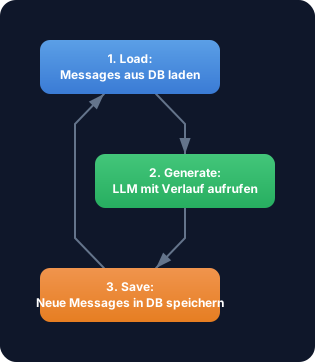
- Load: Before the LLM call, load the existing messages from the database
- Generate: Call
generateTextwith the loaded messages + the new user message - Save: In the
onFinishcallback, save the new messages (user + assistant)
Layer 2: Saving Messages (Save)
Section titled “Layer 2: Saving Messages (Save)”After every LLM call you save the new messages to the database:
import { generateText } from 'ai';import { anthropic } from '@ai-sdk/anthropic';
// Simulated database (Map as in-memory DB)const db = new Map<string, Array<{ role: string; content: string }>>();
async function saveMessages(  chatId: string,  messages: Array<{ role: string; content: string }>,) {  db.set(chatId, messages);                                      // ← Save all messages  console.log(`Saved ${messages.length} messages for chat ${chatId.substring(0, 8)}...`);}
const chatId = crypto.randomUUID();const userMessage = 'Was ist TypeScript?';
// User message + LLM callconst messages: Array<{ role: string; content: string }> = [  { role: 'user', content: userMessage },];
const result = await generateText({  model: anthropic('claude-sonnet-4-5-20250514'),  messages,  onFinish({ text }) {    messages.push({ role: 'assistant', content: text });         // ← Append assistant response    saveMessages(chatId, messages);                              // ← Save to DB  },});
Layer 3: Loading Messages (Load)
Section titled “Layer 3: Loading Messages (Load)”On the next request (or after a reload) the backend loads the existing history:
async function loadMessages(  chatId: string,): Promise<Array<{ role: string; content: string }>> {  return db.get(chatId) || [];                                   // ← Empty array if no chat}
// After "reload": Load historyconst history = await loadMessages(chatId);console.log(`Loaded ${history.length} messages`);// → "Loaded 2 messages" (user + assistant from before)
Layer 4: Resuming a Chat
Section titled “Layer 4: Resuming a Chat”Now everything comes together — load, append new message, generate, save:
async function continueChat(chatId: string, userMessage: string) {  // 1. Load: Load existing history  const history = await loadMessages(chatId);
  // 2. Append new user message  const messages = [...history, { role: 'user' as const, content: userMessage }];
  // 3. Generate: Call LLM with complete history  const result = await generateText({    model: anthropic('claude-sonnet-4-5-20250514'),    messages,    onFinish({ text }) {      // 4. Save: Save complete history      messages.push({ role: 'assistant', content: text });      saveMessages(chatId, messages);    },  });
  return result.text;}
// First callawait continueChat(chatId, 'Was ist TypeScript?');// DB: [user: "Was ist TypeScript?", assistant: "TypeScript ist..."]
// Second call — chat "remembers" the first oneawait continueChat(chatId, 'Und worin unterscheidet es sich von JavaScript?');// DB: [user: "Was ist TypeScript?", assistant: "TypeScript ist...",//      user: "Und worin unterscheidet es sich?", assistant: "Der Hauptunterschied..."]
The LLM receives the entire history with every call and can reference earlier messages. Without persistence it would answer the second question without any context.
Layer 5: Normalized DB Schema (Outlook)
Section titled “Layer 5: Normalized DB Schema (Outlook)”In production you use a real database with a normalized schema instead of a Map:
// Conceptual table structure (e.g. SQLite, PostgreSQL)
// Table: chatsinterface Chat {  id: string;           // UUID  createdAt: Date;  title: string;        // First user message or generated title}
// Table: messagesinterface Message {  id: string;           // UUID  chatId: string;       // Foreign Key → chats.id  role: 'user' | 'assistant' | 'system';  content: string;  tokens: number;       // Token usage for this message  createdAt: Date;}
Two separate tables: chats for metadata, messages for content. Linked via chatId. This enables efficient queries like “all chats by the user” or “token usage per chat”.
Task: Simulate the complete persistence cycle with a Map as an in-memory database: save messages, load them, and resume a chat.
Create a file challenge-4-3.ts:
import { generateText } from 'ai';import { anthropic } from '@ai-sdk/anthropic';
// In-memory "database"const db = new Map<string, Array<{ role: string; content: string }>>();
// TODO 1: Implement saveMessages(chatId, messages) — saves to the Map// TODO 2: Implement loadMessages(chatId) — reads from the Map (empty array as fallback)// TODO 3: Implement continueChat(chatId, userMessage)://   a) Load history with loadMessages//   b) Append new user message//   c) Call generateText with messages//   d) In onFinish: Append assistant response + call saveMessages//   e) Return result.text
// TODO 4: Test the cycle://   a) Generate a new chatId//   b) First message: "Was ist TypeScript?"//   c) Second message: "Nenne mir 3 Vorteile."//   d) Log the stored history — it should have 4 messages
Checklist:
-
saveMessagessaves messages to the Map -
loadMessagesreads messages (with empty-array fallback) -
continueChatloads, generates, and saves - After 2 calls: 4 messages in history (2x user + 2x assistant)
- The LLM references the first question in the second answer
Run with: npx tsx challenge-4-3.ts
Show solution
import { generateText } from 'ai';import { anthropic } from '@ai-sdk/anthropic';
const db = new Map<string, Array<{ role: string; content: string }>>();
function saveMessages(  chatId: string,  messages: Array<{ role: string; content: string }>,) {  db.set(chatId, [...messages]); // Save a copy  console.log(    `Saved: Chat ${chatId.substring(0, 8)}... → ${messages.length} messages`,  );}
function loadMessages(  chatId: string,): Array<{ role: string; content: string }> {  return db.get(chatId) || [];}
async function continueChat(chatId: string, userMessage: string) {  const history = loadMessages(chatId);  const messages: Array<{ role: string; content: string }> = [    ...history,    { role: 'user', content: userMessage },  ];
  const result = await generateText({    model: anthropic('claude-sonnet-4-5-20250514'),    messages,    onFinish({ text }) {      messages.push({ role: 'assistant', content: text });      saveMessages(chatId, messages);    },  });
  return result.text;}
// Testconst chatId = crypto.randomUUID();
console.log('--- Erste Nachricht ---');const answer1 = await continueChat(chatId, 'Was ist TypeScript?');console.log(answer1.substring(0, 100) + '...\n');
console.log('--- Zweite Nachricht (Chat erinnert sich) ---');const answer2 = await continueChat(chatId, 'Nenne mir 3 Vorteile.');console.log(answer2.substring(0, 200) + '...\n');
console.log('--- Gespeicherter Verlauf ---');const stored = loadMessages(chatId);console.log(`Messages: ${stored.length}`);stored.forEach((m, i) =>  console.log(`  ${i + 1}. [${m.role}] ${m.content.substring(0, 60)}...`),);
Expected output (approximate — LLM responses vary):
--- Erste Nachricht ---Saved: Chat a1b2c3d4... → 2 messagesTypeScript ist eine typisierte Erweiterung von JavaScript...
--- Zweite Nachricht (Chat erinnert sich) ---Saved: Chat a1b2c3d4... → 4 messagesDrei Vorteile von TypeScript sind: 1. Statische Typen...
--- Gespeicherter Verlauf ---Messages: 4  1. [user] Was ist TypeScript?...  2. [assistant] TypeScript ist eine typisierte Erweiterung von JavaScript...  3. [user] Nenne mir 3 Vorteile....  4. [assistant] Drei Vorteile von TypeScript sind: 1. Statische Typen...
Explanation: continueChat implements the complete persistence cycle: Load → Generate → Save. The LLM receives the entire history with every call and can reference earlier messages. The Map simulates a database — in production this would be a SQL INSERT / SELECT.
COMBINE
Section titled “COMBINE”
Exercise: Connect Persistence with Chat ID — load a chat by ID, add new messages, and save everything.
- Create a
ChatDBclass withsave,load, andlistmethods save(chatId, messages)saves the complete historyload(chatId)returns the history (empty array as fallback)list()returns all chat IDs with message count- Build a
chat(db, chatId, userMessage)function that executes the cycle - Create 2 different chats, run 2 messages each
- Use
list()to display all chats with message count
Optional Stretch Goal: Add a delete(chatId) method and a getTokenCount(chatId) method that calculates the total token usage of a chat (requires: storing token counts in the messages).