Challenge 4.1: On Finish
How do you save the result of an LLM call — AFTER it finishes, but BEFORE the response goes back to the user?
OVERVIEW
Section titled “OVERVIEW”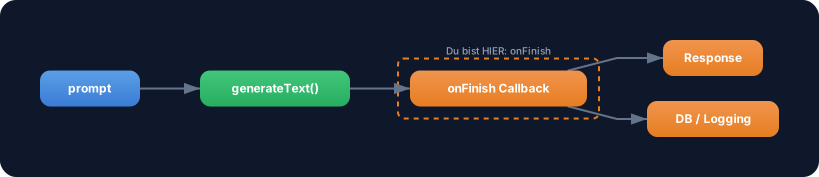
generateText calls an onFinish callback after the full completion. In this callback you have access to text, usage, finishReason, and the full response — the perfect place to save results, track tokens, or write logs.
Without onFinish: You have to manually save results after the await. That works, but if an error occurs between generateText and your save code, the data is lost. No automatic logging, no audit trail, no token tracking “out of the box”.
With onFinish: Saving happens automatically, right after the LLM finishes. The callback is guaranteed to be called — no matter what happens afterward in the code. You have a central place for logging, analytics, and persistence.
WALKTHROUGH
Section titled “WALKTHROUGH”Layer 1: The onFinish Callback
Section titled “Layer 1: The onFinish Callback”onFinish is an optional parameter of generateText. It is called once after the completion is finished:
import { generateText } from 'ai';import { anthropic } from '@ai-sdk/anthropic';
const result = await generateText({  model: anthropic('claude-sonnet-4-5-20250514'),  prompt: 'Was ist TypeScript?',  onFinish({ text, usage, finishReason, response }) {  // ← Called after completion    console.log('Text:', text.substring(0, 50) + '...');    console.log('Tokens:', usage.totalTokens);    console.log('Finish Reason:', finishReason);  },});
The callback receives an object with the most important properties (see the generateText API Reference for the full list):
| Property | Type | Description |
|---|---|---|
text | string | The generated text |
usage | { promptTokens, completionTokens, totalTokens } | Token usage |
finishReason | 'stop' | 'length' | 'tool-calls' | Why the LLM stopped |
response | { messages, headers } | Full response with all messages |
Layer 2: When Does onFinish Fire?
Section titled “Layer 2: When Does onFinish Fire?”The timing is critical:

onFinish is called after the completion finishes and before the await resolves. This means: Your save code in the callback runs before the remaining code after await generateText(...) executes.
Layer 3: Typical Use Cases
Section titled “Layer 3: Typical Use Cases”Token tracking for cost calculation:
let sessionTokens = 0;
const result = await generateText({  model: anthropic('claude-sonnet-4-5-20250514'),  prompt: 'Erklaere Promises.',  onFinish({ usage }) {    sessionTokens += usage.totalTokens;                          // ← Session counter    console.log(`Request: ${usage.totalTokens} Tokens`);    console.log(`Session gesamt: ${sessionTokens} Tokens`);  },});
Logging with timestamp:
const result = await generateText({ model: anthropic('claude-sonnet-4-5-20250514'), prompt: 'Erklaere Promises.', onFinish({ text, usage, finishReason }) { const logEntry = { timestamp: new Date().toISOString(), promptTokens: usage.promptTokens, completionTokens: usage.completionTokens, totalTokens: usage.totalTokens, finishReason, textLength: text.length, }; console.log('LOG:', JSON.stringify(logEntry)); // ← Structured log },});Simulated DB save:
// Simulated database (in-memory)const chatLog: Array<{ role: string; content: string; tokens: number }> = [];
const result = await generateText({  model: anthropic('claude-sonnet-4-5-20250514'),  prompt: 'Was ist TypeScript?',  onFinish({ text, usage }) {    chatLog.push({                                               // ← Save to "DB"      role: 'assistant',      content: text,      tokens: usage.totalTokens,    });    console.log(`Gespeichert. ${chatLog.length} Eintraege in DB.`);  },});
Layer 4: onFinish with streamText
Section titled “Layer 4: onFinish with streamText”onFinish also works with streamText — it is called after the entire stream is complete:
import { streamText } from 'ai';import { anthropic } from '@ai-sdk/anthropic';
const result = streamText({  model: anthropic('claude-sonnet-4-5-20250514'),  prompt: 'Erklaere Promises.',  onFinish({ text, usage, finishReason }) {                      // ← After stream ends    console.log(`Stream fertig. ${usage.totalTokens} Tokens.`);  },});
for await (const chunk of result.textStream) {  process.stdout.write(chunk);}
With streamText, onFinish fires only after the last chunk has been streamed. The complete text is then available in the callback.
Task: Implement a generateText call with an onFinish callback that logs usage and finish reason and saves the result to a simulated log array.
Create a file challenge-4-1.ts:
import { generateText } from 'ai';import { anthropic } from '@ai-sdk/anthropic';
// Simulated logconst auditLog: Array<{  timestamp: string;  tokens: number;  finishReason: string;  textPreview: string;}> = [];
// TODO 1: Call generateText with://   - model: anthropic('claude-sonnet-4-5-20250514')//   - prompt: A question of your choice//   - onFinish: Callback that://     a) logs usage.totalTokens//     b) logs finishReason//     c) pushes an entry to auditLog (timestamp, tokens, finishReason, textPreview)
// TODO 2: Log result.text (first 100 characters)// TODO 3: Log the auditLog array
Checklist:
-
onFinishcallback implemented -
usage.totalTokenslogged -
finishReasonlogged - Entry pushed to
auditLog -
result.textlogged afterawait
Run with: npx tsx challenge-4-1.ts
Show solution
import { generateText } from 'ai';import { anthropic } from '@ai-sdk/anthropic';
const auditLog: Array<{  timestamp: string;  tokens: number;  finishReason: string;  textPreview: string;}> = [];
const result = await generateText({  model: anthropic('claude-sonnet-4-5-20250514'),  prompt: 'Erklaere den Unterschied zwischen let und const in JavaScript.',  onFinish({ text, usage, finishReason }) {    console.log(`--- onFinish ---`);    console.log(`Tokens: ${usage.totalTokens}`);    console.log(`Finish Reason: ${finishReason}`);
    auditLog.push({      timestamp: new Date().toISOString(),      tokens: usage.totalTokens,      finishReason,      textPreview: text.substring(0, 80) + '...',    });  },});
console.log(`\n--- Result ---`);console.log(result.text.substring(0, 100) + '...');
console.log(`\n--- Audit Log ---`);console.log(JSON.stringify(auditLog, null, 2));
Expected output (approximate — LLM responses vary):
--- onFinish ---Tokens: 285Finish Reason: stop
--- Result ---The main difference between let and const lies in reassignment...
--- Audit Log ---[  {    "timestamp": "2026-03-08T14:30:00.000Z",    "tokens": 285,    "finishReason": "stop",    "textPreview": "The main difference between let and const lies in reassignment..."  }]
Explanation: The onFinish callback is automatically called after the completion. It logs the token usage and finish reason and saves an audit entry. The auditLog is populated after the await because onFinish runs before the resolve.
COMBINE
Section titled “COMBINE”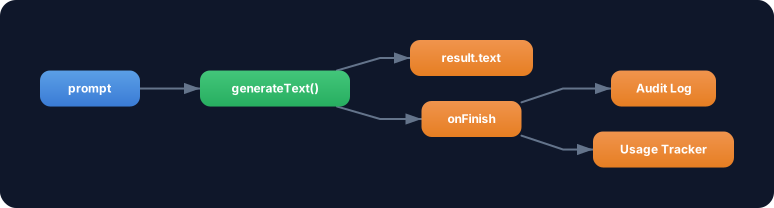
Exercise: Connect onFinish with the usage tracking from Level 2. Build a simple cost tracker that calculates and accumulates costs per request in the onFinish callback.
- Create a
totalCostvariable that accumulates across multiple calls - In the
onFinishcallback: Calculate the cost per request (usage.promptTokens * inputRate + usage.completionTokens * outputRate) - Run 2-3 different
generateTextcalls - Log after each call: Cost of the request + total cost
Example rates (Claude Sonnet):
- Input: $3 / 1M Tokens →
0.000003per token - Output: $15 / 1M Tokens →
0.000015per token
Prices as of March 2026. Check provider pricing pages for current rates.
Optional Stretch Goal: Build a withCostTracking wrapper function that accepts generateText options and automatically injects an onFinish callback for cost tracking.