Challenge 3.5: Tool Approval
Would you let an agent delete files, send emails, or modify data in a database without asking first?
OVERVIEW
Section titled “OVERVIEW”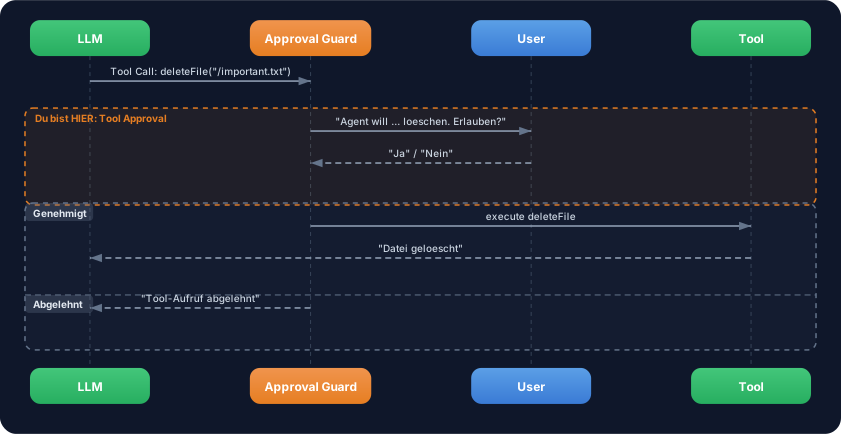
Between tool call and tool execution sits an approval guard. When a tool is marked as critical, the guard asks the user for permission before the tool is executed. This is human-in-the-loop — the human retains control over dangerous actions.
Without approval: The agent executes everything the LLM decides. Delete files, send emails, overwrite data — without asking. A mistake in the prompt or a hallucination can cause irreversible damage.
With approval: Critical operations are only executed after human approval. You define which tools are safe (execute automatically) and which are dangerous (ask first). The agent stays useful but controllable.
WALKTHROUGH
Section titled “WALKTHROUGH”Layer 1: Static approval with needsApproval: true
Section titled “Layer 1: Static approval with needsApproval: true”The simplest form: Every call to this tool requires approval:
import { tool } from 'ai';import { z } from 'zod';
const deleteFileTool = tool({  description: 'Delete a file from the filesystem',  inputSchema: z.object({    path: z.string().describe('The file path to delete'),  }),  needsApproval: true,                                   // ← Always requires approval  execute: async ({ path }) => {    // In production: fs.unlink(path)    return { deleted: path, status: 'success' };  },});
When needsApproval: true is set, execute is NOT called automatically. Instead, the caller (your code) must grant approval before execution takes place.
Layer 2: Dynamic approval
Section titled “Layer 2: Dynamic approval”Sometimes the approval logic should depend on context — e.g. only for certain paths or above a certain amount:
const deleteFileTool = tool({ description: 'Delete a file from the filesystem', inputSchema: z.object({ path: z.string().describe('The file path to delete'), }), needsApproval: async ({ path }) => { // ← Async function // Only require approval for critical directories return path.startsWith('/important/') || path.startsWith('/config/'); }, execute: async ({ path }) => { return { deleted: path, status: 'success' }; },});The needsApproval function receives the same parameters as execute. It returns true when approval is needed, and false when the tool can be executed directly.
Layer 3: Approval flow with generateText
Section titled “Layer 3: Approval flow with generateText”With generateText, the approval flow is controlled via the toolCallApproval option:
import { generateText, tool, stepCountIs } from 'ai';import { anthropic } from '@ai-sdk/anthropic';import { z } from 'zod';import * as readline from 'readline';                    // ← Node.js built-in, no installation needed
const readFileTool = tool({  description: 'Read a file from the filesystem',  inputSchema: z.object({    path: z.string().describe('The file path to read'),  }),  execute: async ({ path }) => ({    content: `Content of ${path}: Lorem ipsum...`,  }),});
const deleteFileTool = tool({  description: 'Delete a file from the filesystem',  inputSchema: z.object({    path: z.string().describe('The file path to delete'),  }),  needsApproval: true,  execute: async ({ path }) => ({    deleted: path, status: 'success',  }),});
// Helper function: Ask user in the terminalfunction askUser(question: string): Promise<boolean> {  const rl = readline.createInterface({    input: process.stdin,    output: process.stdout,  });  return new Promise((resolve) => {    rl.question(question, (answer) => {      rl.close();      resolve(answer.toLowerCase() === 'y' || answer.toLowerCase() === 'yes');    });  });}
const result = await generateText({  model: anthropic('claude-sonnet-4-5-20250514'),  tools: { readFile: readFileTool, deleteFile: deleteFileTool },  stopWhen: stepCountIs(5),  prompt: 'Read the file /tmp/test.txt and delete it afterwards.',  toolCallApproval: async ({ toolCall }) => {            // ← Approval handler    const approved = await askUser(      `Agent wants to execute ${toolCall.toolName}(${JSON.stringify(toolCall.args)}). Allow? (y/n): `    );    return approved ? 'approve' : 'reject';              // ← 'approve' or 'reject'  },});
console.log(result.text);
toolCallApproval is only called for tools with needsApproval. Tools without needsApproval continue to be executed automatically. The function must return 'approve' or 'reject'.
Layer 4: The dangerous/safe tool pattern
Section titled “Layer 4: The dangerous/safe tool pattern”A proven pattern: Separate tools into safe and dangerous categories:
import { tool } from 'ai';import { z } from 'zod';
// Safe tools — execute automaticallyconst searchTool = tool({  description: 'Search for information (read-only)',  inputSchema: z.object({    query: z.string().describe('Search query'),  }),  execute: async ({ query }) => ({    results: [`Result for "${query}"`],  }),});
const readFileTool = tool({  description: 'Read a file (read-only)',  inputSchema: z.object({    path: z.string().describe('File path'),  }),  execute: async ({ path }) => ({    content: `Content of ${path}`,  }),});
// Dangerous tools — always require approvalconst writeFileTool = tool({  description: 'Write content to a file (destructive)',  inputSchema: z.object({    path: z.string().describe('File path'),    content: z.string().describe('Content to write'),  }),  needsApproval: true,  execute: async ({ path, content }) => ({    written: path,    bytes: content.length,  }),});
const deleteFileTool = tool({  description: 'Delete a file (destructive, irreversible)',  inputSchema: z.object({    path: z.string().describe('File path'),  }),  needsApproval: true,  execute: async ({ path }) => ({    deleted: path,  }),});
// Use all tools together:const tools = {  search: searchTool,         // ← auto  readFile: readFileTool,     // ← auto  writeFile: writeFileTool,   // ← needs approval  deleteFile: deleteFileTool, // ← needs approval};
Rule of thumb: Read-only operations are safe. Anything that writes, deletes, or sends needs approval. When in doubt: add approval.
File: challenge-3-5.ts
Task: Build a file management toolset with a readFile (safe) and a deleteFile (with approval). Simulate the approval flow in the terminal.
import { generateText, tool, stepCountIs } from 'ai';import { anthropic } from '@ai-sdk/anthropic';import { z } from 'zod';import * as readline from 'readline';
// TODO 1: Define readFileTool (no approval needed)// - description: Read a file// - inputSchema: path (string)// - execute: Returns simulated content
// TODO 2: Define deleteFileTool (with needsApproval: true)// - description: Delete a file// - inputSchema: path (string)// - needsApproval: true// - execute: Returns deletion confirmation
// TODO 3: Create an askUser() helper function// - Asks for approval in the terminal// - Returns true/false
// TODO 4: Use generateText with toolCallApproval// - tools: { readFile, deleteFile }// - stopWhen: stepCountIs(5)// - toolCallApproval: Asks the user for critical tools// - prompt: 'Read /tmp/notes.txt and delete the file afterwards.'
// TODO 5: Log result.text and all tool calls
Checklist:
-
readFileTooldefined without approval -
deleteFileTooldefined withneedsApproval: true -
askUser()helper function implemented -
toolCallApprovalhandler returns'approve'or'reject' - On “No”: Tool is not executed, agent reacts accordingly
Show solution
import { generateText, tool, stepCountIs } from 'ai';import { anthropic } from '@ai-sdk/anthropic';import { z } from 'zod';import * as readline from 'readline';
const readFileTool = tool({  description: 'Read a file from the filesystem (safe, read-only)',  inputSchema: z.object({    path: z.string().describe('The file path to read'),  }),  execute: async ({ path }) => ({    path,    content: `Content of ${path}: These are important notes.`,    size: 42,  }),});
const deleteFileTool = tool({  description: 'Delete a file from the filesystem (destructive, irreversible)',  inputSchema: z.object({    path: z.string().describe('The file path to delete'),  }),  needsApproval: true,  execute: async ({ path }) => ({    deleted: path,    status: 'success',  }),});
function askUser(question: string): Promise<boolean> {  const rl = readline.createInterface({    input: process.stdin,    output: process.stdout,  });  return new Promise((resolve) => {    rl.question(question, (answer) => {      rl.close();      resolve(answer.toLowerCase() === 'y' || answer.toLowerCase() === 'yes');    });  });}
const { text, steps } = await generateText({  model: anthropic('claude-sonnet-4-5-20250514'),  tools: { readFile: readFileTool, deleteFile: deleteFileTool },  stopWhen: stepCountIs(5),  prompt: 'Read the file /tmp/notes.txt and delete it afterwards.',  toolCallApproval: async ({ toolCall }) => {    console.log(`\n--- Approval Request ---`);    console.log(`Tool: ${toolCall.toolName}`);    console.log(`Parameters: ${JSON.stringify(toolCall.args)}`);    const approved = await askUser('Execute? (y/n): ');    console.log(approved ? 'Approved.' : 'Rejected.');    return approved ? 'approve' : 'reject';  },});
const allToolCalls = steps.flatMap(s => s.toolCalls);console.log('\n=== Result ===');console.log(`Steps: ${steps.length}`);console.log(`Tool Calls: ${allToolCalls.length}`);for (const call of allToolCalls) {  console.log(`  - ${call.toolName}(${JSON.stringify(call.args)})`);}console.log(`\nAnswer: ${text}`);
Explanation: The agent first reads /tmp/notes.txt (automatically, no approval needed) and then tries to delete the file. On the deleteFile call the approval guard kicks in: The user is asked in the terminal. On “y” the file is deleted, on “n” the LLM receives the rejection and reacts accordingly — e.g. with “The file was not deleted because the action was rejected.”
Run: npx tsx challenge-3-5.ts
Expected output (approximate):
--- Approval Request ---Tool: deleteFileParameters: {"path":"/tmp/notes.txt"}Execute? (y/n): yApproved.
=== Result ===Steps: 2Tool Calls: 2  - readFile({"path":"/tmp/notes.txt"})  - deleteFile({"path":"/tmp/notes.txt"})
Answer: The file /tmp/notes.txt was read and then deleted.
COMBINE
Section titled “COMBINE”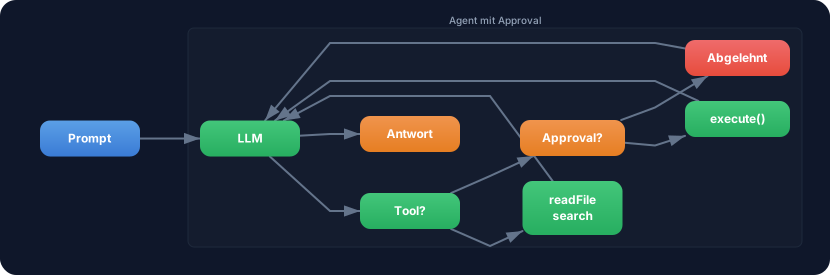
Exercise: Extend the research agent from Challenge 3.3 with an approval step for saving results.
- Take the agent from Challenge 3.3 with
searchToolandsummarizeTool - Add a
saveResultsToolwithneedsApproval: true - Prompt: “Research TypeScript, summarize it, and save the results to /tmp/research.txt.”
- The agent should first research and summarize (automatically), then ask before saving
- Log whether the user approved or rejected the save
Optional Stretch Goal: Implement dynamic approval: needsApproval as a function that only requires approval for paths outside of /tmp/. Test with different paths.