Challenge 3.4: MCP
How do you connect your LLM to external services — without building a custom integration for each one? What if there were a standardized protocol that every tool server speaks?
OVERVIEW
Section titled “OVERVIEW”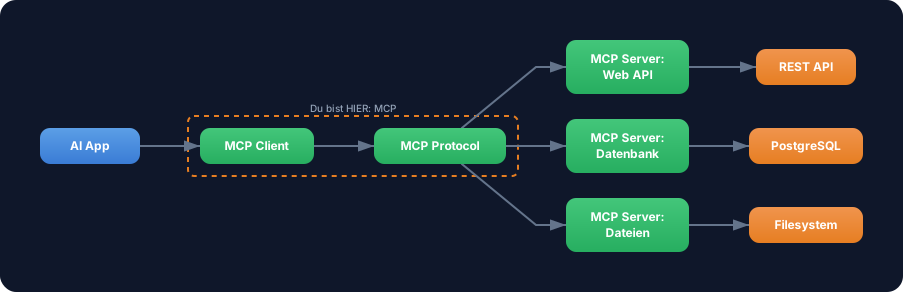
MCP (Model Context Protocol) is an open protocol that standardizes communication between AI applications and tool servers. An MCP client in your app connects to any number of MCP servers — each server provides tools that your LLM can use.
Without MCP: For each external service you build a custom integration. Custom tool() definition, custom API binding, custom error handling. With 10 services you have 10 different integrations to maintain. Not standardized, not interchangeable.
With MCP: One protocol for all tools. You connect to an MCP server and automatically get all its tools — with descriptions, schemas, ready to use. Switch servers? Change transport? A configuration change, not a code rewrite.
WALKTHROUGH
Section titled “WALKTHROUGH”Setup for this challenge
Section titled “Setup for this challenge”MCP requires two additional packages:
npm install @ai-sdk/mcp @modelcontextprotocol/sdkLayer 1: Creating an MCP client
Section titled “Layer 1: Creating an MCP client”The MCP client is the bridge between your app and an MCP server. You create it with createMCPClient:
import { createMCPClient } from '@ai-sdk/mcp';
const client = await createMCPClient({  transport: {    type: 'http',                                        // ← Transport type    url: 'https://my-mcp-server.com/mcp',               // ← Server URL  },});
createMCPClient is async — it establishes the connection to the server and negotiates capabilities. The client then knows which tools the server offers.
Layer 2: Transport options
Section titled “Layer 2: Transport options”MCP supports different transports for different scenarios:
| Transport | Use case | Example |
|---|---|---|
| HTTP (Streamable) | Remote server, production | Cloud-hosted MCP server |
| SSE | Alternative to HTTP | Server-Sent Events based |
| stdio | Local server, development | Local process (Node.js, Python) |
HTTP — for remote servers in production:
const client = await createMCPClient({ transport: { type: 'http', url: 'https://my-mcp-server.com/mcp', headers: { // ← Optional: Auth headers Authorization: 'Bearer my-api-key', }, },});stdio — for local servers during development:
import { StdioClientTransport } from '@modelcontextprotocol/sdk/client/stdio.js';
const client = await createMCPClient({  transport: new StdioClientTransport({    command: 'node',                                     // ← Command to start the server    args: ['my-mcp-server.js'],                          // ← Arguments  }),});
stdio starts the MCP server as a local child process. Communication runs over stdin/stdout. Ideal for development and testing.
Layer 3: Loading and using MCP tools
Section titled “Layer 3: Loading and using MCP tools”client.tools() returns all tools from the server as an object — ready for generateText:
import { createMCPClient } from '@ai-sdk/mcp';import { generateText } from 'ai';import { anthropic } from '@ai-sdk/anthropic';
const client = await createMCPClient({  transport: {    type: 'http',    url: 'https://my-mcp-server.com/mcp',  },});
// Load all tools from the serverconst tools = await client.tools();                      // ← Returns { toolName: tool, ... }
console.log('Available tools:', Object.keys(tools));
// Use tools directly with generateTextconst result = await generateText({  model: anthropic('claude-sonnet-4-5-20250514'),  tools,                                                 // ← Use MCP tools like local tools  prompt: 'What is the weather in Berlin?',});
console.log(result.text);
// Important: Close the client when doneawait client.close();
client.tools() returns an object that has exactly the format generateText expects. You can also mix MCP tools and local tools:
const mcpTools = await client.tools();const allTools = { ...mcpTools, // ← MCP tools calculator: calculatorTool, // ← Local tool};Layer 4: Typed tools with schemas
Section titled “Layer 4: Typed tools with schemas”By default MCP tools are untyped — the schemas come from the server. But you can specify your own Zod schemas for full TypeScript type safety:
import { z } from 'zod';
const tools = await client.tools({  schemas: {    'get-weather': {                                     // ← Tool name from the server      inputSchema: z.object({        location: z.string(),      }),      outputSchema: z.object({                           // ← Optional: Typed output        temperature: z.number(),        condition: z.string(),      }),    },  },});
// Now input and output are typed
The schemas don’t override the server schemas — they add TypeScript types. If the server has a different schema, you’ll get a runtime error.
Layer 5: Client lifecycle
Section titled “Layer 5: Client lifecycle”The MCP client holds an open connection. You must close it when done:
const client = await createMCPClient({  transport: { type: 'http', url: 'https://server.com/mcp' },});
try {  const tools = await client.tools();  const result = await generateText({    model: anthropic('claude-sonnet-4-5-20250514'),    tools,    prompt: 'Hello!',  });  console.log(result.text);} finally {  await client.close();                                  // ← Always close!}
Alternatively in onFinish when streaming:
const result = streamText({ model: anthropic('claude-sonnet-4-5-20250514'), tools: await client.tools(), prompt: 'Hello!', onFinish: async () => { await client.close(); // ← Close after stream ends },});File: challenge-3-4.ts
Task: Create an MCP client with stdio transport, load the available tools, and use them with generateText.
import { createMCPClient } from '@ai-sdk/mcp';import { StdioClientTransport } from '@modelcontextprotocol/sdk/client/stdio.js';import { generateText } from 'ai';import { anthropic } from '@ai-sdk/anthropic';
// TODO 1: Create an MCP client with stdio transport// - command: 'npx'// - args: ['-y', '@modelcontextprotocol/server-everything']//   (a demo server that provides various test tools)
// TODO 2: Load the available tools with client.tools()// TODO 3: Log the tool names: Object.keys(tools)
// TODO 4: Use the tools with generateText// - model: anthropic('claude-sonnet-4-5-20250514')// - tools: the loaded MCP tools// - prompt: A question that fits the available tools
// TODO 5: Log result.text and result.toolCalls// TODO 6: Close the client with client.close()
Checklist:
- MCP client created with stdio transport
-
client.tools()called - Available tool names logged
- Tools used with
generateText - Client closed at the end
Show solution
import { createMCPClient } from '@ai-sdk/mcp';import { StdioClientTransport } from '@modelcontextprotocol/sdk/client/stdio.js';import { generateText } from 'ai';import { anthropic } from '@ai-sdk/anthropic';
const client = await createMCPClient({  transport: new StdioClientTransport({    command: 'npx',    args: ['-y', '@modelcontextprotocol/server-everything'],  }),});
try {  const tools = await client.tools();  console.log('Available tools:', Object.keys(tools));
  const result = await generateText({    model: anthropic('claude-sonnet-4-5-20250514'),    tools,    prompt: 'Use the echo tool to say "Hello from MCP!"',  });
  console.log('\nAnswer:', result.text);  console.log('Tool Calls:', result.toolCalls);} finally {  await client.close();}
Explanation: The @modelcontextprotocol/server-everything is an official demo server that provides various test tools (echo, add, etc.). The stdio transport starts it as a local child process. client.tools() automatically loads all available tools with their descriptions and schemas. After use, the client — and thus the child process — is cleanly shut down.
Note:
npx -ydownloads and starts the demo server automatically — you don’t need to install it first.
Run: npx tsx challenge-3-4.ts
Expected output (approximate):
Available tools: [ 'echo', 'add', 'longRunningOperation', ... ]
Answer: Hello from MCP!Tool Calls: [{ toolName: 'echo', args: { message: 'Hello from MCP!' } }]
COMBINE
Section titled “COMBINE”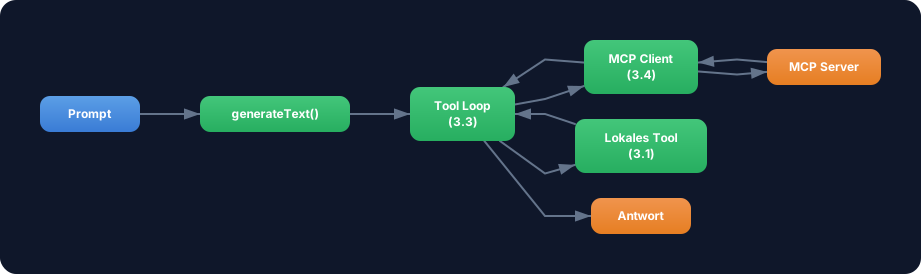
Exercise: Combine MCP tools with the agentic loop from Challenge 3.3. Use MCP tools as part of a multi-step agent.
- Create an MCP client (stdio with the demo server)
- Load the MCP tools
- Add a local
calculatorTool(from Challenge 3.1) - Use
generateTextwithstopWhen: stepCountIs(3)and all tools - Prompt: “Use the echo tool to repeat ‘Hello’, then calculate 42 * 17.”
- Log the agent trace: Which tools (MCP vs. local) were used in which step?
- Close the client at the end
Optional Stretch Goal: Create two MCP clients (e.g. two different servers or the same server twice) and merge their tools into a single tool object. Test whether the agent can use tools from both servers.