Challenge 3.3: Tool Loop Agent
What if an LLM needs to call multiple tools in sequence to solve a task — e.g. first search, then summarize, then calculate?
OVERVIEW
Section titled “OVERVIEW”
This is the agentic loop: The LLM generates → checks if it needs a tool → executes the tool → sends the result back → generates again. This repeats until the LLM has a final answer or a limit is reached.
Without loop: Only a single tool call per request. The LLM can answer a question that needs one tool, but not complex tasks that require multiple steps. “Research X, summarize it and calculate Y” — impossible in a single step.
With loop: Autonomous multi-step agents. The LLM decides on its own which tool it needs next, how many times it iterates, and when it’s done. It can use intermediate results to plan the next step.
WALKTHROUGH
Section titled “WALKTHROUGH”Layer 1: Multi-step tool calls with stopWhen
Section titled “Layer 1: Multi-step tool calls with stopWhen”The key to the agentic loop is stopWhen: stepCountIs(n). This allows the LLM to take up to n steps — each step can contain one or more tool calls:
import { generateText, tool, stepCountIs } from 'ai';import { anthropic } from '@ai-sdk/anthropic';import { z } from 'zod';
const searchTool = tool({  description: 'Search for information on a topic',  inputSchema: z.object({    query: z.string().describe('The search query'),  }),  execute: async ({ query }) => ({    results: [`Result 1 for "${query}"`, `Result 2 for "${query}"`],  }),});
const result = await generateText({  model: anthropic('claude-sonnet-4-5-20250514'),  tools: { search: searchTool },  stopWhen: stepCountIs(5),                              // ← Max 5 steps  prompt: 'Research the history of the Rust programming language.',});
console.log(result.text);                                // ← Final answer after all steps
Without stopWhen, generateText performs only a single tool call. With stopWhen: stepCountIs(5) the LLM may take up to 5 steps — it decides on its own when it has enough information and generates a final answer.
What is a step? A step = one LLM call. Each step can contain multiple tool calls (when the LLM calls tools in parallel). After each step, the tool results are returned, and the LLM decides whether it needs another step.
Layer 2: Evaluating steps
Section titled “Layer 2: Evaluating steps”Each step in the loop is stored in the steps array. This lets you trace what the agent did:
const { text, steps } = await generateText({  model: anthropic('claude-sonnet-4-5-20250514'),  tools: { search: searchTool },  stopWhen: stepCountIs(5),  prompt: 'Research the history of Rust.',});
// Extract all tool calls across all stepsconst allToolCalls = steps.flatMap(step => step.toolCalls);
console.log(`Agent took ${steps.length} steps`);console.log(`Total ${allToolCalls.length} tool calls:`);
for (const call of allToolCalls) {  console.log(`  - ${call.toolName}(${JSON.stringify(call.args)})`);}
// Token usage across all stepsconst totalTokens = steps.reduce(  (sum, step) => sum + step.usage.totalTokens, 0);console.log(`Total tokens: ${totalTokens}`);
steps.flatMap(s => s.toolCalls) is the key pattern: It collects all tool calls from all steps into a flat array. The same works for toolResults.
Layer 3: Multiple tools in the loop
Section titled “Layer 3: Multiple tools in the loop”The true power of the agentic loop shows with multiple tools. The LLM picks the right tool for each step:
import { generateText, tool, stepCountIs } from 'ai';import { anthropic } from '@ai-sdk/anthropic';import { z } from 'zod';
const searchTool = tool({  description: 'Search for information on a topic',  inputSchema: z.object({    query: z.string().describe('The search query'),  }),  execute: async ({ query }) => ({    results: [`Info on "${query}": Rust was introduced by Mozilla in 2010.`],  }),});
const summarizeTool = tool({  description: 'Summarize a text into key points',  inputSchema: z.object({    text: z.string().describe('The text to summarize'),  }),  execute: async ({ text }) => ({    summary: `Summary: ${text.slice(0, 100)}...`,    keyPoints: ['Point 1', 'Point 2'],  }),});
const calculatorTool = tool({  description: 'Perform a math calculation with two numbers',  inputSchema: z.object({    operation: z.enum(['add', 'subtract', 'multiply']).describe('The math operation'),    a: z.number().describe('First number'),    b: z.number().describe('Second number'),  }),  execute: async ({ operation, a, b }) => {    const ops = { add: a + b, subtract: a - b, multiply: a * b };    return { operation, a, b, result: ops[operation] };  // ← Safe, no eval()  },});
const { text, steps } = await generateText({  model: anthropic('claude-sonnet-4-5-20250514'),  tools: { search: searchTool, summarize: summarizeTool, calculator: calculatorTool },  stopWhen: stepCountIs(5),  prompt: 'How long has Rust existed? How many years ago is that? Summarize the history.',});
console.log('Final answer:', text);console.log(`\nAgent trace (${steps.length} steps):`);for (const [i, step] of steps.entries()) {  const tools = step.toolCalls.map(tc => tc.toolName).join(', ');  console.log(`  Step ${i + 1}: ${tools || 'Final answer'}`);}
The LLM might proceed like this: Step 1 → search("Rust history") → Step 2 → calculator({ operation: 'subtract', a: 2026, b: 2010 }) → Step 3 → summarize(...) → Step 4 → Final answer. The order is decided autonomously by the LLM.
Layer 4: onStepFinish callback
Section titled “Layer 4: onStepFinish callback”With onStepFinish you get a callback after each step. Ideal for real-time monitoring:
const { text, steps } = await generateText({ model: anthropic('claude-sonnet-4-5-20250514'), tools: { search: searchTool, summarize: summarizeTool }, stopWhen: stepCountIs(5), prompt: 'Research and summarize: What is WebAssembly?', onStepFinish({ stepNumber, text, toolCalls, usage }) { console.log(`--- Step ${stepNumber} completed ---`); if (toolCalls.length > 0) { console.log(` Tools: ${toolCalls.map(tc => tc.toolName).join(', ')}`); } if (text) { console.log(` Text: ${text.slice(0, 80)}...`); } console.log(` Tokens: ${usage.totalTokens}`); },});onStepFinish is called after every step — regardless of whether the step contained a tool call or text. This gives you live feedback on the agent’s progress.
File: challenge-3-3.ts
Task: Build a research agent with search and summarize tools. The agent should research and summarize in up to 3 steps.
import { generateText, tool, stepCountIs } from 'ai';import { anthropic } from '@ai-sdk/anthropic';import { z } from 'zod';
// TODO 1: Define a searchTool// - description: Searches for information// - inputSchema: query (string)// - execute: Returns simulated search results
// TODO 2: Define a summarizeTool// - description: Summarizes text// - inputSchema: text (string)// - execute: Returns a simulated summary
// TODO 3: Use generateText with:// - Both tools// - stopWhen: stepCountIs(3)// - onStepFinish: Log each step// - prompt: 'Research what TypeScript is and summarize it.'
// TODO 4: Log:// - result.text (final answer)// - Number of steps// - All tool calls across all steps
Checklist:
- Two tools defined (search + summarize)
-
stopWhen: stepCountIs(3)set -
onStepFinishcallback implemented -
steps.flatMap(s => s.toolCalls)for all tool calls - Agent uses both tools autonomously
Show solution
import { generateText, tool, stepCountIs } from 'ai';import { anthropic } from '@ai-sdk/anthropic';import { z } from 'zod';
const searchTool = tool({  description: 'Search for information on a topic',  inputSchema: z.object({    query: z.string().describe('The search query'),  }),  execute: async ({ query }) => ({    results: [      `TypeScript is a programming language developed by Microsoft.`,      `TypeScript extends JavaScript with static types.`,      `TypeScript was released in 2012 and is actively maintained.`,    ],    source: `search: "${query}"`,  }),});
const summarizeTool = tool({  description: 'Summarize collected information into key points',  inputSchema: z.object({    text: z.string().describe('The text to summarize'),  }),  execute: async ({ text }) => ({    summary: `Summary of ${text.length} characters`,    keyPoints: [      'Microsoft development since 2012',      'Static types for JavaScript',      'Active development',    ],  }),});
const { text, steps } = await generateText({  model: anthropic('claude-sonnet-4-5-20250514'),  tools: { search: searchTool, summarize: summarizeTool },  stopWhen: stepCountIs(3),  prompt: 'Research what TypeScript is and summarize it.',  onStepFinish({ stepNumber, toolCalls, usage }) {    console.log(`--- Step ${stepNumber} ---`);    if (toolCalls.length > 0) {      console.log(`  Tools: ${toolCalls.map(tc => tc.toolName).join(', ')}`);    } else {      console.log(`  Final answer generated`);    }    console.log(`  Tokens: ${usage.totalTokens}`);  },});
const allToolCalls = steps.flatMap(step => step.toolCalls);
console.log('\n=== Result ===');console.log(`Steps: ${steps.length}`);console.log(`Tool Calls: ${allToolCalls.length}`);for (const call of allToolCalls) {  console.log(`  - ${call.toolName}(${JSON.stringify(call.args).slice(0, 60)}...)`);}console.log(`\nAnswer:\n${text}`);
Explanation: The agent runs through the agentic loop: Step 1 → call search → receive search results → Step 2 → summarize with the results → receive summary → Step 3 → formulate final answer. The LLM decides the order autonomously.
Run: npx tsx challenge-3-3.ts
Expected output (approximate):
--- Step 1 ---  Tools: search  Tokens: ~200--- Step 2 ---  Tools: summarize  Tokens: ~250--- Step 3 ---  Final answer generated  Tokens: ~300
=== Result ===Steps: 3Tool Calls: 2  - search({"query":"TypeScript"})  - summarize({"text":"TypeScript is..."})
Answer:TypeScript is a programming language developed by Microsoft...
COMBINE
Section titled “COMBINE”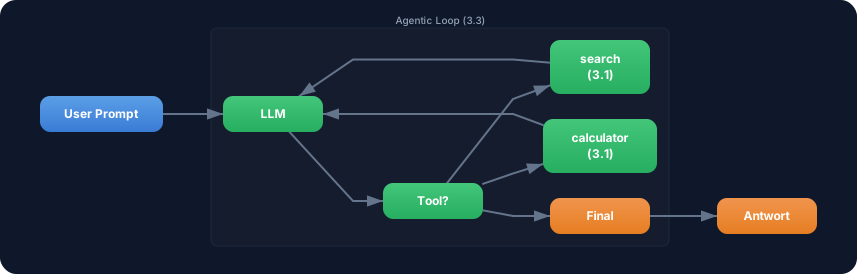
Exercise: Extend the research agent with the calculator tool from Challenge 3.1. The agent should be able to both research and calculate.
- Take the
searchToolandsummarizeToolfrom above - Add the
calculatorToolfrom Challenge 3.1 - Set
stopWhen: stepCountIs(5)for more steps - Prompt: “Research when TypeScript was released. Calculate how many years ago that was. Summarize everything.”
- Log the complete agent trace: Which tool was used in which step?
Optional Stretch Goal: Add onStepFinish and calculate the cumulative token usage across all steps. Show after each step: “Step X: Y tokens (total: Z tokens).”