Challenge 3.2: Tools in the Frontend
When an LLM calls a tool — how do you show that to the user in the UI? Does the user only see the final answer, or also what’s happening in between?
OVERVIEW
Section titled “OVERVIEW”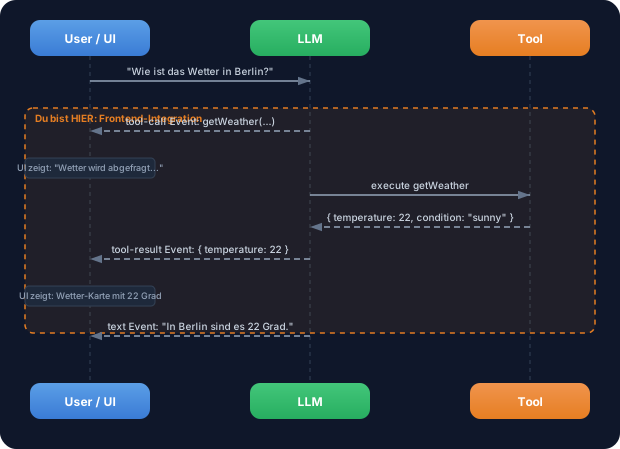
When streaming, you don’t just get text events — you also get tool-call and tool-result events. You can use these in the frontend to display loading states, tool-specific UIs, and transparent intermediate steps.
Without frontend integration: The user sees a long pause, then the final answer. They don’t know what the LLM is doing. No feedback, no transparency, no trust.
With frontend integration: The user sees in real time: “Fetching weather…”, then a weather card, then the final answer. Transparency builds trust. Loading states bridge wait times. Tool-specific UIs (cards, charts, tables) make results tangible.
WALKTHROUGH
Section titled “WALKTHROUGH”Layer 1: Message Parts — the building blocks of a message
Section titled “Layer 1: Message Parts — the building blocks of a message”An LLM response doesn’t always consist of just text. When tools are involved, a message consists of multiple parts:
// A message can have multiple parts:const messageParts = [ { type: 'text', text: 'Let me check the weather...' }, // ← Text part { type: 'tool-call', toolCallId: 'tc_1', toolName: 'weather', // ← Tool call part args: { location: 'Berlin' } }, { type: 'tool-result', toolCallId: 'tc_1', toolName: 'weather', // ← Tool result part result: { temperature: 22, condition: 'sunny' } }, { type: 'text', text: 'In Berlin it\'s 22 degrees and sunny.' }, // ← Final text];Each message is an array of parts. The LLM can mix text and tool calls in any order. The toolCallId connects a tool-call with its tool-result.
Layer 2: Tool events in the stream
Section titled “Layer 2: Tool events in the stream”When you use streamText with tools, you get specific events via fullStream:
import { streamText, tool } from 'ai';import { anthropic } from '@ai-sdk/anthropic';import { z } from 'zod';
const weatherTool = tool({  description: 'Get the weather in a location',  inputSchema: z.object({    location: z.string().describe('The city name'),  }),  execute: async ({ location }) => ({    location, temperature: 22, condition: 'sunny',  }),});
const result = streamText({  model: anthropic('claude-sonnet-4-5-20250514'),  tools: { weather: weatherTool },  prompt: 'What is the weather in Berlin?',});
for await (const part of result.fullStream) {  switch (part.type) {    case 'text-delta':                                   // ← Text chunk      process.stdout.write(part.textDelta);      break;    case 'tool-call':                                    // ← LLM wants to call a tool      console.log(`\n[Tool Call] ${part.toolName}(${JSON.stringify(part.args)})`);      break;    case 'tool-result':                                  // ← Tool result is available      console.log(`[Tool Result] ${JSON.stringify(part.result)}`);      break;    case 'finish':      console.log(`\n[Done] Tokens: ${part.usage.totalTokens}`);      break;  }}
The event order is always: tool-call → (tool is executed) → tool-result → then more text or further tool calls.
Layer 3: Tool-call vs. tool-result state
Section titled “Layer 3: Tool-call vs. tool-result state”Between tool-call and tool-result lies the execution time of the tool. During this phase you can show a loading state:
// Pseudo-code for UI rendering:for await (const part of result.fullStream) { switch (part.type) { case 'tool-call': // Show loading state console.log(`⏳ ${part.toolName} is executing...`); console.log(` Parameters: ${JSON.stringify(part.args)}`); break; case 'tool-result': // Replace loading state with result console.log(`✓ ${part.toolName} completed`); console.log(` Result: ${JSON.stringify(part.result)}`); break; }}In a real frontend (React, Next.js) you’d trigger a state change here: A spinner gets replaced by a result component. In the terminal we show this with formatted output.
Layer 4: Rendering multiple parts
Section titled “Layer 4: Rendering multiple parts”A complete rendering logic must handle all part types. Here’s an example that formats text, tool calls and tool results:
import { streamText, tool } from 'ai';import { anthropic } from '@ai-sdk/anthropic';import { z } from 'zod';
const weatherTool = tool({  description: 'Get the weather in a location',  inputSchema: z.object({    location: z.string().describe('The city name'),  }),  execute: async ({ location }) => ({    location, temperature: 22, condition: 'sunny',  }),});
const result = streamText({  model: anthropic('claude-sonnet-4-5-20250514'),  tools: { weather: weatherTool },  prompt: 'What is the weather in Berlin and Munich?',});
const toolStates = new Map<string, string>();             // ← Tracks tool status
for await (const part of result.fullStream) {  switch (part.type) {    case 'text-delta':      process.stdout.write(part.textDelta);      break;    case 'tool-call':      toolStates.set(part.toolCallId, 'running');      console.log(`\n┌─ Tool: ${part.toolName}`);      console.log(`│  Args: ${JSON.stringify(part.args)}`);      console.log(`│  Status: executing...`);      break;    case 'tool-result':      toolStates.set(part.toolCallId, 'done');      console.log(`│  Result: ${JSON.stringify(part.result)}`);      console.log(`└─ Completed`);      break;    case 'finish':      console.log(`\n--- ${toolStates.size} tool(s) executed ---`);      console.log(`Tokens: ${part.usage.totalTokens}`);      break;  }}
The Map tracks the status of each tool call via its toolCallId. In a real frontend this would be a React state that updates the UI.
File: challenge-3-2.ts
Task: Use fullStream with a tool and format all events in the terminal — text, tool calls, and tool results separately.
import { streamText, tool } from 'ai';import { anthropic } from '@ai-sdk/anthropic';import { z } from 'zod';
// Tool is provided:const weatherTool = tool({  description: 'Get the weather in a location',  inputSchema: z.object({    location: z.string().describe('The city name'),  }),  execute: async ({ location }) => ({    location,    temperature: Math.floor(Math.random() * 30),    condition: ['sunny', 'cloudy', 'rainy'][Math.floor(Math.random() * 3)],  }),});
// TODO 1: Call streamText with the weatherTool// TODO 2: Iterate over result.fullStream// TODO 3: Handle these event types://   - 'text-delta': Write text to the terminal//   - 'tool-call': Display tool name and parameters//   - 'tool-result': Display result in formatted form//   - 'finish': Display token usage
Checklist:
-
streamTextcalled with tool -
fullStreamconsumed withfor await -
text-deltaevents output as text -
tool-callevents displayed with tool name and args -
tool-resultevents displayed with formatted result -
finishevent logged with token usage
Show solution
import { streamText, tool } from 'ai';import { anthropic } from '@ai-sdk/anthropic';import { z } from 'zod';
const weatherTool = tool({  description: 'Get the weather in a location',  inputSchema: z.object({    location: z.string().describe('The city name'),  }),  execute: async ({ location }) => ({    location,    temperature: Math.floor(Math.random() * 30),    condition: ['sunny', 'cloudy', 'rainy'][Math.floor(Math.random() * 3)],  }),});
const result = streamText({  model: anthropic('claude-sonnet-4-5-20250514'),  tools: { weather: weatherTool },  prompt: 'What is the weather in Berlin and Munich?',});
for await (const part of result.fullStream) {  switch (part.type) {    case 'text-delta':      process.stdout.write(part.textDelta);      break;    case 'tool-call':      console.log(`\n[TOOL CALL] ${part.toolName}`);      console.log(`  Parameters: ${JSON.stringify(part.args, null, 2)}`);      break;    case 'tool-result':      console.log(`[TOOL RESULT] ${part.toolName}`);      console.log(`  Result: ${JSON.stringify(part.result, null, 2)}`);      break;    case 'finish':      console.log(`\n\n--- Stream finished ---`);      console.log(`Tokens: ${part.usage.totalTokens}`);      console.log(`Finish Reason: ${part.finishReason}`);      break;  }}
Explanation: The LLM calls weather for “Berlin” and “Munich” — possibly in separate tool calls. Each call first produces a tool-call event (with args), then after execution a tool-result event (with result). At the end comes text that summarizes both results.
Run: npx tsx challenge-3-2.ts
Expected output (approximate):
[TOOL CALL] weather  Parameters: { "location": "Berlin" }[TOOL RESULT] weather  Result: { "location": "Berlin", "temperature": 18, "condition": "sunny" }
[TOOL CALL] weather  Parameters: { "location": "Munich" }[TOOL RESULT] weather  Result: { "location": "Munich", "temperature": 12, "condition": "cloudy" }
It's 18 degrees and sunny in Berlin, and 12 degrees and cloudy in Munich.
--- Stream finished ---Tokens: ~350Finish Reason: stop
COMBINE
Section titled “COMBINE”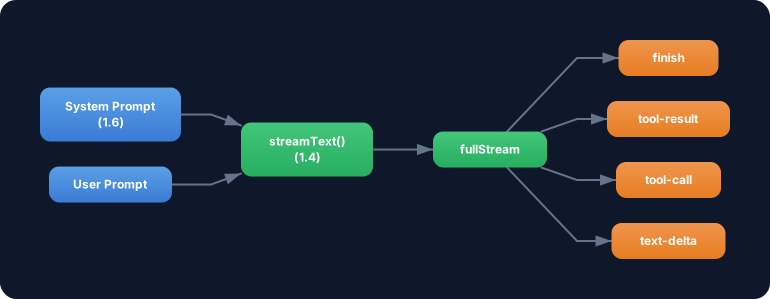
Exercise: Combine the tool event rendering with streamText from Challenge 1.4. Build a formatted terminal output that visually distinguishes text and tool events.
- Use the
weatherTooland acalculatorTool(from Challenge 3.1) together - Ask a question that requires both tools: “What is the weather in Berlin? And convert the temperature from Celsius to Fahrenheit (formula: C * 9/5 + 32).”
- Format the output so that tool calls and tool results are visually highlighted (e.g. with a
[TOOL]prefix) - Show a summary at the end: How many tools were called, how many tokens consumed?
Optional Stretch Goal: Build a renderToolResult(toolName, result) helper that outputs different formats for different tools — e.g. a weather display for weather and a calculation for calculator.