Challenge 3.1: Tool Calling
What if an LLM could not only generate text, but also perform actions — e.g. check the weather, run a calculation, or query a database?
OVERVIEW
Section titled “OVERVIEW”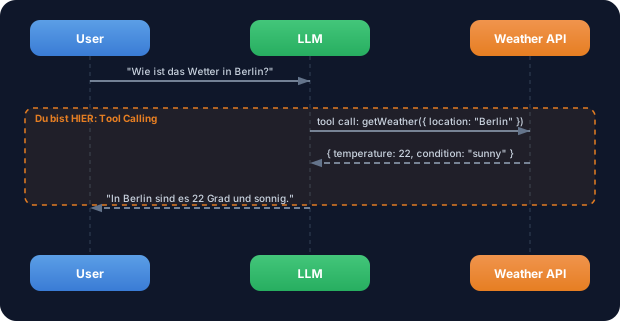
The LLM recognizes that it can’t answer the weather question from its own knowledge. It generates a tool call — a structured request to a function. The function is executed, the result goes back to the LLM, and the LLM formulates a natural response from it.
Without tools: The LLM can only talk, not act. It has no current knowledge, can’t compute, can’t access databases. Every question about current data gets answered with a hallucination or “I don’t know.”
With tools: The LLM becomes an agent. It recognizes which function it needs, calls it with the right parameters, and processes the result. It can now check weather, compute, read files — anything you define a tool for.
WALKTHROUGH
Section titled “WALKTHROUGH”Layer 1: Defining a tool with tool()
Section titled “Layer 1: Defining a tool with tool()”A tool has three parts: a description (so the LLM knows when to use the tool), an input schema (so the LLM knows which parameters to send), and an execute function (which does the actual work):
import { tool } from 'ai';import { z } from 'zod';
const weatherTool = tool({  description: 'Get the weather in a location',          // ← When should the LLM use this tool?  inputSchema: z.object({                                 // ← What parameters does it need?    location: z.string().describe('The city name'),       // ← .describe() helps the LLM  }),  execute: async ({ location }) => ({                     // ← What happens on invocation?    location,    temperature: 22,    condition: 'sunny',  }),});
Three critical details:
descriptioninfluences whether the LLM picks the tool. The more precise, the better..describe()on Zod fields explains to the LLM what the parameter means.executeis async — you can run real API calls, database queries, or any code.
Layer 2: Using a tool with generateText
Section titled “Layer 2: Using a tool with generateText”Tools are passed as an object to generateText. The keys are the tool names the LLM sees:
import { generateText } from 'ai';import { anthropic } from '@ai-sdk/anthropic';
const result = await generateText({  model: anthropic('claude-sonnet-4-5-20250514'),  tools: {                                                // ← Tools as an object    weather: weatherTool,                                 // ← Key = tool name for the LLM  },  prompt: 'What is the weather in Berlin?',});
console.log(result.text);// → "It's currently 22 degrees and sunny in Berlin."
The LLM decides on its own whether to use a tool. For the question “What’s the weather?” it recognizes that it needs to call weather. For “What is TypeScript?” it would answer directly.
Layer 3: Tool Choice — controlling tool usage
Section titled “Layer 3: Tool Choice — controlling tool usage”With toolChoice you control how the LLM handles tools:
const result = await generateText({ model: anthropic('claude-sonnet-4-5-20250514'), tools: { weather: weatherTool }, toolChoice: 'auto', // ← LLM decides (default) prompt: 'What is the weather in Berlin?',});| toolChoice | Behavior |
|---|---|
'auto' | LLM decides on its own whether a tool is needed (default) |
'required' | LLM MUST use at least one tool |
'none' | No tools — LLM responds with text only |
{ type: 'tool', toolName: 'weather' } | Forces a specific tool |
Layer 4: Tool calls and tool results in the result
Section titled “Layer 4: Tool calls and tool results in the result”After execution you’ll find all tool calls and their results in the result object:
const result = await generateText({  model: anthropic('claude-sonnet-4-5-20250514'),  tools: { weather: weatherTool },  prompt: 'What is the weather in Berlin?',});
// Tool calls from the last stepfor (const toolCall of result.toolCalls) {  console.log('Tool:', toolCall.toolName);                // → "weather"  console.log('Args:', toolCall.args);                    // → { location: "Berlin" }}
// Tool results from the last stepfor (const toolResult of result.toolResults) {  console.log('Result:', toolResult.result);              // → { location: "Berlin", temperature: 22, ... }}
result.toolCalls and result.toolResults contain the data from the last step. For multi-step scenarios (coming in Challenge 3.3) you’ll use result.steps.
File: challenge-3-1.ts
Task: Build a calculator tool with three operations (add, subtract, multiply) and use it with generateText.
import { generateText, tool } from 'ai';import { anthropic } from '@ai-sdk/anthropic';import { z } from 'zod';
// TODO 1: Define a calculator tool// - description: A description telling the LLM when to use the calculator// - inputSchema with://   - operation: z.enum(['add', 'subtract', 'multiply']).describe(...)//   - a: z.number().describe('First number')//   - b: z.number().describe('Second number')// - execute: Performs the calculation and returns the result
// TODO 2: Use the tool with generateText// - model: anthropic('claude-sonnet-4-5-20250514')// - tools: { calculator: calculatorTool }// - prompt: 'What is 42 times 17?'
// TODO 3: Log result.text, result.toolCalls and result.toolResults
Checklist:
- Calculator tool defined with
tool() - Zod schema with
operation,aandb— all with.describe() -
executeperforms the correct operation (switch/case or if/else) - Tool integrated with
generateText -
result.textshows the LLM’s natural response -
result.toolCallsshows the tool invocation
Show solution
import { generateText, tool } from 'ai';import { anthropic } from '@ai-sdk/anthropic';import { z } from 'zod';
const calculatorTool = tool({  description: 'Perform a math calculation with two numbers',  inputSchema: z.object({    operation: z.enum(['add', 'subtract', 'multiply']).describe('The math operation to perform'),    a: z.number().describe('The first number'),    b: z.number().describe('The second number'),  }),  execute: async ({ operation, a, b }) => {    switch (operation) {      case 'add':        return { operation, a, b, result: a + b };      case 'subtract':        return { operation, a, b, result: a - b };      case 'multiply':        return { operation, a, b, result: a * b };    }  },});
const result = await generateText({  model: anthropic('claude-sonnet-4-5-20250514'),  tools: { calculator: calculatorTool },  prompt: 'What is 42 times 17?',});
console.log('Answer:', result.text);console.log('Tool Calls:', result.toolCalls);console.log('Tool Results:', result.toolResults);
Explanation: The LLM recognizes the math problem, calls calculator with { operation: 'multiply', a: 42, b: 17 }, gets back { result: 714 }, and formulates a natural response like “42 times 17 is 714.”
Run: npx tsx challenge-3-1.ts
Expected output (approximate):
Answer: 42 times 17 is 714.Tool Calls: [{ toolName: 'calculator', args: { operation: 'multiply', a: 42, b: 17 } }]Tool Results: [{ result: { operation: 'multiply', a: 42, b: 17, result: 714 } }]COMBINE
Section titled “COMBINE”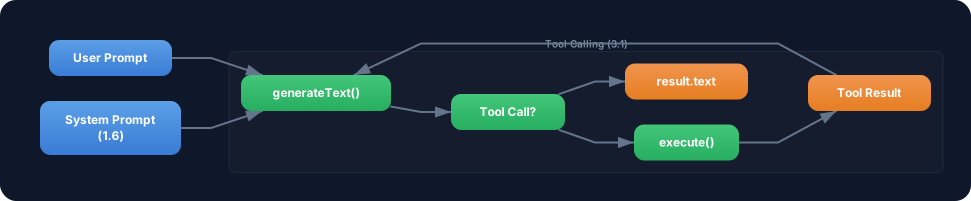
Exercise: Combine a tool with a system prompt from Challenge 1.6. Give the LLM a role and a tool at the same time.
- Define a system prompt: “You are a friendly math tutor. Explain every calculation step by step.”
- Use the calculator tool from the TRY exercise
- Ask a math question — the LLM should use the tool AND explain the approach
- Compare: How does the response change with vs. without a system prompt?
Optional Stretch Goal: Define a second tool (unitConverter) that converts units (e.g. km to miles). Give the LLM both tools and ask a question that requires both: “I’m driving 100 km — how many miles is that and how long does it take at 60 km/h?”