Challenge 2.2: Usage Tracking
What does a single LLM call cost — and how do you find out?
OVERVIEW
Section titled “OVERVIEW”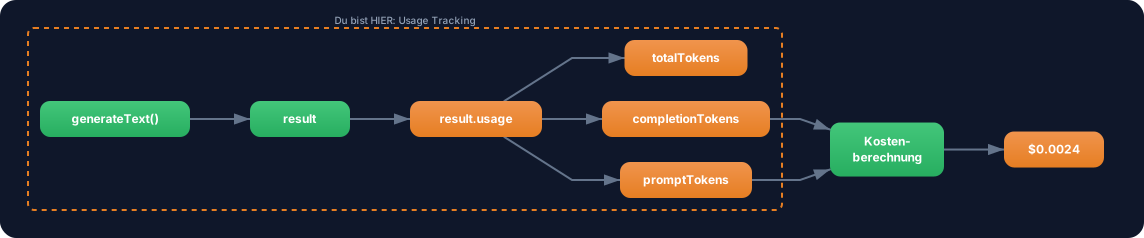
Every generateText call returns a usage object that tells you exactly how many tokens were consumed. Using the provider’s prices, you can calculate the cost per call.
Without Usage Tracking: You have no idea what your AI application costs. At the end of the month the provider bill arrives and you can’t trace which endpoint consumed how much. Cost explosion without warning.
With Usage Tracking: You know after every call what it cost. You can set budgets, trigger alerts on overruns, and optimize strategically — e.g. identify the most expensive endpoint and switch it to a cheaper model.
WALKTHROUGH
Section titled “WALKTHROUGH”Layer 1: The usage object
Section titled “Layer 1: The usage object”Every generateText and streamText call automatically returns a usage object with three fields:
import { generateText } from 'ai';import { anthropic } from '@ai-sdk/anthropic';
const result = await generateText({  model: anthropic('claude-sonnet-4-5-20250514'),  system: 'Du bist ein hilfreicher Assistent.',  prompt: 'Was ist TypeScript?',});
console.log(result.usage);// → {//     promptTokens: 22,        ← What you sent (system + prompt)//     completionTokens: 85,    ← What the LLM generated//     totalTokens: 107         ← Sum//   }
promptTokens includes everything sent to the LLM: system, prompt, messages, tool definitions. completionTokens is the LLM’s response. The distinction matters because input and output are priced differently.
Layer 2: Calculating costs
Section titled “Layer 2: Calculating costs”The formula is simple — tokens divided by 1 million, times price per 1M tokens:
interface ModelPricing {  inputPerMillion: number;   // Price per 1M input tokens in USD  outputPerMillion: number;  // Price per 1M output tokens in USD}
// Prices of common models (as of March 2026)const PRICING: Record<string, ModelPricing> = {  'claude-sonnet-4-5-20250514': { inputPerMillion: 3.0, outputPerMillion: 15.0 },  'gpt-4o':                      { inputPerMillion: 2.5, outputPerMillion: 10.0 },  'gemini-2.5-flash':            { inputPerMillion: 0.15, outputPerMillion: 0.60 },};
function calculateCost(                                   // ← Reusable function  usage: { promptTokens: number; completionTokens: number },  modelId: string,): { inputCost: number; outputCost: number; totalCost: number } {  const pricing = PRICING[modelId];  if (!pricing) throw new Error(`Unknown model: ${modelId}`);
  const inputCost = (usage.promptTokens / 1_000_000) * pricing.inputPerMillion;  const outputCost = (usage.completionTokens / 1_000_000) * pricing.outputPerMillion;
  return {    inputCost,    outputCost,    totalCost: inputCost + outputCost,                    // ← Total cost per call  };}
Example: 22 prompt tokens + 85 completion tokens with Claude Sonnet:
- Input: 22 / 1,000,000 * $3.00 = $0.000066
- Output: 85 / 1,000,000 * $15.00 = $0.001275
- Total: $0.001341 per call
Layer 3: Extended Usage Details
Section titled “Layer 3: Extended Usage Details”Starting with AI SDK v6, some providers return extended token details. You’ll find these in result.usage or in providerMetadata:
const result = await generateText({  model: anthropic('claude-sonnet-4-5-20250514'),  system: 'Du bist ein hilfreicher Assistent fuer TypeScript-Fragen.',  prompt: 'Erklaere Generics in TypeScript.',});
// Standard usage (always available)console.log('Prompt Tokens:', result.usage.promptTokens);console.log('Completion Tokens:', result.usage.completionTokens);
// Extended details (provider-dependent)// For Anthropic:// - cacheReadTokens: Tokens read from cache (cheaper!)// - cacheCreationTokens: Tokens written to cache// For OpenAI with reasoning models:// - reasoningTokens: Tokens for internal reasoning
These extended details are important for cost optimization. If cacheReadTokens > 0, you pay less for those tokens — you’ll learn about that in Challenge 2.4 (Prompt Caching).
Layer 4: Session tracking across multiple calls
Section titled “Layer 4: Session tracking across multiple calls”For an application with multiple calls, you need a running total. With generateText, the result is available directly after the await — you simply access result.usage:
import { generateText } from 'ai';import { anthropic } from '@ai-sdk/anthropic';
let sessionTokens = { prompt: 0, completion: 0, total: 0 };let sessionCost = 0;
async function trackedGenerate(prompt: string) {  const modelId = 'claude-sonnet-4-5-20250514';
  const result = await generateText({    model: anthropic(modelId),    prompt,  });
  // After the await: read usage directly from result.usage  const { usage } = result;  sessionTokens.prompt += usage.promptTokens;  sessionTokens.completion += usage.completionTokens;  sessionTokens.total += usage.totalTokens;
  const cost = calculateCost(usage, modelId);  sessionCost += cost.totalCost;
  console.log(`[Track] Call: ${cost.totalCost.toFixed(6)} USD | Session: ${sessionCost.toFixed(6)} USD`);
  return result;}
// Multiple calls — session costs accumulateawait trackedGenerate('Was ist TypeScript?');await trackedGenerate('Erklaere async/await.');await trackedGenerate('Was sind Generics?');
console.log(`\nSession total: ${sessionTokens.total} Tokens, ${sessionCost.toFixed(6)} USD`);
Note:
streamTexthas anonFinishcallback that fires when the stream ends. WithgenerateTextyou don’t need a callback — the result is immediately available after theawait.
Task: Build a Cost Calculator — make a generateText call, read usage, and calculate the costs based on the model pricing table.
Create a file challenge-2-2.ts:
import { generateText } from 'ai';import { anthropic } from '@ai-sdk/anthropic';
// TODO 1: Define a PRICING table with at least 2 models// Tip: { inputPerMillion: number, outputPerMillion: number }
// TODO 2: Implement calculateCost(usage, modelId)// Formula: tokens / 1_000_000 * pricePerMillion
// TODO 3: Make a generateText call// const result = await generateText({//   model: anthropic('claude-sonnet-4-5-20250514'),//   prompt: 'Erklaere in 3 Saetzen, was Machine Learning ist.',// });
// TODO 4: Calculate and log the costs// console.log('Usage:', result.usage);// const cost = calculateCost(result.usage, 'claude-sonnet-4-5-20250514');// console.log('Input cost:', cost.inputCost.toFixed(6), 'USD');// console.log('Output cost:', cost.outputCost.toFixed(6), 'USD');// console.log('Total:', cost.totalCost.toFixed(6), 'USD');
Checklist:
- PRICING table with at least 2 models
-
calculateCostcomputes input and output costs separately -
result.usageis correctly passed tocalculateCost - Costs are logged with 6 decimal places (USD range for individual calls)
Show solution
import { generateText } from 'ai';import { anthropic } from '@ai-sdk/anthropic';
interface ModelPricing {  inputPerMillion: number;  outputPerMillion: number;}
const PRICING: Record<string, ModelPricing> = {  'claude-sonnet-4-5-20250514': { inputPerMillion: 3.0, outputPerMillion: 15.0 },  'gpt-4o': { inputPerMillion: 2.5, outputPerMillion: 10.0 },};
function calculateCost(  usage: { promptTokens: number; completionTokens: number },  modelId: string,): { inputCost: number; outputCost: number; totalCost: number } {  const pricing = PRICING[modelId];  if (!pricing) throw new Error(`Unknown model: ${modelId}`);
  const inputCost = (usage.promptTokens / 1_000_000) * pricing.inputPerMillion;  const outputCost = (usage.completionTokens / 1_000_000) * pricing.outputPerMillion;
  return { inputCost, outputCost, totalCost: inputCost + outputCost };}
const result = await generateText({  model: anthropic('claude-sonnet-4-5-20250514'),  prompt: 'Erklaere in 3 Saetzen, was Machine Learning ist.',});
console.log('Usage:', result.usage);
const cost = calculateCost(result.usage, 'claude-sonnet-4-5-20250514');console.log('Input cost:', cost.inputCost.toFixed(6), 'USD');console.log('Output cost:', cost.outputCost.toFixed(6), 'USD');console.log('Total:', cost.totalCost.toFixed(6), 'USD');
Run with:
npx tsx challenge-2-2.tsExpected output (approximate):
Usage: { promptTokens: 20, completionTokens: 78, totalTokens: 98 }Input cost: 0.000060 USDOutput cost: 0.001170 USDTotal: 0.001230 USDExplanation: The function separates input and output costs because they are priced differently. With Claude Sonnet, output costs 5x more than input — so it pays to control response length (e.g. “Answer in at most 3 sentences”).
COMBINE
Section titled “COMBINE”
Exercise: Extend the selectModel function from Level 1.2 with automatic cost tracking. Every call should log its costs.
- Copy the
selectModelfunction from yourchallenge-1-2.tsinto the current file (or re-implement it) - Wrap the
generateTextcall in atrackedGeneratefunction - After each
await generateText(...), read costs fromresult.usageand log them - Test with different tasks — compare costs between Flash and Pro models
Optional Stretch Goal: Build session tracking that sums cumulative costs across multiple calls and outputs a summary at the end (“3 calls, 450 tokens, $0.003420 USD”).