Boss Fight: CLI Chat
The Scenario
Section titled “The Scenario”You’re building an interactive CLI chat — a terminal program that works like a mini ChatGPT. The chat combines all six building blocks from Level 1: SDK setup, model selection, system prompt, streaming and structured output.
Your chat should feel like this:
> Hallo! Wer bist Du?Ich bin Dein AI-Assistent. Ich kann Dir bei Fragen helfen...
> /json Was ist TypeScript?{  "topic": "TypeScript",  "summary": "TypeScript ist eine typisierte Erweiterung von JavaScript...",  "keyPoints": ["Statische Typen", "Bessere IDE-Unterstuetzung", ...],  "difficulty": "beginner"}
> Tokens bisher: 342
Expected duration: 30-45 minutes. Create a file
chat.tsand run it withnpx tsx chat.ts.
This project connects all six building blocks:
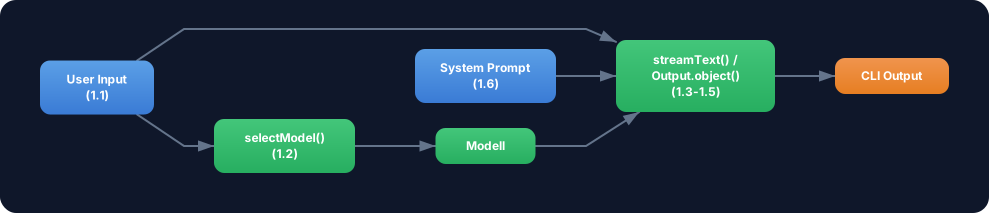
Requirements
Section titled “Requirements”- Interactive input — The user can enter messages repeatedly (readline or
process.stdin). The program runs until the user types “exit”. - System prompt (Challenge 1.6) — The chat has a defined role with rules and style. The system prompt is passed with every call.
- streamText for normal responses (Challenge 1.4) — Normal messages are answered with
streamText. Text appears token by token in the terminal. - Output.object + Zod schema on “/json” (Challenge 1.5) — When the user starts a message with
/json, the response is generated as a structured JSON object (generateText+Output.object). - selectModel based on message length (Challenge 1.2) — Short messages (under 50 characters) use a cheap flash model. Long messages use a pro model.
- Usage tracking (Challenge 1.3) — After each response, the consumed tokens are displayed. A total counter tracks the session.
Starter Code
Section titled “Starter Code”import * as readline from 'readline';// TODO: Import AI SDK functions (generateText, streamText, Output)// TODO: Import provider (anthropic from '@ai-sdk/anthropic')// TODO: Import zod (z from 'zod')// Tip: If you only have one provider, use different models// from the same provider -- e.g. anthropic('claude-haiku-3-5-20241022')// for short and anthropic('claude-sonnet-4-5-20250514') for long messages.
// TODO: Definiere einen System Prompt mit Rolle und Regeln
// TODO: Definiere ein Zod Schema fuer den /json Modus
// TODO: Implementiere selectModel(message: string)
let totalTokens = 0;
const rl = readline.createInterface({ input: process.stdin, output: process.stdout,});
function askQuestion(): void { rl.question('\n> ', async (input) => { const message = input.trim();
if (message === 'exit') { console.log(`\nSession beendet. Tokens gesamt: ${totalTokens}`); rl.close(); return; }
if (message === '') { askQuestion(); return; }
// TODO: Pruefe ob die Nachricht mit /json beginnt // TODO: Waehle das Modell basierend auf der Nachrichtenlaenge // TODO: Bei /json → generateText + Output.object // TODO: Sonst → streamText + textStream // TODO: Aktualisiere totalTokens
askQuestion(); });}
console.log('CLI Chat gestartet. Tippe "exit" zum Beenden.');console.log('Starte eine Nachricht mit /json fuer strukturierte Ausgabe.\n');askQuestion();Evaluation Criteria
Section titled “Evaluation Criteria”Your Boss Fight is passed when:
- The chat runs interactively in the terminal and reacts to user input
- A system prompt defines the assistant’s role and behavior
- Normal messages are output with
streamTexttoken by token - Messages starting with
/jsonproduce structured output withOutput.objectand Zod schema -
selectModelchooses the model based on message length - After each response, the token usage is displayed
- A total counter tracks the tokens for the entire session
- “exit” ends the program cleanly with the total counter
Hint 1: readline and async/await
The readline callback is not directly async. But you can mark the callback as async — this works because readline ignores the callback’s return value. Alternatively you can create a separate async function handleMessage(message: string) and call it from the callback.
Hint 2: Writing stream output to the terminal
For streamText use process.stdout.write(chunk) instead of console.log(chunk), so that the text appears word by word without line breaks. After the stream, use a console.log() for the final line break. You can get the token usage from fullStream (event type finish) or via result.usage (a promise you can await after the stream).
Hint 3: /json detection and prompt extraction
Check with message.startsWith('/json') whether JSON mode should be activated. The actual prompt is then message.slice(5).trim() — everything after “/json”. For JSON mode use generateText (not streamText), because Output.object needs a complete object, not a stream.