Challenge 1.4: Streaming text
Why do you see the response in ChatGPT word by word instead of all at once? And what happens under the hood to make that work?
OVERVIEW
Section titled “OVERVIEW”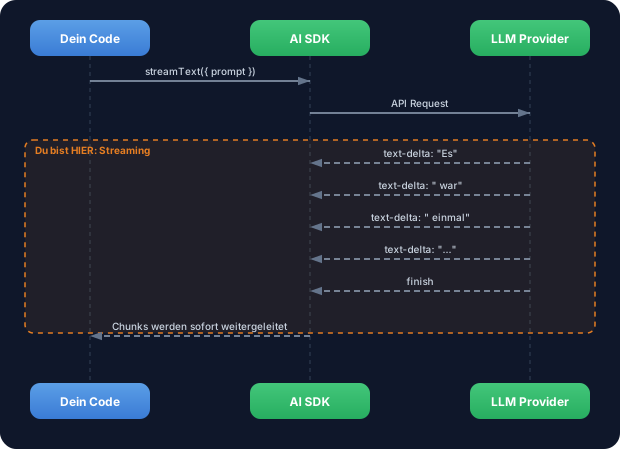
The LLM generates token by token. With streamText you receive each token immediately, instead of waiting for the complete response. The dashed arrows show: data flows back in pieces.
Without streaming: The user waits 5-10 seconds staring at an empty page, thinking the app is frozen. Only when the LLM is completely done does the entire response appear at once. For long responses, this feels like a crash.
With streaming: Immediate feedback. The first token appears after just a few milliseconds. The user sees that something is happening and can already read while the LLM is still generating. Perceived speed increases massively.
WALKTHROUGH
Section titled “WALKTHROUGH”Layer 1: streamText basics
Section titled “Layer 1: streamText basics”streamText works like generateText — same parameters, same interface. The difference: It immediately returns a stream object instead of waiting for the complete response.
import { streamText } from 'ai';import { anthropic } from '@ai-sdk/anthropic';
const result = streamText({                          // ← Kein await noetig!  model: anthropic('claude-sonnet-4-5-20250514'),  prompt: 'Erzaehle eine kurze Geschichte.',});
Important: streamText is not called with await. The function synchronously returns a result object that contains multiple streams. The actual waiting happens when consuming the streams.
Layer 2: textStream — AsyncIterable for text chunks
Section titled “Layer 2: textStream — AsyncIterable for text chunks”result.textStream is an AsyncIterable that delivers each text chunk individually. You consume it with for await...of:
for await (const chunk of result.textStream) { process.stdout.write(chunk); // ← Schreibt jedes Wort sofort ins Terminal}Why process.stdout.write instead of console.log? Because console.log adds a line break after each call. process.stdout.write writes the text exactly as it arrives — word by word on the same line.
Layer 3: fullStream — All events, not just text
Section titled “Layer 3: fullStream — All events, not just text”textStream gives you only the text. fullStream gives you all events — including start, finish and token usage:
for await (const part of result.fullStream) { switch (part.type) { case 'text-delta': // ← Ein Text-Chunk process.stdout.write(part.textDelta); break; case 'finish': // ← Stream ist fertig console.log('\n\nTokens:', part.usage.totalTokens); console.log('Finish Reason:', part.finishReason); break; case 'error': // ← Fehler im Stream console.error('Fehler:', part.error); break; }}The most important event types:
| Event | When | Data |
|---|---|---|
text-delta | On each text chunk | part.textDelta |
finish | Stream is done | part.usage, part.finishReason |
error | On an error | part.error |
tool-call | LLM calls a tool | part.toolName, part.args (Level 3) |
Layer 4: toUIMessageStreamResponse — Preview of later levels
Section titled “Layer 4: toUIMessageStreamResponse — Preview of later levels”For web APIs (e.g. Next.js) there’s toUIMessageStreamResponse(). It converts the stream directly into an HTTP response:
// In einer Next.js API Route (spaetere Levels):export async function POST(req: Request) { const result = streamText({ model: anthropic('claude-sonnet-4-5-20250514'), prompt: 'Hallo!', }); return result.toUIMessageStreamResponse(); // ← Stream als HTTP Response}You don’t need this yet — but it shows why streaming is so central: It works from the terminal to the web app with the same API.
Task: Stream text to the terminal with textStream. Then switch to fullStream and additionally log the finish event.
import { streamText } from 'ai';import { anthropic } from '@ai-sdk/anthropic';
// TODO 1: Rufe streamText auf (ohne await!)// const result = streamText({//   model: ???,//   prompt: 'Erklaere in 3 Saetzen, warum TypeScript besser als JavaScript ist.',// });
// TODO 2: Konsumiere result.textStream mit for await...of// for await (const chunk of result.textStream) {//   // Schreibe jeden Chunk sofort ins Terminal// }
// TODO 3 (Bonus): Ersetze textStream durch fullStream// Logge text-delta UND das finish-Event mit Token-Verbrauch
Checklist:
-
streamTextimported and called (withoutawait) -
textStreamconsumed withfor await...of - Text is written chunk by chunk to the terminal (with
process.stdout.write) - Bonus:
fullStreamevents logged (text-delta + finish)
Show solution
Variant 1: textStream
import { streamText } from 'ai';import { anthropic } from '@ai-sdk/anthropic';
const result = streamText({  model: anthropic('claude-sonnet-4-5-20250514'),  prompt: 'Erklaere in 3 Saetzen, warum TypeScript besser als JavaScript ist.',});
for await (const chunk of result.textStream) {  process.stdout.write(chunk);}console.log(); // Zeilenumbruch am Ende
Variant 2: fullStream with events
import { streamText } from 'ai';import { anthropic } from '@ai-sdk/anthropic';
const result = streamText({  model: anthropic('claude-sonnet-4-5-20250514'),  prompt: 'Erklaere in 3 Saetzen, warum TypeScript besser als JavaScript ist.',});
for await (const part of result.fullStream) {  switch (part.type) {    case 'text-delta':      process.stdout.write(part.textDelta);      break;    case 'finish':      console.log('\n\n--- Stream beendet ---');      console.log('Tokens:', part.usage.totalTokens);      console.log('Finish Reason:', part.finishReason);      break;  }}
Explanation: streamText synchronously returns a result object. The actual API call only starts when you consume the stream (with for await). textStream delivers only text chunks, fullStream delivers all event types including metadata like token usage.
Tip: As an alternative to
fullStream, you can also useawait result.usageafter the stream — the result object hasusageas a promise that resolves once the stream is finished.
Run it:
npx tsx challenge-1-4.tsExpected output (approximately):
TypeScript is better than JavaScript because it has static types...(text appears word by word in the terminal)
--- Stream finished ---Tokens: 78Finish Reason: stop
COMBINE
Section titled “COMBINE”
Exercise: Combine streamText with the selectModel function from Challenge 1.2. Stream the same prompt with two different models sequentially and compare the perceived speed.
- Use
selectModelto choose a flash model and a pro model - Stream with the first model, then with the second
- Measure the time with
performance.now()orDate.now()— which model delivers the first token faster? - Use
fullStreamto compare the token usage of both models at the end
Optional Stretch Goal: Build a function streamWithTimer(model, prompt) that consumes the stream AND measures the “Time to First Token” (TTFT) — the time from the call to the first text-delta event.