Challenge 1.3: Generating text
What do you get back when you ask an LLM for text — just the text, or more?
OVERVIEW
Section titled “OVERVIEW”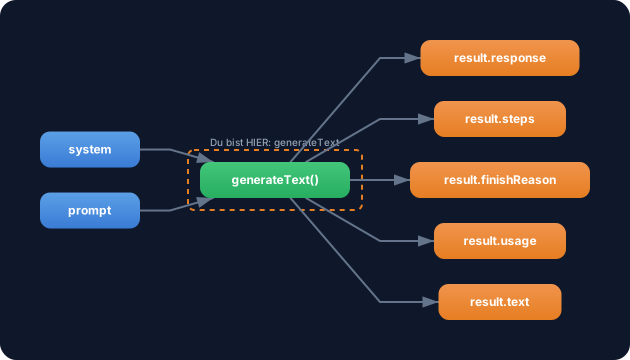
generateText takes model + prompt as input and returns a rich result object. Beyond the text you get token usage, the reason for stopping, individual steps and the raw response.
Without understanding the result object: You only use result.text and miss everything else. You have no control over costs (token tracking), no debugging (finish reason), no understanding of multi-step processing (steps). When something goes wrong, you’re in the dark.
With understanding the result object: You track token usage for cost optimization, detect via finishReason why a response was cut off, and use callbacks for logging and monitoring. Full control instead of a black box.
WALKTHROUGH
Section titled “WALKTHROUGH”Layer 1: generateText basics
Section titled “Layer 1: generateText basics”The simplest form — model + prompt in, result out:
import { generateText } from 'ai';import { anthropic } from '@ai-sdk/anthropic';
const result = await generateText({  model: anthropic('claude-sonnet-4-5-20250514'),  prompt: 'Erklaere Promises in JavaScript.',});
generateText is an async function. It waits until the LLM has generated the complete response, then returns the result object. No streaming — everything at once.
Layer 2: The result object in detail
Section titled “Layer 2: The result object in detail”The result object has five important properties:
// Der generierte Text als Stringresult.text// → "Promises in JavaScript sind Objekte, die einen..."
// Token-Verbrauch — wichtig fuer Kostenberechnungresult.usage// → { promptTokens: 12, completionTokens: 150, totalTokens: 162 }
// Warum hat das LLM aufgehoert zu generieren?result.finishReason// → 'stop'       — LLM ist fertig (normal)// → 'length'     — Token-Limit erreicht (Antwort abgeschnitten!)// → 'tool-calls' — LLM will ein Tool aufrufen
// Alle Schritte bei Multi-Step-Verarbeitungresult.steps// → [{ text, usage, finishReason, ... }]
// Rohe Response (Headers, Messages)result.response// → { headers, messages, body }
Especially important: If finishReason has the value 'length', the response was truncated. This means the token limit was reached before the LLM was done. You’ll then see an incomplete response. In that case you can increase maxTokens:
const result = await generateText({ model: anthropic('claude-sonnet-4-5-20250514'), maxTokens: 4096, // ← default is often lower prompt: '...',});Layer 3: The system + prompt combination
Section titled “Layer 3: The system + prompt combination”With the system parameter you give the LLM a role. The prompt is then the actual task. (Details on system prompts and how to design them optimally in Challenge 1.6.)
const result = await generateText({ model: anthropic('claude-sonnet-4-5-20250514'), system: 'Du bist ein erfahrener TypeScript-Entwickler. Erklaere kurz und praezise.', // ← Rolle prompt: 'Erklaere Promises in JavaScript.', // ← Aufgabe});system influences HOW the LLM responds (style, tone, perspective). prompt determines WHAT it responds about (content). The separation is important — system often stays the same, while prompt changes.
Layer 4: Callbacks — onFinish and onStepFinish
Section titled “Layer 4: Callbacks — onFinish and onStepFinish”Callbacks are invoked when generation is complete. Useful for logging, cost tracking or analytics:
const result = await generateText({ model: anthropic('claude-sonnet-4-5-20250514'), system: 'Du bist ein erfahrener TypeScript-Entwickler.', prompt: 'Erklaere Promises in JavaScript.', onFinish({ text, usage, finishReason }) { // ← Wird nach Abschluss aufgerufen console.log(`Tokens verbraucht: ${usage.totalTokens}`); // ← Kosten tracken console.log(`Finish Reason: ${finishReason}`); // ← Debugging }, onStepFinish({ stepNumber, finishReason, usage }) { // ← Pro Schritt (bei Multi-Step) console.log(`Schritt ${stepNumber} fertig.`); },});onFinish is called once at the end. onStepFinish is called after each individual step — relevant for tool calls, when multiple LLM calls happen in sequence (you’ll learn this in Level 3).
Task: Generate text with system + prompt, log the complete result object and implement an onFinish callback.
import { generateText } from 'ai';import { anthropic } from '@ai-sdk/anthropic';
// TODO 1: Rufe generateText auf mit://   - model: anthropic('claude-sonnet-4-5-20250514')//   - system: Eine Rolle Deiner Wahl//   - prompt: Eine Frage Deiner Wahl//   - onFinish: Callback der Tokens loggt
// TODO 2: Logge result.text// TODO 3: Logge result.usage.totalTokens// TODO 4: Logge result.finishReason
Checklist:
-
systemandpromptboth set -
result.textlogged -
result.usage.totalTokenslogged -
result.finishReasonlogged -
onFinishcallback implemented
Show solution
import { generateText } from 'ai';import { anthropic } from '@ai-sdk/anthropic';
const result = await generateText({  model: anthropic('claude-sonnet-4-5-20250514'),  system: 'Du bist ein erfahrener TypeScript-Entwickler. Erklaere Konzepte kurz und praezise mit Codebeispielen.',  prompt: 'Was ist der Unterschied zwischen interface und type in TypeScript?',  onFinish({ text, usage, finishReason }) {    console.log(`\n--- onFinish Callback ---`);    console.log(`Tokens verbraucht: ${usage.totalTokens}`);    console.log(`Finish Reason: ${finishReason}`);  },});
console.log('--- Generierter Text ---');console.log(result.text);
console.log('\n--- Details ---');console.log('Total Tokens:', result.usage.totalTokens);console.log('Prompt Tokens:', result.usage.promptTokens);console.log('Completion Tokens:', result.usage.completionTokens);console.log('Finish Reason:', result.finishReason);
Explanation: The onFinish callback is invoked as soon as generation is complete — even before you log result.text. This makes it ideal for logging and monitoring, because it’s guaranteed to execute regardless of what happens later in the code.
Run it:
npx tsx challenge-1-3.tsExpected output (approximately):
--- onFinish Callback ---Tokens consumed: 162Finish Reason: stop--- Generated Text ---Interfaces and types in TypeScript are similar...--- Details ---Total Tokens: 162Prompt Tokens: 18Completion Tokens: 144Finish Reason: stopCOMBINE
Section titled “COMBINE”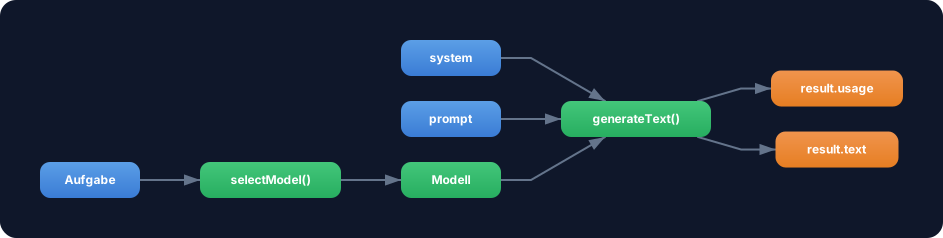
Exercise: Combine generateText with the selectModel function from Challenge 1.2. Generate text with different models and compare usage.totalTokens.
- Use
selectModel('zusammenfassen')for a flash model - Use
selectModel('analysieren')for a pro model - Send the same
promptto both models - Compare: Which model consumes more tokens? Which one answers better?
Optional Stretch Goal: Build a trackCost function that converts usage.totalTokens into estimated costs (e.g. 1 token = $0.000003 for Claude Sonnet). Use the onFinish callback to log the costs.