Challenge 1.2: Your first model
How do you decide which LLM to use for a task — cost, quality, speed? And what happens if you want to switch providers later?
OVERVIEW
Section titled “OVERVIEW”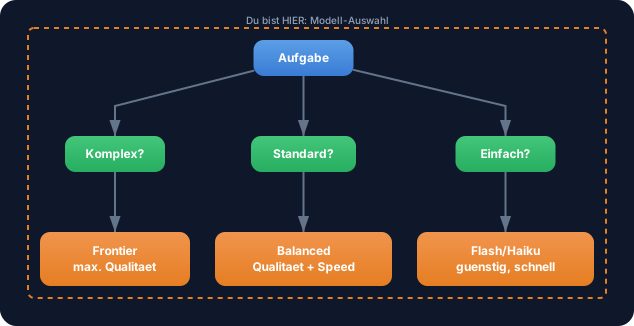
Model selection is a deliberate decision: Which model fits which task? The AI SDK makes switching trivial — only the import and model line change.
Without deliberate model selection: You always use the same model. Too expensive for simple tasks (generating titles with the strongest model), too weak for complex tasks (code review with the cheapest model). Your AI costs explode or your quality suffers.
With deliberate model selection: You use the optimal model for each task. Flash models for simple tasks, pro models for complex ones. The AI SDK makes switching so easy that you can mix different models within a single application.
WALKTHROUGH
Section titled “WALKTHROUGH”Layer 1: Importing providers
Section titled “Layer 1: Importing providers”Each provider is its own npm package. You only install the ones you need:
import { anthropic } from '@ai-sdk/anthropic'; // ← npm install @ai-sdk/anthropicimport { openai } from '@ai-sdk/openai'; // ← npm install @ai-sdk/openaiimport { google } from '@ai-sdk/google'; // ← npm install @ai-sdk/googleEach import gives you a function that creates model instances. The function is named after the provider (anthropic, openai, google).
Layer 2: Instantiating a model
Section titled “Layer 2: Instantiating a model”The provider function takes a model name as a string and returns a model instance:
const model1 = anthropic('claude-sonnet-4-5-20250514'); // ← Anthropic Claude Sonnetconst model2 = openai('gpt-4o'); // ← OpenAI GPT-4oconst model3 = google('gemini-2.5-flash'); // ← Google Gemini FlashAll three share the same interface. You can use them anywhere the AI SDK expects a model — in generateText, streamText, Output.object and all other functions.
Layer 3: Switching providers
Section titled “Layer 3: Switching providers”The crucial point: Only the import and model line change. All remaining code stays identical.
Before — Anthropic:
import { generateText } from 'ai';import { anthropic } from '@ai-sdk/anthropic';       // ← Import: Anthropic
const result = await generateText({  model: anthropic('claude-sonnet-4-5-20250514'),     // ← Modell: Claude Sonnet  prompt: 'Erklaere Promises in JavaScript.',});
console.log(result.text);
After — OpenAI:
import { generateText } from 'ai';import { openai } from '@ai-sdk/openai';              // ← Import: OpenAI (geaendert)
const result = await generateText({  model: openai('gpt-4o'),                            // ← Modell: GPT-4o (geaendert)  prompt: 'Erklaere Promises in JavaScript.',          // ← Identisch});
console.log(result.text);                              // ← Identisch
Two lines changed, the rest is the same. result.text, result.usage, result.finishReason — everything works identically.
Task: Create a script that calls TWO different providers with the same prompt and compares the results.
import { generateText } from 'ai';// TODO 1: Importiere zwei verschiedene Provider// import { ... } from '@ai-sdk/anthropic';// import { ... } from '@ai-sdk/openai';  // oder @ai-sdk/google
const prompt = 'Was ist der Unterschied zwischen let und const in JavaScript?';
// TODO 2: Erster Call mit Provider 1// const result1 = await generateText({//   model: ???,//   prompt,// });
// TODO 3: Zweiter Call mit Provider 2// const result2 = await generateText({//   model: ???,//   prompt,// });
// TODO 4: Vergleiche die Ergebnisse// console.log('--- Provider 1 ---');// console.log('Text:', result1.text);// console.log('Tokens:', result1.usage.totalTokens);//// console.log('--- Provider 2 ---');// console.log('Text:', result2.text);// console.log('Tokens:', result2.usage.totalTokens);
Checklist:
- Two different providers imported
- Both
generateTextcalls use the same prompt - Outputs from both models are logged
- Usage (tokens) is compared
Show solution
import { generateText } from 'ai';import { anthropic } from '@ai-sdk/anthropic';import { openai } from '@ai-sdk/openai';
const prompt = 'Was ist der Unterschied zwischen let und const in JavaScript?';
const result1 = await generateText({  model: anthropic('claude-sonnet-4-5-20250514'),  prompt,});
const result2 = await generateText({  model: openai('gpt-4o'),  prompt,});
console.log('--- Anthropic (Claude Sonnet) ---');console.log('Text:', result1.text);console.log('Tokens:', result1.usage.totalTokens);
console.log('\n--- OpenAI (GPT-4o) ---');console.log('Text:', result2.text);console.log('Tokens:', result2.usage.totalTokens);
Explanation: Both calls use the exact same prompt. Only model differs. The outputs show you how differently (or similarly) different models answer the same question — and how many tokens they consume in the process.
Only have one API key? No problem — use two models from the same provider, e.g.
anthropic('claude-haiku-3-5-20241022')andanthropic('claude-sonnet-4-5-20250514').
Run it:
npx tsx challenge-1-2.tsExpected output (approximately):
--- Anthropic (Claude Sonnet) ---Text: let allows reassignment, const does not...Tokens: 87
--- OpenAI (GPT-4o) ---Text: In JavaScript, let and const are...Tokens: 102
COMBINE
Section titled “COMBINE”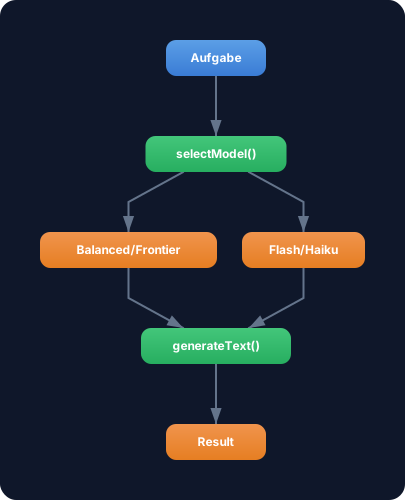
Exercise: Build a function selectModel(task: string) that returns an appropriate model based on the task. Use the decision tree from the OVERVIEW as the logic.
import { anthropic } from '@ai-sdk/anthropic';import { google } from '@ai-sdk/google';import type { LanguageModel } from 'ai';
function selectModel(task: string): LanguageModel {  // Einfache Aufgaben: Flash-Modell (guenstig, schnell)  if (task.includes('zusammenfassen') || task.includes('uebersetzen')) {    return google('gemini-2.5-flash');  }  // Komplexe Aufgaben: Pro-Modell (teurer, besser)  return anthropic('claude-sonnet-4-5-20250514');}
Use selectModel in combination with generateText from Challenge 1.1. Test with different tasks and verify that the correct model is chosen.
Optional Stretch Goal: Extend selectModel with a third category — e.g. code tasks that use a specialized model.