Challenge 1.1: What is the AI SDK?
If you want to work with Claude, GPT and Gemini — do you need a different library for each? Different types? Different error handling?
OVERVIEW
Section titled “OVERVIEW”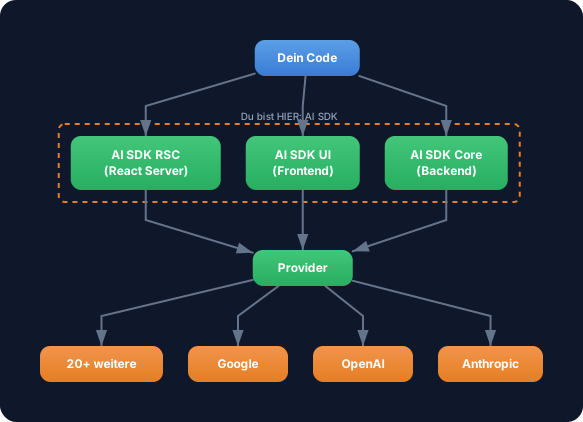
The AI SDK sits between your code and the LLM providers. It offers a unified API — regardless of which provider you use. Three libraries, one interface.
Without AI SDK: A different API, different types, different error handling for each provider. Switching providers means rewriting half your code. Each provider has its own SDKs with different interfaces.
With AI SDK: One API for all providers. You switch the provider by changing one import line and the model name. The rest of your code stays identical.
WALKTHROUGH
Section titled “WALKTHROUGH”Layer 1: The three libraries
Section titled “Layer 1: The three libraries”The AI SDK consists of three parts. In this level we work exclusively with AI SDK Core:
| Library | Package | Use case |
|---|---|---|
| AI SDK Core | ai | Backend: generating text, tools, agents, structured output |
| AI SDK UI | ai (same import) | Frontend: framework-agnostic hooks for chat UIs |
| AI SDK RSC | ai (same import) | React Server Components: streaming React components |
AI SDK Core is the foundation. Everything else builds on top of it. When you use generateText or streamText, you’re using AI SDK Core.
Layer 2: Installation and setup
Section titled “Layer 2: Installation and setup”If you completed the briefing setup,
aiand@ai-sdk/anthropicare already installed and your API key is in the.envfile. You can skip this section.
Two packages — the AI SDK itself and a provider package:
npm install ai @ai-sdk/anthropicai is the core package with all functions (generateText, streamText, Output, etc.). @ai-sdk/anthropic is the provider — it knows how to communicate with the Anthropic API.
Your API key is set as an environment variable — best in a .env file (automatically loaded by tsx):
echo 'ANTHROPIC_API_KEY=sk-ant-...' > .envLayer 3: Your first generateText call
Section titled “Layer 3: Your first generateText call”The “Hello World” of the AI SDK — a single API call that generates text:
import { generateText } from 'ai';import { anthropic } from '@ai-sdk/anthropic';
const result = await generateText({  model: anthropic('claude-sonnet-4-5-20250514'),  // ← Provider + model  prompt: 'Was ist TypeScript in einem Satz?',});
console.log(result.text);         // ← The generated textconsole.log(result.usage);        // ← Token usage: { promptTokens, completionTokens, totalTokens }console.log(result.finishReason); // ← Why it stopped: 'stop' | 'length' | 'tool-calls'
Three lines of code, three pieces of information back:
result.text— the generated text as a stringresult.usage— how many tokens were consumed (important for costs)result.finishReason— why the LLM stopped generating
The model argument is the only place where the provider appears. Everything else (prompt, result.text, result.usage) is provider-independent.
Task: Install the AI SDK and the Anthropic provider. Execute a generateText call and log text, usage and finish reason.
// TODO 1: Installiere die Packages// npm install ai @ai-sdk/anthropic
// TODO 2: Importiere generateText und den Anthropic Provider// import { ... } from 'ai';// import { ... } from '@ai-sdk/anthropic';
// TODO 3: Setze den API-Key als Environment Variable// export ANTHROPIC_API_KEY="sk-ant-..."
// TODO 4: Rufe generateText auf// const result = await generateText({//   model: ???,//   prompt: ???,// });
// TODO 5: Logge die drei Ergebnisse// console.log(result.???);  // Text// console.log(result.???);  // Token-Verbrauch// console.log(result.???);  // Warum gestoppt
Checklist:
-
aiand@ai-sdk/anthropicinstalled -
generateTextimported and called -
result.text,result.usageandresult.finishReasonlogged -
ANTHROPIC_API_KEYset as environment variable
Show solution
import { generateText } from 'ai';import { anthropic } from '@ai-sdk/anthropic';
const result = await generateText({  model: anthropic('claude-sonnet-4-5-20250514'),  prompt: 'Was ist TypeScript in einem Satz?',});
console.log('Text:', result.text);console.log('Usage:', result.usage);console.log('Finish Reason:', result.finishReason);
Explanation: generateText is an async function that returns a result object. The model argument creates an Anthropic model instance with the model name claude-sonnet-4-5-20250514. The prompt is the user input. The three logged properties give you the generated text, the token usage and the reason for stopping.
Run it:
npx tsx challenge-1-1.tsExpected output (approximately):
Text: TypeScript is a typed superset of JavaScript that adds static type checking...Usage: { promptTokens: 14, completionTokens: 42, totalTokens: 56 }Finish Reason: stopCOMBINE
Section titled “COMBINE”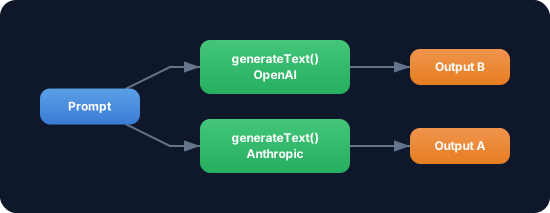
Exercise: Change the provider — replace anthropic with openai. What do you need to change?
- Install the OpenAI provider:
npm install @ai-sdk/openai - Change the import:
import { openai } from '@ai-sdk/openai' - Change the model line:
model: openai('gpt-4o') - Set
OPENAI_API_KEYas environment variable
The rest of the code stays identical — result.text, result.usage, result.finishReason work the same way. That’s the provider interchangeability of the AI SDK.
Optional Stretch Goal: Run both providers sequentially (Anthropic and OpenAI) with the same prompt and compare the outputs.