Challenge 5.4: Retrieval (RAG)
Was passiert, wenn Du ein LLM nach aktuellen Nachrichten fragst? Woher weiss es, ob seine Antwort stimmt?
OVERVIEW
Abschnitt betitelt „OVERVIEW“
Das Diagramm zeigt den RAG-Datenfluss: Eine User-Frage wird nicht direkt ans LLM geschickt — zuerst werden relevante Daten aus einer externen Quelle geladen und im <background-data>-Tag in den Prompt eingefuegt. Ohne diesen Schritt (gestrichelte Linie) droht Halluzination.
So sieht der <background-data>-Tag im vollstaendigen Prompt Template aus:
<task-context>Du bist ein Assistent, der Fragen zu Webseiten beantwortet.</task-context>
<background-data>                          <!-- ← HIER kommen die externen Daten rein -->  <url>https://example.com</url>  <content>  [Geladener Inhalt der Webseite]  </content></background-data>
<rules>- Nutze nur die bereitgestellten Daten zur Beantwortung.- Wenn die Frage nicht beantwortbar ist, sage das ehrlich.</rules>
<the-ask>Beantworte die Frage basierend auf den Daten.</the-ask>
<output-format>Antwort mit Quellenangabe.</output-format>Ohne RAG: Ein LLM hat ein festes Trainingsdatum. Es kennt keine aktuellen Ereignisse, keine internen Firmendaten, keine spezifischen Webseiten. Wenn Du es trotzdem danach fragst, wird es halluzinieren — eine plausibel klingende, aber falsche Antwort generieren. Die Antwort ist nicht verifizierbar.
Mit RAG: Du laedt die relevanten Daten vorher und gibst sie als Kontext mit. Das LLM antwortet basierend auf echten Quellen. Die Antwort ist verifizierbar, aktuell und mit Quellenangabe versehen. Halluzinationen werden drastisch reduziert.
WALKTHROUGH
Abschnitt betitelt „WALKTHROUGH“Schicht 1: Das RAG-Prinzip (Retrieve, Augment, Generate)
Abschnitt betitelt „Schicht 1: Das RAG-Prinzip (Retrieve, Augment, Generate)“RAG steht für Retrieval-Augmented Generation und besteht aus drei Schritten:
- Retrieve: Relevante Daten aus einer externen Quelle laden
- Augment: Die Daten in den Prompt einfuegen (als
<background-data>) - Generate: Das LLM antwortet basierend auf dem angereicherten Kontext
// Schritt 1: RETRIEVE — Daten aus einer Quelle ladenconst content = loadContent('https://docs.example.com/api');
// Schritt 2: AUGMENT — Daten in den Prompt einfuegenconst prompt = `<background-data>  <url>https://docs.example.com/api</url>  <content>${content}</content></background-data>`;
// Schritt 3: GENERATE — LLM antwortet mit Kontextconst result = await generateText({  model: anthropic('claude-sonnet-4-5-20250514'),  prompt,});
Das Prinzip ist einfach: Gib dem LLM die Daten, die es braucht — bevor es antwortet.
Schicht 2: Datenquellen-Tabelle
Abschnitt betitelt „Schicht 2: Datenquellen-Tabelle“Die Daten für RAG können aus verschiedenen Quellen kommen:
| Quelle | Beispiel | Typischer Einsatz |
|---|---|---|
| Web Scraping | Tavily, Firecrawl | Aktuelle Webinhalte |
| Vector Database | Pinecone, Chroma, pgvector | Eigene Dokumente (Embeddings) |
| SQL/API | Eigene DB, REST API | Strukturierte Unternehmensdaten |
| Dateisystem | fs.readFileSync() | Lokale Dateien, Konfigurationen |
In dieser Challenge nutzen wir simulierten Content — das Prompt-Pattern bleibt aber dasselbe, egal woher die Daten kommen.
Schicht 3: Integration ins Prompt Template — background-data
Abschnitt betitelt „Schicht 3: Integration ins Prompt Template — background-data“Geladene Daten gehören in den <background-data>-Abschnitt — also in die Mitte des Prompts. Innerhalb von <background-data> strukturierst Du die Daten mit <url> und <content> Tags:
const sourceUrl = 'https://www.aihero.dev/';const websiteContent = '...geladener Inhalt...';
// ${sourceUrl}       → Quellenangabe: woher kommen die Daten?// ${websiteContent}  → Die eigentlichen Daten, dynamisch injiziertconst prompt = `<task-context>You are a helpful assistant that answers questions about website content.</task-context>
<background-data>  <url>${sourceUrl}</url>  <content>  ${websiteContent}  </content></background-data>
<rules>- Use the content of the website to answer the question.- Use quotes from the content.- If the question is not answerable from the content, say so honestly.</rules>
<conversation-history>${question}</conversation-history>
<the-ask>Answer the question based on the provided data.</the-ask>
<output-format>Return the answer in paragraphs. Include quotes from the source material.</output-format>`;
Das <url>-Tag ist wichtig: Es ermoeglicht dem LLM, die Quelle in der Antwort zu zitieren. Das macht die Antwort verifizierbar.
Schicht 4: Die kritische Regel — Halluzinationen verhindern
Abschnitt betitelt „Schicht 4: Die kritische Regel — Halluzinationen verhindern“Die wichtigste Zeile in jedem RAG-Prompt steht in <rules>:
<rules>- Use only the provided data to answer the question.- If the question is not answerable from the provided data, say "I can only answer questions based on the provided content."</rules>Ohne diese Regel versucht das LLM trotzdem zu antworten — mit seinem Trainingswissen, nicht mit den bereitgestellten Daten. Das fuehrt zu Halluzinationen, die besonders gefaehrlich sind, weil sie plausibel klingen und in einem Kontext erscheinen, der quellenbasierte Antworten erwarten laesst.
Tipp: Formuliere die Regel positiv und konkret. Nicht “Halluziniere nicht”, sondern “Sage ehrlich, wenn die Frage nicht beantwortbar ist.”
Aufgabe: Baue ein System, das Website-Content laedt und Fragen dazu beantwortet. Nutze den simulierten Content unten. Ergaenze den Prompt um <background-data>, <rules> und <output-format>.
Erstelle challenge-5-4.ts und fuehre aus mit: npx tsx challenge-5-4.ts
import { streamText } from 'ai';import { anthropic } from '@ai-sdk/anthropic';
// Simulierter Web-Content (in Production: fetch, Tavily, etc.)const websiteContent = `AI Hero is an educational platform created by Matt Pocock,known for Total TypeScript. The platform teaches AI engineeringskills including the Vercel AI SDK, prompt engineering, andbuilding production-ready AI applications. Guillermo Rauch,CEO of Vercel, said: "Matt is one of the best educators inthe TypeScript ecosystem."`;
const question = 'What did Guillermo Rauch say about Matt Pocock?';const sourceUrl = 'https://www.aihero.dev/';
const result = await streamText({  model: anthropic('claude-sonnet-4-5-20250514'),  prompt: `<task-context>You are a helpful assistant that answers questions about website content.</task-context>
// TODO: Fuege <background-data> ein mit://   - <url> Tag für die Quellenangabe//   - <content> Tag für den geladenen Inhalt
// TODO: Fuege <rules> ein://   - Nur die bereitgestellten Daten verwenden//   - Zitate aus dem Quellmaterial nutzen//   - Ehrlich sagen wenn etwas nicht beantwortbar ist
<conversation-history>${question}</conversation-history>
<the-ask>Answer the question based on the provided website content.</the-ask>
// TODO: Fuege <output-format> ein://   - Antwort in Absaetzen//   - Quellenangabe einschliessen  `.trim(),});
for await (const chunk of result.textStream) {  process.stdout.write(chunk);}
Checkliste:
-
<background-data>enthaelt den geladenen Content mit<url>-Tag -
<rules>definiert: nur bereitgestellte Daten verwenden -
<rules>definiert: ehrlich sagen wenn nicht beantwortbar -
<output-format>definiert das Antwort-Format
Lösung anzeigen
import { streamText } from 'ai';import { anthropic } from '@ai-sdk/anthropic';
const websiteContent = `AI Hero is an educational platform created by Matt Pocock,known for Total TypeScript. The platform teaches AI engineeringskills including the Vercel AI SDK, prompt engineering, andbuilding production-ready AI applications. Guillermo Rauch,CEO of Vercel, said: "Matt is one of the best educators inthe TypeScript ecosystem."`;
const question = 'What did Guillermo Rauch say about Matt Pocock?';const sourceUrl = 'https://www.aihero.dev/';
const result = await streamText({  model: anthropic('claude-sonnet-4-5-20250514'),  prompt: `<task-context>You are a helpful assistant that answers questions about website content.</task-context>
<background-data>  <url>${sourceUrl}</url>  <content>  ${websiteContent}  </content></background-data>
<rules>- Use the content of the website to answer the question.- If the question is not related to the content of the website,  say "I can only answer questions based on the provided content."- Use quotes from the content of the website to support your answer.- Do not use any knowledge outside the provided content.</rules>
<conversation-history>${question}</conversation-history>
<the-ask>Answer the question based on the provided website content.</the-ask>
<output-format>Return the answer in paragraphs. Include direct quotes from the sourcematerial where relevant. Cite the source URL.</output-format>  `.trim(),});
for await (const chunk of result.textStream) {  process.stdout.write(chunk);}
Erklärung: Die geladenen Daten stehen in <background-data> mit klarer Quellenangabe (<url>). Die <rules> definieren explizit, dass nur die bereitgestellten Daten verwendet werden duerfen und das LLM ehrlich sein soll, wenn die Frage nicht beantwortbar ist. Das <output-format> verlangt Absaetze und Quellenangaben — so wird die Antwort verifizierbar.
Erwarteter Output (ungefaehr):
According to the website (https://www.aihero.dev/), Guillermo Rauch, CEO of Vercel, said: "Matt is one of the best educators in the TypeScript ecosystem."COMBINE
Abschnitt betitelt „COMBINE“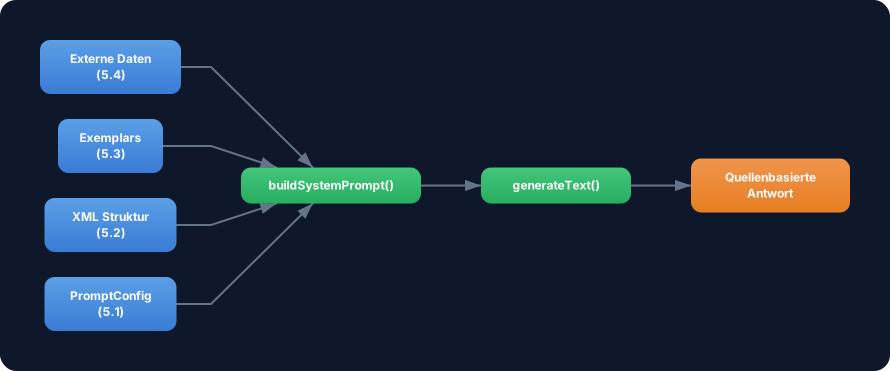
Uebung: Baue jetzt ein vollstaendiges RAG-System das Template (5.1) + XML Struktur (5.2) + Exemplars (5.3) + Retrieval (5.4) kombiniert. Erstelle eine Funktion buildRAGPrompt die alle vier Konzepte vereint.
Konkret:
- Erstelle ein
RAGConfig-Interface dasPromptConfigumsourceUrl,contentundexemplarserweitert - In
buildRAGPrompt(): Baue den Prompt mit<task-context>,<background-data>(mit<url>und<content>),<examples>und<rules> - Die
<rules>müssen die Anti-Halluzinations-Regel enthalten - Nutze die Exemplars, um das Antwort-Format zu demonstrieren
Optional Stretch Goal: Fuege Unterstuetzung für mehrere Quellen hinzu — <background-data> mit mehreren <url>/<content>-Paaren. Nutze ein Array von Quellen im Config.
Weiter denken: Von statischem Content zu Vector Search
Abschnitt betitelt „Weiter denken: Von statischem Content zu Vector Search“Diese Challenge nutzt statischen Content. In Production wuerdest Du:
- Dokumente in Chunks aufteilen (z.B. 500 Tokens pro Chunk)
- Embeddings erstellen (z.B. mit
text-embedding-3-small) - In einer Vector DB speichern (Pinecone, Chroma, pgvector)
- Zur Laufzeit die relevantesten Chunks suchen und in den Prompt einfuegen
Das Prompt-Pattern bleibt dasselbe — nur der Retrieve-Schritt wird komplexer.