Challenge 3.2: Tool Events im Stream
Wenn ein LLM ein Tool aufruft — wie zeigst Du das dem User im UI? Sieht er nur die finale Antwort, oder auch was zwischendurch passiert?
OVERVIEW
Abschnitt betitelt „OVERVIEW“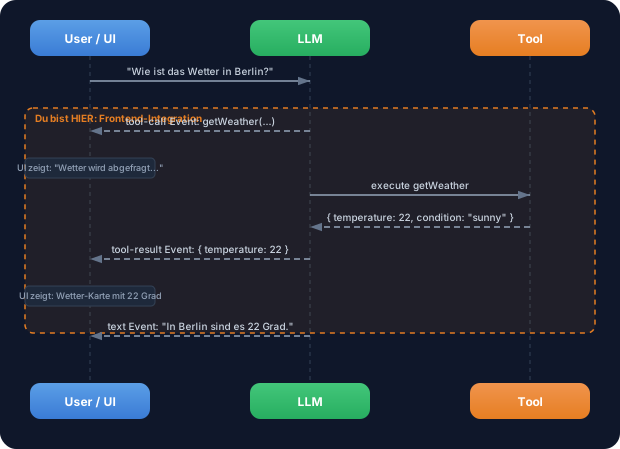
Beim Streaming bekommst Du nicht nur Text-Events, sondern auch tool-call und tool-result Events. Diese kannst Du im Frontend nutzen, um Loading States, spezifische Tool-UIs und transparente Zwischenschritte anzuzeigen.
Ohne Frontend-Integration: Der User sieht eine lange Pause, dann die finale Antwort. Er weiss nicht, was das LLM gerade tut. Kein Feedback, keine Transparenz, kein Vertrauen.
Mit Frontend-Integration: Der User sieht in Echtzeit: “Wetter wird abgefragt…”, dann eine Wetter-Karte, dann die finale Antwort. Transparenz schafft Vertrauen. Loading States ueberbruecken Wartezeiten. Tool-spezifische UIs (Karten, Charts, Tabellen) machen Ergebnisse greifbar.
WALKTHROUGH
Abschnitt betitelt „WALKTHROUGH“Schicht 1: Message Parts — Die Bausteine einer Nachricht
Abschnitt betitelt „Schicht 1: Message Parts — Die Bausteine einer Nachricht“Eine LLM-Antwort besteht nicht immer nur aus Text. Wenn Tools im Spiel sind, besteht eine Nachricht aus mehreren Parts:
// Eine Nachricht kann mehrere Parts haben:const messageParts = [ { type: 'text', text: 'Ich schaue nach dem Wetter...' }, // ← Text-Part { type: 'tool-call', toolCallId: 'tc_1', toolName: 'weather', // ← Tool-Call-Part args: { location: 'Berlin' } }, { type: 'tool-result', toolCallId: 'tc_1', toolName: 'weather', // ← Tool-Result-Part result: { temperature: 22, condition: 'sunny' } }, { type: 'text', text: 'In Berlin sind es 22 Grad und sonnig.' }, // ← Finaler Text];Jede Nachricht ist ein Array von Parts. Das LLM kann Text und Tool Calls in beliebiger Reihenfolge mischen. Die toolCallId verbindet einen tool-call mit seinem tool-result.
Schicht 2: Tool Events im Stream
Abschnitt betitelt „Schicht 2: Tool Events im Stream“Wenn Du streamText mit Tools nutzt, bekommst Du über fullStream spezifische Events:
import { streamText, tool } from 'ai';import { anthropic } from '@ai-sdk/anthropic';import { z } from 'zod';
const weatherTool = tool({  description: 'Get the weather in a location',  inputSchema: z.object({    location: z.string().describe('The city name'),  }),  execute: async ({ location }) => ({    location, temperature: 22, condition: 'sunny',  }),});
const result = streamText({  model: anthropic('claude-sonnet-4-5-20250514'),  tools: { weather: weatherTool },  prompt: 'Wie ist das Wetter in Berlin?',});
for await (const part of result.fullStream) {  switch (part.type) {    case 'text-delta':                                   // ← Text-Chunk      process.stdout.write(part.textDelta);      break;    case 'tool-call':                                    // ← LLM will ein Tool aufrufen      console.log(`\n[Tool Call] ${part.toolName}(${JSON.stringify(part.args)})`);      break;    case 'tool-result':                                  // ← Tool-Ergebnis ist da      console.log(`[Tool Result] ${JSON.stringify(part.result)}`);      break;    case 'finish':      console.log(`\n[Fertig] Tokens: ${part.usage.totalTokens}`);      break;  }}
Die Event-Reihenfolge ist immer: tool-call → (Tool wird ausgefuehrt) → tool-result → dann weiterer Text oder weitere Tool Calls.
Schicht 3: Tool-Call vs. Tool-Result State
Abschnitt betitelt „Schicht 3: Tool-Call vs. Tool-Result State“Zwischen tool-call und tool-result liegt die Ausfuehrungszeit des Tools. In dieser Phase kannst Du einen Loading State anzeigen:
// Pseudo-Code für UI-Rendering:for await (const part of result.fullStream) { switch (part.type) { case 'tool-call': // Loading State anzeigen console.log(`⏳ ${part.toolName} wird ausgefuehrt...`); console.log(` Parameter: ${JSON.stringify(part.args)}`); break; case 'tool-result': // Loading State durch Ergebnis ersetzen console.log(`✓ ${part.toolName} abgeschlossen`); console.log(` Ergebnis: ${JSON.stringify(part.result)}`); break; }}In einem echten Frontend (React, Next.js) wuerdest Du hier einen State-Wechsel ausloesen: Ein Spinner wird durch eine Ergebnis-Komponente ersetzt. Im Terminal zeigen wir das mit formatierter Ausgabe.
Schicht 4: Mehrere Parts rendern
Abschnitt betitelt „Schicht 4: Mehrere Parts rendern“Eine vollständige Rendering-Logik muss alle Part-Typen behandeln. Hier ein Beispiel, das Text, Tool Calls und Tool Results formatiert ausgibt:
import { streamText, tool } from 'ai';import { anthropic } from '@ai-sdk/anthropic';import { z } from 'zod';
const weatherTool = tool({  description: 'Get the weather in a location',  inputSchema: z.object({    location: z.string().describe('The city name'),  }),  execute: async ({ location }) => ({    location, temperature: 22, condition: 'sunny',  }),});
const result = streamText({  model: anthropic('claude-sonnet-4-5-20250514'),  tools: { weather: weatherTool },  prompt: 'Wie ist das Wetter in Berlin und in Muenchen?',});
const toolStates = new Map<string, string>();             // ← Trackt Tool-Status
for await (const part of result.fullStream) {  switch (part.type) {    case 'text-delta':      process.stdout.write(part.textDelta);      break;    case 'tool-call':      toolStates.set(part.toolCallId, 'running');      console.log(`\n┌─ Tool: ${part.toolName}`);      console.log(`│  Args: ${JSON.stringify(part.args)}`);      console.log(`│  Status: ausfuehrend...`);      break;    case 'tool-result':      toolStates.set(part.toolCallId, 'done');      console.log(`│  Ergebnis: ${JSON.stringify(part.result)}`);      console.log(`└─ Abgeschlossen`);      break;    case 'finish':      console.log(`\n--- ${toolStates.size} Tool(s) ausgefuehrt ---`);      console.log(`Tokens: ${part.usage.totalTokens}`);      break;  }}
Die Map trackt den Status jedes Tool Calls über seine toolCallId. In einem echten Frontend würde das ein React State sein, der die UI aktualisiert.
Datei: challenge-3-2.ts
Aufgabe: Nutze fullStream mit einem Tool und formatiere alle Events im Terminal — Text, Tool Calls und Tool Results getrennt.
import { streamText, tool } from 'ai';import { anthropic } from '@ai-sdk/anthropic';import { z } from 'zod';
// Tool ist vorgegeben:const weatherTool = tool({  description: 'Get the weather in a location',  inputSchema: z.object({    location: z.string().describe('The city name'),  }),  execute: async ({ location }) => ({    location,    temperature: Math.floor(Math.random() * 30),    condition: ['sunny', 'cloudy', 'rainy'][Math.floor(Math.random() * 3)],  }),});
// TODO 1: Rufe streamText auf mit dem weatherTool// TODO 2: Iteriere über result.fullStream// TODO 3: Behandle diese Event-Typen://   - 'text-delta': Text ins Terminal schreiben//   - 'tool-call': Tool-Name und Parameter anzeigen//   - 'tool-result': Ergebnis formatiert anzeigen//   - 'finish': Token-Verbrauch anzeigen
Checkliste:
-
streamTextmit Tool aufgerufen -
fullStreammitfor awaitkonsumiert -
text-deltaEvents als Text ausgegeben -
tool-callEvents mit Tool-Name und Args angezeigt -
tool-resultEvents mit formatiertem Ergebnis angezeigt -
finishEvent mit Token-Verbrauch geloggt
Lösung anzeigen
import { streamText, tool } from 'ai';import { anthropic } from '@ai-sdk/anthropic';import { z } from 'zod';
const weatherTool = tool({  description: 'Get the weather in a location',  inputSchema: z.object({    location: z.string().describe('The city name'),  }),  execute: async ({ location }) => ({    location,    temperature: Math.floor(Math.random() * 30),    condition: ['sunny', 'cloudy', 'rainy'][Math.floor(Math.random() * 3)],  }),});
const result = streamText({  model: anthropic('claude-sonnet-4-5-20250514'),  tools: { weather: weatherTool },  prompt: 'Wie ist das Wetter in Berlin und Muenchen?',});
for await (const part of result.fullStream) {  switch (part.type) {    case 'text-delta':      process.stdout.write(part.textDelta);      break;    case 'tool-call':      console.log(`\n[TOOL CALL] ${part.toolName}`);      console.log(`  Parameter: ${JSON.stringify(part.args, null, 2)}`);      break;    case 'tool-result':      console.log(`[TOOL RESULT] ${part.toolName}`);      console.log(`  Ergebnis: ${JSON.stringify(part.result, null, 2)}`);      break;    case 'finish':      console.log(`\n\n--- Stream beendet ---`);      console.log(`Tokens: ${part.usage.totalTokens}`);      console.log(`Finish Reason: ${part.finishReason}`);      break;  }}
Erklärung: Das LLM ruft weather für “Berlin” und “Muenchen” auf — möglicherweise in separaten Tool Calls. Jeder Call erzeugt erst ein tool-call Event (mit Args), dann nach Ausfuehrung ein tool-result Event (mit Ergebnis). Am Ende kommt Text, der beide Ergebnisse zusammenfasst.
Ausfuehren: npx tsx challenge-3-2.ts
Erwarteter Output (ungefaehr):
[TOOL CALL] weather  Parameter: { "location": "Berlin" }[TOOL RESULT] weather  Ergebnis: { "location": "Berlin", "temperature": 18, "condition": "sunny" }
[TOOL CALL] weather  Parameter: { "location": "Muenchen" }[TOOL RESULT] weather  Ergebnis: { "location": "Muenchen", "temperature": 12, "condition": "cloudy" }
In Berlin sind es 18 Grad und sonnig, in Muenchen 12 Grad und bewoelkt.
--- Stream beendet ---Tokens: ~350Finish Reason: stop
COMBINE
Abschnitt betitelt „COMBINE“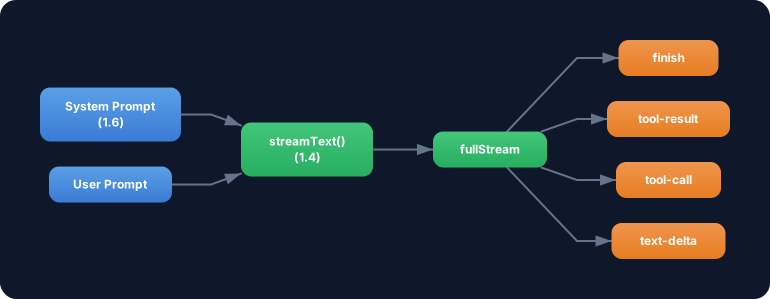
Uebung: Kombiniere das Tool-Event-Rendering mit streamText aus Challenge 1.4. Baue eine formatierte Terminal-Ausgabe, die Text und Tool-Events visuell unterscheidet.
- Nutze das
weatherToolund eincalculatorTool(aus Challenge 3.1) zusammen - Stelle eine Frage, die beide Tools erfordert: “Wie ist das Wetter in Berlin? Und rechne die Temperatur von Celsius in Fahrenheit um (Formel: C * 9/5 + 32).”
- Formatiere die Ausgabe so, dass Tool Calls und Tool Results visuell hervorgehoben sind (z.B. mit
[TOOL]Prefix) - Zeige am Ende eine Zusammenfassung: Wie viele Tools wurden aufgerufen, wie viele Tokens verbraucht?
Optional Stretch Goal: Baue einen renderToolResult(toolName, result) Helper, der für verschiedene Tools unterschiedliche Formatierungen ausgibt — z.B. eine Wetter-Anzeige für weather und eine Berechnung für calculator.